In this post I will discuss Vlan access control lists (VACL), also called VLAN access Map or VLAN Map. A VLAN Access-map allows us to filter incoming and outgoing traffic in a switch Vlan. VLAN access-map configuration is very similar to the Route-map configuration.
A Vlan access-map is placed on the whole Vlan, which means that the incoming and outgoing traffic in a Vlan are filterd by the VLan access-map.
We can apply a VLAN access-map to a Layer3 access-list and also to a mac access-list.
We know that the usual access control list (ACL), which is the most well known concept, has an implied DENY IP ANY ANY at the end. Of course, a VACL has the same implied deny statement, but this is not recommended, as we will see next.
Because a normal ACL checks only Layer 3 packet traffic, therefore it doesn’t block Layer 2 protocols like STP, VTP, ARP etc.
On the other hand, a VLAN access-map blocks L2 protocols (in addition to Layer3), if we don’t explicitly allow them. That’s why it’s not recommended to have an implicit deny all at the end.
Looking now at the details, let’s consider the following example:
we have two Routers R1 and R2 which are in the same VLAN (Broadcast Domain) and they are connected to each other via a switch as shown below. Let’s block only Telnet protocol from R1 and permit all the rest.
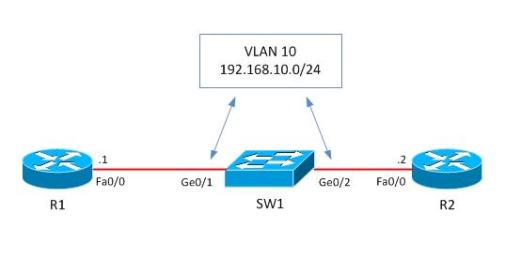
Before starting configuration, let’s check if telnet works from R1.
R1#telnet 192.168.10.2
Trying 192.168.10.2 … Open
User Access Verification
Password:
R1#quit
[Connection to 192.168.10.2 closed by foreign host] R1#As we see, telnet is working, so now let’s start the VLAN access-map configuration which will block telnet and permit everything else.
!Create access-list, by which interesting traffic will be matched. As I’ve already said, the principle of VLAN access-map config is similar to the route-map working principle. Later we snap this access-list to a VLAN access-map.
switch(config)#ip access-list extended restrict_telnet_R2
switch(config-ext-nacl)#permit tcp host 192.168.10.1 host 192.168.10.2 eq 23
After this we’ll create a vlan access-map, which has two main parameters: action and match.
Match: by this parameter the interesting traffic is matched and here RACL or MAC ACL can be applied as well.
Action: what to do with matched traffic. Two main parameters exist: Drop and Forward. In case of Drop, matched traffic will be dropped, and in case of forward, matched traffic will be allowed. Also, on High-End devices, a Redirect and Capture parameters also exist in the Action statement.
In our case we must block matched traffic and permit all the rest.
switch(config-ext-nacl)#vlan access-map VACL 10
switch(config-access-map)#action drop
switch(config-access-map)#match ip address restrict_telnet_R2
switch(config-access-map)#vlan access-map VACL 20
switch(config-access-map)#action forward
switch(config-access-map)#exit
After creating the VLAN access-map, it should be applied to a VLAN or VLANs. In this case we’ll apply it to VLAN 10 which is specified by “vlan-list 10”.
switch(config)#vlan filter VACL vlan-list 10
By this configuration is completed. Let’s see if telnet is blocked and ping works.
R1#ping 192.168.10.2
Type escape sequence to abort.
Sending 5, 100-byte ICMP Echos to 192.168.10.2, timeout is 2 seconds:
!!!!!
R1#telnet 192.168.10.2
Trying 192.168.10.2 …
% Connection timed out; remote host not responding
As we see, ping is okay from R1 and telnet is blocked as we planned.
Related Posts
- What is Cisco Switch Virtual Interface (SVI) – Configuration Example and Explanation
- Deleting the VLAN Database from a Cisco Switch (IOS or Nexus)
- What is Cisco Virtual Port Channel (vPC) – Explained and Discussed
- Discussion and Explanation of BPDU Guard (With Cisco Config Example)
- From Reactive to Proactive: Mastering Network Performance with Switch Monitoring