A switch is a network device that interconnects host devices at Layer 2 of the OSI model. In order to perform its function correctly, it must be able to learn the MAC addresses of the connected hosts and maintain them in a MAC address table.
In this article, I’ll explain in detail how a switch achieves MAC Learning and why this is important for the operation of these devices.
What is a Switch?
A switch is a network device that interconnects multiple hosts. Its primary function is to receive incoming network packets and determine the destination port for each one, enabling it to be sent only to the intended recipient.
This differs from a network hub, which does not filter traffic and sends incoming packets to all ports, leaving the filtering to be done by the individual connected hosts, an extremely inefficient situation.
A switch gets its name from its function, which is essentially frame switching. It reads the destination MAC address contained in the frame and forwards or switches the frame to be sent out of the appropriate port based on this address.
The MAC Address Table
In order for a switch to be able to “know” out of which port to send a particular frame, it must learn the MAC addresses of the connected hosts, and maintain a list of those addresses with their corresponding ports. This list is called the MAC address table.
This table, maintained within the memory of a switch, contains a list of all of the learned MAC addresses and the port to which each MAC address corresponds.
This table also typically includes the VLAN to which the specific port belongs. The following is an example of a MAC address table in a typical Cisco switch.
Mac Address Table
———————-
Vlan Mac Address Type Ports
—- ———– ——– —–
1 00d0.ba8b.5f7d DYNAMIC Fa0/1
1 00e0.f726.3b8f DYNAMIC Fa0/2
1 00a2.89d6.9a4b DYNAMIC Fa0/3
10 00e0.a3dd.48a8 DYNAMIC Fa0/4
10 01e7.5de2.9c5d DYNAMIC Fa0/5
100 0024.e8ad.5762 DYNAMIC Fa0/6
100 0035.ce56.2b4a DYNAMIC Fa0/7
You can see the MAC addresses that have populated the table, and you can also see the corresponding port of each MAC address, as well as the VLAN on which that port belongs.
So, if the switch receives a frame with a destination address of 00d0.ba8b.5f7d, for example, the device will know to switch that frame out of the Fa0/1 interface only, based on this entry in the MAC address table.
This is much more efficient than a hub which would send the frame out of all of its ports and let each individual host receiving the frame decide to process it or drop it.
Maintaining the MAC Address Table
Now the question remains, how does a switch create, populate, maintain, and update the MAC address table?
Simply put, a switch inspects the source MAC address of the frame received on a particular port and places that in the MAC address table.
To understand this more fully, let’s take a look at the following topology:
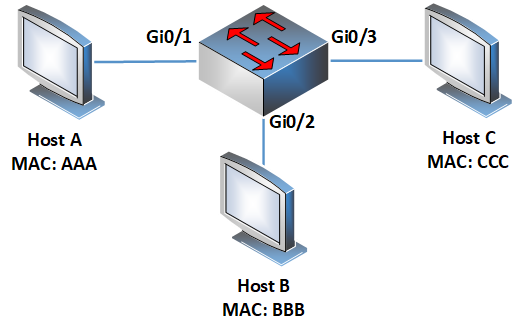
We haven’t configured any VLANs at all, so all ports are on the default VLAN of 1. We’ll use simplified MAC addresses as indicated for convenience. Initially, when we turn the switch on, the MAC address table is empty like so:
Mac Address Table
——————————————-
Vlan Mac Address Type Ports
—- ———– ——– —–
Let’s say that Host A sends a frame to Host C:
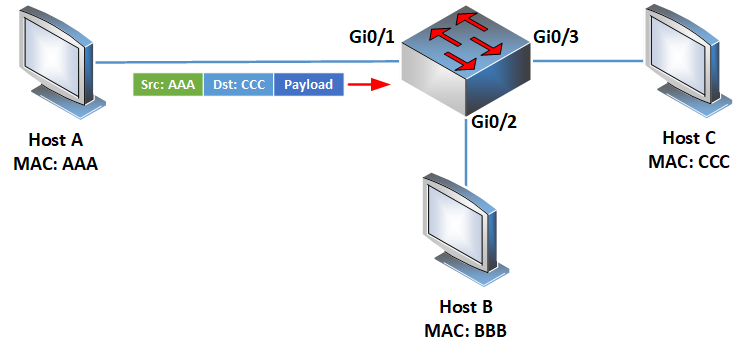
The switch will receive this frame on Gi0/1 and will examine the source address. It will then create a MAC address table entry for this MAC address:
Mac Address Table
——————————————-
Vlan Mac Address Type Ports
—- ———– ——– —–
1 AAA DYNAMIC Gi0/1
Since a frame was received on Gi0/1 from source AAA, that means that the host with a MAC address of AAA can be reached via Gi0/1.
Now since Host A was sending the frame to Host C, the destination MAC address of that frame is CCC, however, there is no such entry in the MAC address table, so it doesn’t know to which port to send the frame.
In this case, the switch will send it out of all ports except the one it was received on, as shown in the diagram below:
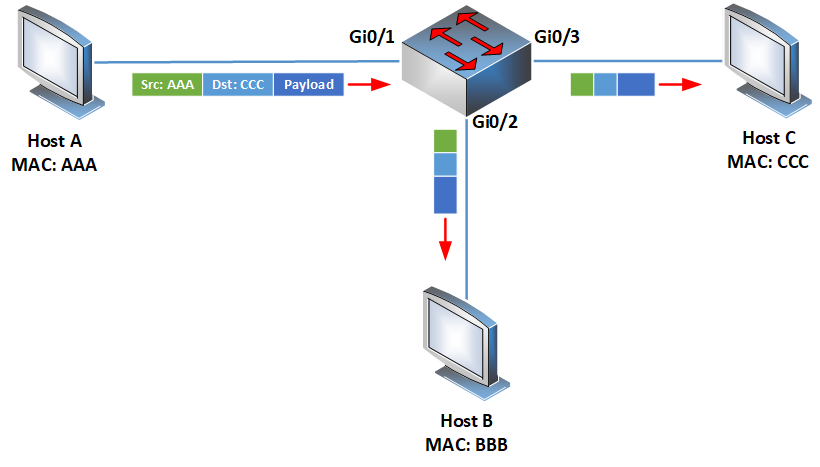
So, both Host B and Host C will receive this frame. Host B will see that the destination MAC is not its own, so it will drop the frame. Host C sees that the destination MAC is its own, so it receives and processes the frame.
At this point in the process, the switch has recorded and populated the entry for the MAC address of Host A.
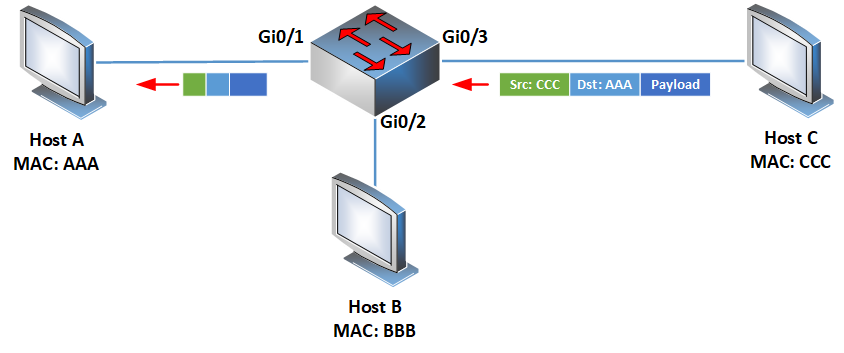
Now when Host C responds to Host A, it will prepare a frame with the source MAC address of CCC and a destination MAC address of AAA like so:
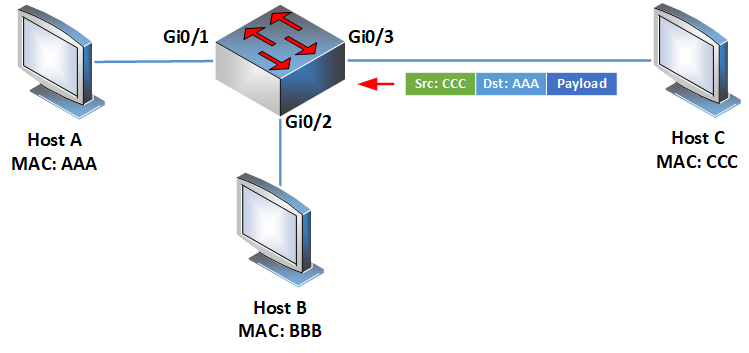
The switch will receive this frame on Gi0/3 and will examine the source address. It will then create another MAC address table entry for this source MAC address like so:
Mac Address Table
——————————————-
Vlan Mac Address Type Ports
—- ———– ——– —–
1 AAA DYNAMIC Gi0/1
1 CCC DYNAMIC Gi0/3
Since a frame was received on Gi0/3 from source CCC, that means that the host with a MAC address of CCC can be reached via Gi0/3.
Now the switch checks the destination MAC address of the frame, which is AAA, and looks it up in the MAC address table.
There is an entry that corresponds to port Gi0/1, so the frame is sent out of only that port, and will not be sent out of any other port.
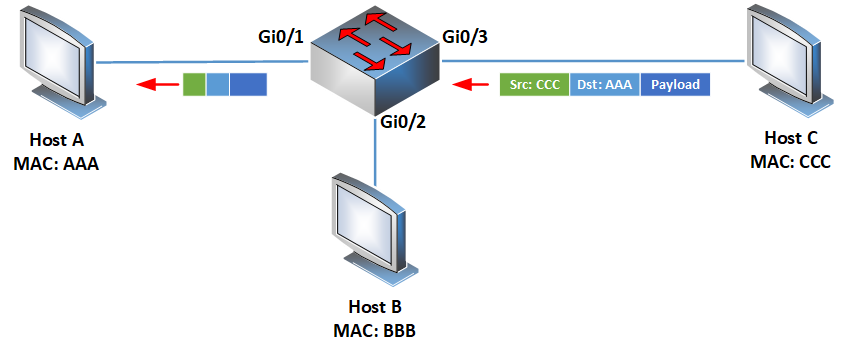
At this point, the MAC address table has become fully populated with the MAC addresses of Hosts A and C.
As frames continue to ingress on various ports of the switch, the source addresses of those frames are used to continue to populate the MAC address table.
Operational details and notes
There are a few more issues that must be addressed concerning the MAC address learning process and the overall management of the MAC address table.
Dynamic and static entries
In all the MAC address tables shown above, all of the entries were dynamic, as indicated in the “Type” field of the tables.
Dynamic entries are those learned from the source MAC address field of each frame. It is also possible to manually configure static MAC address table entries using the following command on a Cisco switch:
SW(config)#mac address-table static aaaa.bbbb.cccc vlan 1 interface GigabitEthernet 0/1
The resulting MAC address table entry would look like this:
Mac Address Table
——————————————-
Vlan Mac Address Type Ports
—- ———– ——– —–
1 aaaa.bbbb.cccc STATIC Gi0/1
Static MAC address table entries are rarely used and should never be employed unless absolutely necessary.
Other MAC Address table parameters
When managing the MAC address table, it is important to keep the following in mind:
- By default, a MAC address table entry remains in the MAC address table for 300 seconds or 5 minutes. If no new frame arrives with that MAC address in the source field for more than 300 seconds, the entry is removed.
- Each MAC address can appear only once in the MAC address table. If a MAC address is detected on a port other than the one already in the table, the new entry replaces the old one. If a MAC address continually appears on multiple ports, the MAC address table is continually updated, resulting in what is known as “MAC Address Flapping.” This is an undesirable situation that may indicate a loop or an incorrect network design or topology.
- Each port may have multiple MAC addresses corresponding to them especially when the switch is directly connected to another switch.
Conclusion
Understanding how the MAC address table works and how a switch learns MAC addresses is a fundamental skill that is necessary for all network engineers. This knowledge aids in network design, network management, as well as network troubleshooting.
Related Posts
- What is Cisco Switch Virtual Interface (SVI) – Configuration Example and Explanation
- Deleting the VLAN Database from a Cisco Switch (IOS or Nexus)
- What is Cisco Virtual Port Channel (vPC) – Explained and Discussed
- Discussion and Explanation of BPDU Guard (With Cisco Config Example)
- From Reactive to Proactive: Mastering Network Performance with Switch Monitoring