A network sniffer, or packet sniffer, is a specialized software (or even a hardware device) that listens in over a network and records the IP packets of data that travel through it.
Many network administrators use these tools to determine the efficiency of a network, to troubleshoot communication problems, to identify common network bottlenecks etc.
Of course, hackers can also use network sniffing tools to collect personal data such as passwords over a network. That’s why network traffic should be encrypted whenever possible.
As a network and security engineer I have been using network sniffing tools for decades. I remember myself digging inside IP packets captured by Wireshark in order to troubleshoot communication problems between network devices and much more.
The easiest way to collect network traffic with a sniffing tool is to connect your computer (which has the sniffer software installed) on a SPAN port of a switch which basically copies all traffic passing through the switch to that SPAN port.
The sniffing software is listening on the network interface card of the computer to collect all traffic which passes through the interface for analysis. Of course, this is one way of capturing network traffic. There are more options as we’ll see below depending on whether the traffic comes from the wired or wireless network.
In this article I have researched some popular (both free and commercial) IP network sniffing tools and present them below with a brief description of each one.
The ranking below is in no particular order:
1) WireShark – FREE

As one of the world’s most used network sniffing and analysis tools, WireShark has a wealth of features that are continually being added to by a community of volunteers.
This free tool is usually the de-facto first option for network and system engineers for capturing and analyzing network packets.
WireShark is available across various platforms, including Windows, Mac, Linux, FreeBSD, Solaris, and others.
It also can read hundreds of network protocols and can do all of this in real time over a variety of networks, including Ethernet, PPP, Bluetooth, FDDI etc.
A website full of information with a wealth of tutorials and documents tops all of this off, and they even conduct regular training on how to use their software.
This makes it relatively easy to get up to speed on not just how to use the tool, but also how it can help network administrators and other IT professionals improve the speed and efficiency of their networks.
Personally I use Wireshark extensively in my work environment to either troubleshoot problems or inspect traffic for security purposes.
There is a learning curve to find out the various filters needed to apply in order to search within packets and display only the packets you want. If you learn these, the tool is very powerful and flexible.
2) Manage Engine Netflow Analyzer – PAID
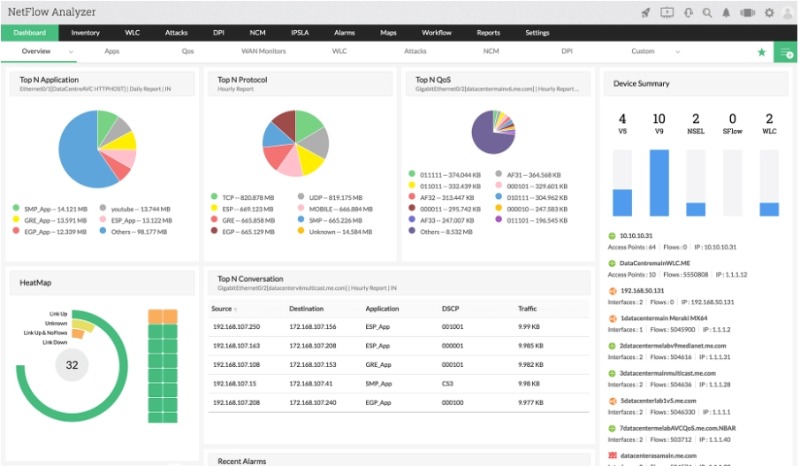
This real time network analysis tool uses an attractive graphical interface to display traffic data over a network.
It is based on packet flow technologies and supports Cisco’s Netflow, Juniper’s JFlow, sFlow, IPFix, Appflow and Netstream.
Using the above Flow Technologies, this software is ideal for people who want to be able to visualize everything in real time and drill down on the details to identify any potential network issues.
Moreover, by supporting all major packet flow protocols, the tool is ideal in environments with multiple hardware network vendors.
It supports major networking vendors such as Cisco, HP, Juniper, Fortinet etc, and can display data from all supported hardware devices using Flow Technology.
This is an easy way to see where there might be any network problems. Color-coded pie charts and summarized information on a single screen make this a wise choice for professional network administrators.
The Manage Engine tool works as a collector to receive flow traffic from network devices such as routers, switches etc and any other device that can send flow data. This allows it to monitor bandwidth usage, application usage, security monitoring etc.
What I like about this traffic monitoring solution is that it gives you the ability to discover which application or IP is consuming your bandwidth, helping identify resource-intensive applications or network components.
So, if your boss or users complain about a slow network, you can find the root cause of the problem with Netflow Analyzer.
3) PRTG IP Sniffer – PAID
PRTG by Paessler is a popular and powerful network monitor tool which does much more than IP sniffing.
PRTG’s approach to network monitoring is based on sensors. You can set up sensors across an entire network that measure the values of different things such as CPU load, disk space, bandwidth and so on.
Once you set them up, they can all be monitored from a central dashboard. In this sense, the sensors act like little network alarms that will alert the network administrator to a network problem.
There’s a lot to like about this approach, and the first 100 sensors are free to use for 30 days, after which the software will revert to a free version that has limitations. The unique sensor-based approach that PRTG takes makes it an interesting choice.
Now, the IP Sniffing functionality of PRTG is another sensor just like the other ones they have.
The Packet Sniffer Sensor uses a built-in packet sniffer to monitor the headers of data packets passing through the network card. Only packet headers are captured (e.g source IP, destination IP etc) but the data is presented on customizable graphs and so-called toplists so that you can have a comprehensive view of network traffic.
4) Solarwinds Deep Packet Inspection – PAID
Solarwinds is another big player in the network management/monitoring arena. They develop tools for all sorts of management tasks, monitoring, analysis of IT infrastructure etc.
If you want to see where your data bottlenecks are located across a sophisticated network, the Solarwinds Deep Packet Inspection tool offers some unique insights.
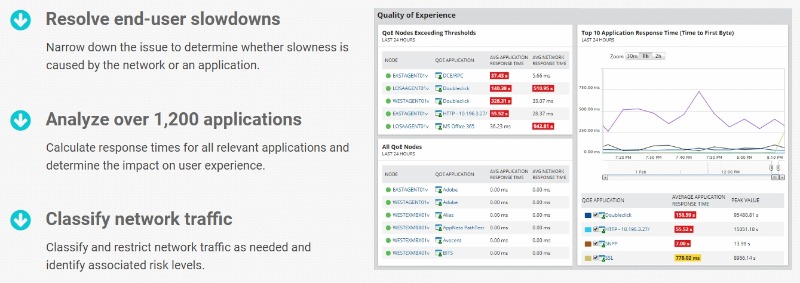
By presenting all information in an easy to read and interpret graphing front-end, Solarwinds is ideal for those who need to know everything about their network and how it performs under load.
Out of the box, Solarwinds has support for analyzing the network traffic for 1200 applications. Such applications include Skype, SQL server, Social Media traffic, Web Traffic and many more.
The Deep Packet Inspection (DPI) tool classifies traffic into categories. A business can use this classification to identify traffic that is not business-related (e.g excessive social media traffic) in order to apply rate limiting, traffic blocking etc.
5) Tcpdump – FREE
If you’re more accustomed to command line applications and need something fast and powerful, Tcpdump is one of the best choices available in the world of packet sniffing and analysis in the Unix world.
This software is ideal for Linux-based machines and gives you the ability to capture packets going in and out of the host’s network card and presents the results in printed format for easy reading and analysis.
As with many command line applications, many features can be controlled with flag settings. Tcpdump is very powerful and flexible but is more geared towards system admins with some Linux knowledge.
Here are some example commands of using tcpdump to capture traffic on a Linux machine:
sudo tcpdump -i eth0 host 192.168.1.1 (capture traffic having source or destination to IP 192.168.1.1)
sudo tcpdump -A -s0 port 80 (capture traffic on port 80)
6) WinDump – FREE
Windump is the Windows version of the above mentioned tcpdump. It also presents information in a command line interface and is compatible with tcpdump.
Just like tcpdump, Windump is free and is made for those who like a simple but powerful command line-driven experience for deep packet troubleshooting across a host.
It is based on the free WinPcap which is a driver for capturing packets form the host’s network interface. In addition to the wired card, it can also capture packets from a wireless interface card (802.11b/g wifi card) so that it can even sniff traffic from WiFi networks as well.
7) EtherApe – FREE
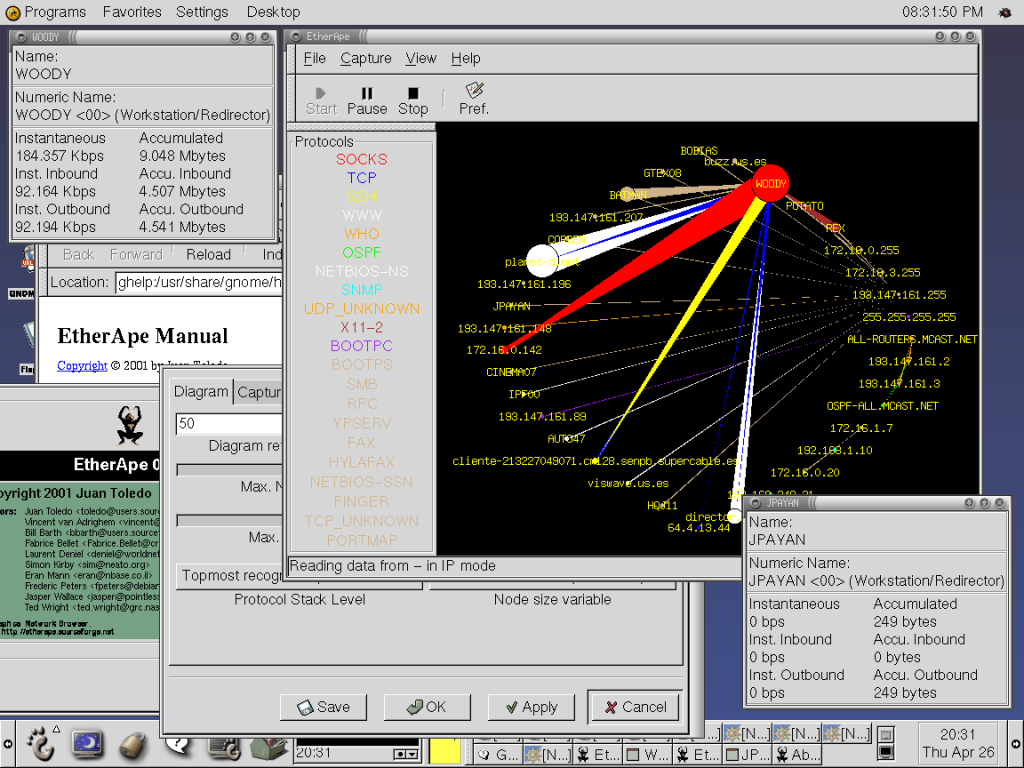
This may not be the most complex or complete tool available, but for those who rely on Unix, this GTK3-based network monitor can get the job done.
It uses an easy to decipher color-coded display for visualizing network and packet data, and has RPM packages that have been built for Arch Linux, Fedora, OpenSUSE, and Mageia 6.
The use of the GTK3 graphical libraries make this an attractive native Linux experience in several flavors.
The display of network data is heavily graphical and intuitive in design, with more active nodes appearing large on the screen.
This makes an otherwise arcane tool rather easy to use and interpret, even for those with intermediate knowledge of networks.
8) LiveAction Omnipeek – PAID
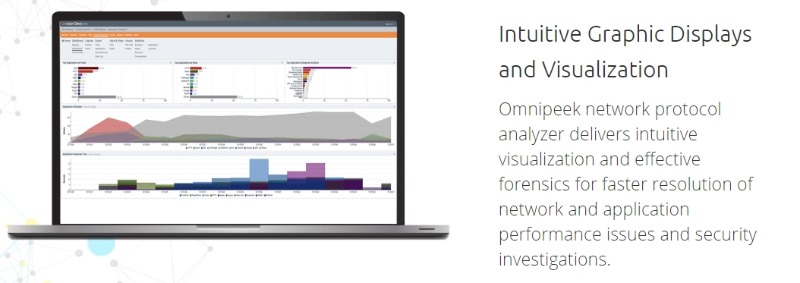
Though not free, this network analyzer offers professionals a powerful and intuitive way to view network congestion, identify problems, and focus on solving Wi-Fi speed issues among others.
Many network tools have a distinct focus on traditional wired networks, but Omnipeek provides a sophisticated way to visualize the data flow within wireless networks as well. This makes it thoroughly up to the job in the modern world, where wireless networks are very common.
Moreover, it helps admins to troubleshoot and monitor Voice and Video traffic, end-user devices, and also decode over 1000 protocols.
The solution offers also an appliance option (LiveCapture) used to distribute the collection and network monitoring at remote sites and branches.
9) Netresec Network Miner – FREE or PAID
Coming in both a free and professional paid version, Netresec Network Miner is an open source software tool that features a passive mode operation.
Operating in this mode ensures that no extra load is placed on the network, and Network Miner goes to work capturing packet data and identifying hostname and operating system information.
The featured passive mode makes it an ideal tool for large networks, especially the professional edition, which features many more functions, including exportable reports and OS fingerprinting.
The tool uses PCAP files created from capturing network traffic (Live Sniffing feature) to perform forensic network analysis and investigate incidents related to security etc.
10) Steelcentral Packet Analyzer – PAID
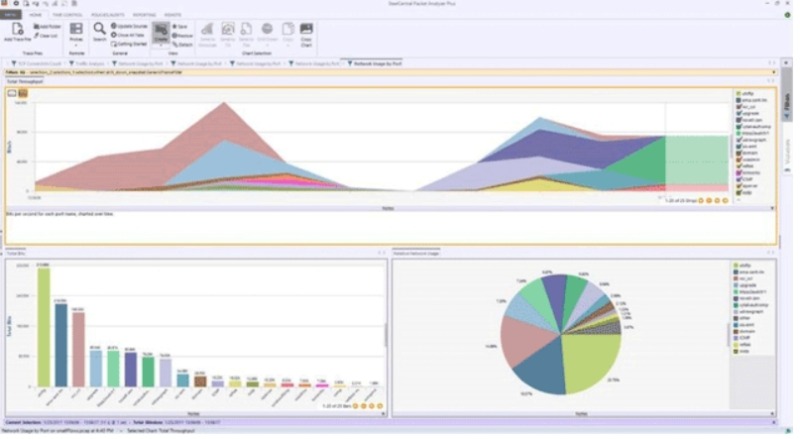
An attractive and intuitive interface is one of the characteristics of this tool.
This makes it quite easy to diagnose problems and bottlenecks across a network. What makes it even easier to use is the included preset analysis views.
By applying one of these preset views, it’s possible to see a wide range of problems presented in an attractive and humanly readable way.
Steelcentral Packet Analyzer makes it a cinch to diagnose issues on large networks in a business environment. It has been designed from the ground up to collect information and present it in a way that speeds up the job of network administrators.
11) Capsa – PAID
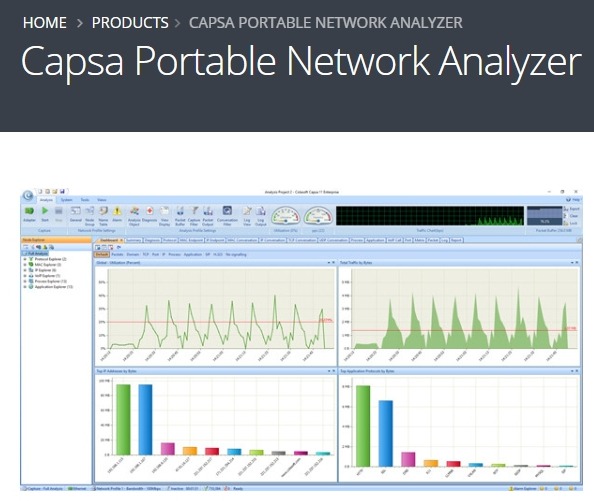
Though not inexpensive, Capsa offers numerous features that set it above many other network analysis tools. It is aimed at enterprise environments and operates on a very large scale, delivering information in an easy to read window and dashboard view.
Capsa is extensive, and supports over 1800 network protocols. It’s possible to monitor networks on a 24/7 basis, capture information from multiple networks in real time, and capture instant messaging and email traffic so network administrators are aware of any policy breaches in a business environment.
Wireless (WiFi) Network Sniffer Tool
So far we have listed and described packet capture tools that work mainly on wired networks (although some of them work with WiFi networks as well).
In the next section we will examine a few sniffer tools that work primarily in Wireless (mainly WiFi) environments and are primarily used for security testing purposes or for analyzing and enhancing the WiFi radio spectrum.
12) Kismet – FREE
Kismet is an open-source, passive network-detection and packet-capture software designed to watch the air for far more than just Wi-Fi as it supports also RF, Bluetooth, Zigbee etc.
Originally developed for 802.11 wireless LANs, Kismet has evolved into a comprehensive multi-protocol monitoring solution that runs on Linux and macOS platforms.
Moreover, a single Kismet server can ingest data from multiple local or remote interfaces, merge it in real time, display it through a modern browser-based UI, and log it to disk for forensics or security research purposes.
Because capture and presentation are decoupled, you can scatter low-cost “sensor” hardware (Raspberry Pi, OpenWrt APs, Android/NetHunter phones, SDR dongles, etc.) and view everything from one dashboard.
Kismet stands out as a versatile tool for security professionals, network administrators, and researchers who need comprehensive wireless network analysis across multiple protocols and technologies. Its passive monitoring approach makes it ideal for security assessments without alerting potential targets.
13) Solarwinds Wi-Fi Analyzer – PAID
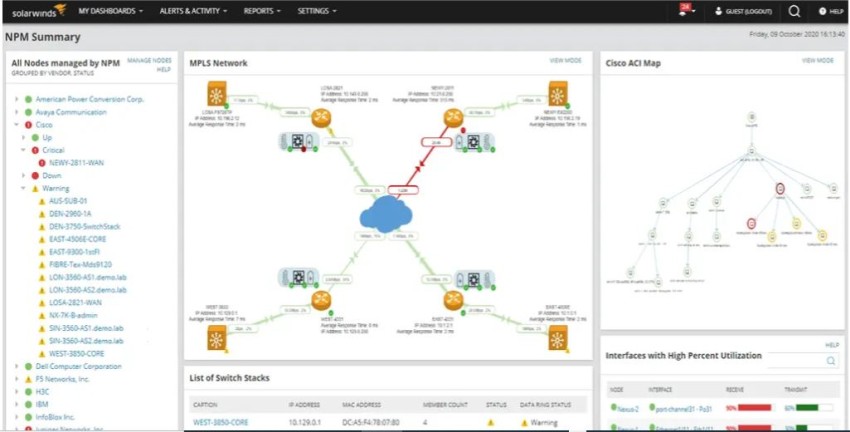
The SolarWinds WiFi Analyzer is a comprehensive network monitoring tool specifically designed for wireless network performance analysis and optimization.
It’s part of the SolarWinds Network Performance Monitor (NPM) suite and provides network administrators with deep insights into Wi-Fi infrastructure performance.
By monitoring the WiFi network traffic the tool shows details access points like name, type, SSID, connected clients, MAC address, signal strength, time connected, data rate, and bytes received/transmitted.
The business benefits provided by the tool include the following:
• Minimize Wi-Fi downtime and improve end-user experience by spotting problems before they escalate.
• Consolidate wired and wireless monitoring into one SolarWinds NPM console, cutting tool sprawl.
• Shorten mean time to detect (MTTD) and mean time to repair (MTTR) with guided, data-rich troubleshooting workflows.
• Gain the situational awareness necessary to plan capacity, optimize RF coverage, and validate changes with empirical data.
14) inSSIDer – FREE or PAID

This is mostly a tool to observe and analyze your WiFi environment and identify any radio and channel interferences to optimize your wireless network.
What it does:
- Scans the airwaves and lists every nearby access point (SSID, MAC, vendor, security type, 2.4/5 GHz band, channel, signal strength, and 802.11 protocol).
- Visualizes channel usage and co-channel overlap, making it easy to spot congestion and interference.
- Grades your own network’s configuration (channel choice, channel width, security settings) and recommends fixes to improve throughput and reduce drops.
- Tracks signal-to-noise over time so you can identify dead zones or sources of intermittent problems.
- Exports logs for deeper analysis or for sharing with support staff.
This tool is useful because instead of relying on guesswork or endless router resets, inSSIDer gives you actionable data to make smart changes. It’s especially handy for diagnosing slow speeds, optimizing wifi mesh systems, and setting up reliable wireless networks for work, study, or streaming.
15) Acrylic WiFi Sniffer – Free or PAID

Although this is a paid tool (with free option available), it offers budget-friendly licenses of just 100 euro / year or 220 euro for perpetual license.
It works on Windows OS and supports the most common and most recent WiFi cards (either USB or embedded) with the latest WiFi standards such as Wi-Fi 6 and Wi-Fi 6E, and WPA3.
It’s intended for network admins, IT/security analysts and wireless engineers who need real‑time packet capture, analysis and integration with packet‑analysis and site‑survey tools (it even integrates with Wireshark for deeper packet analysis).
Some of its use cases include:
- Troubleshooting wireless networks and client issues
- Security/forensic packet captures and analysis
- Wireless site surveys combined with heat‑map generation
- Performance analysis across 2.4/5/6 GHz bands
Conclusion
Network sniffing and analysis tools cover a wide range of functions and needs, and are available in free and paid versions.
The simplest will certainly do the job of capturing data over a network, but for large corporate environments and sophisticated networks, the paid professional offerings are a better option.
Related Posts
- Beyond SNMP: API-Powered Monitoring for Cisco ACI Fabrics
- Automated Compliance for Network Devices using Network Configuration Management
- Beyond the Blips – The Importance of Network Traffic Analysis with the Right Tools
- The Role of Baseline Configuration Management in Network Configuration Management
- Alternatives to VMware – Here are 7 Virtualization Solutions to Replace VMware