File transfers are an important network service. There are many protocols that can achieve this function, however, the SSH File Transfer Protocol, or SFTP is one of the safest, most efficient, and most popular methods around. It is arguably the most relied upon secure file transfer protocol used today!

In this article, we’ll unpack the SFTP protocol to see how it works and how it achieves safe file transfers. We will also compare it with other popular file transfer protocols and explain the differences between them. Finally, we’ll examine the security benefits and the practical uses of SFTP in today’s networks.
Introducing SFTP
SSH File Transfer Protocol or SFTP is a protocol that has been designed by the Internet Engineering Task Force (IETF) as an extension of the Secure Shell (SSH) protocol.
That’s right, SFTP stands for SSH File Transfer Protocol, and not Secure File Transfer Protocol, as it is often mistakenly thought to be.
SSH in turn stands for the Secure SHell protocol. But you may be thinking, “Isn’t that something else?”
You are most likely familiar with SSH as a secure method of achieving connectivity to a remote command line terminal, such as to the CLI of a Cisco device or a Linux server.
Although SSH was indeed initially designed as a secure replacement for the Telnet terminal protocol, providing secure login and remote terminal services, it has since evolved into a cryptographic network protocol for operating a wide variety of network services securely over an unsecured network.
So SFTP leverages the security provided by SSH to deliver file access, file transfer, and file management services over a network with the same level of security and confidentiality that we have come to expect from SSH remote terminal operations.
SFTP Default Port
SFTP by default uses port 22, the same port that SSH uses. This is because SFTP is essentially an extension of the SSH protocol, leveraging its secure channel to transfer files, as mentioned above.
This protocol encrypts both the commands and the data, preventing passwords and sensitive information from being transmitted in the clear over the network. This makes it a secure alternative to older protocols like FTP (File Transfer Protocol), which transmit data unencrypted.
Please have in mind that if the default SSH port 22 is changed on the server side, then SFTP will work fine with the changed port number (e.g 2222 for example).
Importance of Secure File Transfers
SFTP focuses on delivering these file-related services in a highly secure manner as we said above. Security is of utmost importance especially when transferring files that can potentially contain confidential information.
As we will see later in the article, the types of files that SFTP typically manages potentially contain confidential and sensitive information including passwords, personal, and financial data among others.
In such cases, security features are needed to safeguard the authenticity and confidentiality of transmitted information. This is essential for maintaining trust, compliance with regulations, and preventing data loss or cyberattacks.
What is SFTP and How Does it Work?
SFTP is a protocol that adheres to the client-server model and goes through the following stages to establish a secure connection, fulfill the file transfer and management process, and then tear down the connection.
Establishing a secure connection
An SFTP client begins by requesting a secure connection to the SFTP server. This is achieved using standard SSH security procedures. I’ll give you a brief summary of the steps here, but if you want to discover SSH and how it works in more detail, you can take a look at the RFC that defines it.
To request a secure connection, an SFTP client will do the following:
- Client Initiates Connection: The client sends a connection request to the SFTP server, which by default is on port 22 (the default SSH port).
- Server Authentication: The server responds by sending its public key to the client. This allows the client to verify the server’s authenticity, making sure it’s connecting to the right server and not to a device masquerading as the server.
Now you may have some experience with this server authentication process if you have used terminal programs like PUTTY using SSH. If you connect for the first time using the SSH command line to a remote device you will see something like this:
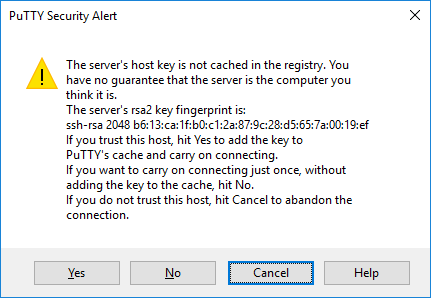
This is actually part of the SSH server authentication process. That “ssh-rsa” key is the public key sent by the server authenticating itself. So, every subsequent connection will use that key to check the authenticity of the server. But let’s continue the process:
- Client Authentication: Once the server is authenticated, the client is authenticated. This can be done using either:
- Password Authentication: The client sends a password to authenticate itself.
- Public Key Authentication: The client uses a private key to sign data that the server verifies with the corresponding public key.
- SSH Session Setup: After successful authentication, a secure SSH channel is established using symmetric encryption. This encrypted tunnel protects the confidentiality and integrity of data transferred over the connection.
File transfer process
Once the secure encrypted tunnel has been established, the SFTP subsystem is initiated by the client. This allows the client to issue SFTP commands over the secure SSH tunnel.
The commands are actually in the form of text CLI commands, much like you would use with an SSH terminal connection.
Common commands such as put and get can be used to send and receive files, while commands similar to those used with Linux can be used to list files, create directories, and change file permissions.
It’s important to note here that all commands sent as well as all of the files that are transmitted are transmitted over the secure SSH tunnel.
Session Management (ending the session)
Once all of the intended transactions are complete, the session can be torn down.
Comparison with other protocols
The following table compares these and other file transfer protocols stressing their differences and similarities.
| Protocol | Encryption | Authentication | Port | Connection Type |
Speed |
| SSH FTP | Encrypted
(SSH-based) |
Username/Password, SSH Key | 22 (SSH) | TCP | Moderate to Fast |
| FTP | No encryption | Username/Password | 20 and 21 | TCP | Fast |
| FTPS | Encrypted (SSL/TLS) | Username/Password, Client Certs | 21 and 990 | TCP | Fast |
| SCP | Encrypted
(SSH-based) |
Username/Password, SSH Key | 22 (SSH) | TCP | Moderate |
| FTP over SSH | Encrypted
(SSH tunnel) |
Depends on FTP (usually User/Pass) | 22 (SSH) | TCP | Moderate to Fast |
| TFTP | No encryption | None | 69 | UDP | Very Fast |
| Simple FTP | No encryption | None or simple authentication | 115 | TCP | Fast |
Some key take-aways from this table include:
- SFTP and SCP are secure file transfer methods using the SSH protocol, making them more secure. SCP, which stands for Secure Copy Protocol, however, only performs file copying over the network. It is not capable of file management.
- FTPS or FTP Secure adds security to traditional FTP by incorporating SSL/TLS encryption, making it suitable for environments where security is a concern.
- TFTP and Simple FTP are fast but lack security features and are often used for transferring small files in trusted local environments like device configuration.
- FTP over SSH allows FTP to run through an SSH tunnel, combining FTP functionality with SSH security.
Because the acronyms used by the various protocols are similar, there may be some misconceptions about the origins and functionalities of SFTP in relation to other file transfer protocols. The following points clarify these misconceptions:
- SFTP is incompatible with the more traditional FTP protocol. It is not based on FTP and is a completely different protocol with a completely new approach and architecture.
- SFTP should not be confused with FTP over SSH, which tunnels the traditional FTP protocol through SSH to provide security.
- SSH FTP (SFTP) should not be confused with Simple FTP (SFTP) which uses the same acronym.
SFTP Use Cases
SFTP is ideal to be used in cases where files must be transferred over a network in a secure manner. This is vital in many areas including:
- Web server file management
- Backup and restore operations
- Medical imaging file transfers
- Financial record file transfers
- Network device configuration transfer and management
- Device firmware and OS file management
All of the above file management scenarios deal with files that can potentially contain sensitive information including financial records, medical records, passwords, and confidential data. Security is of utmost importance in these cases, and this can be maintained using SFTP.
SFTP and Firewalls
SFTP is generally considered firewall-friendly due to its use of a single port (default TCP port 22) and its integration with SSH.
This simplifies firewall configuration because only one port needs to be opened for SFTP traffic. Many other protocols, like traditional FTP, require multiple ports to be open, which can complicate firewall rules and increase security risks.
SFTP and NAT
SFTP is compatible with Network Address Translation (NAT), which is commonly used in network environments to map multiple private IP addresses to a single public IP address.
Because SFTP uses a single, consistent TCP port, it avoids the complications that arise with protocols requiring dynamic port allocation, like FTP, or other protocols for voice traffic.
Conclusion
Transferring data files is one of the oldest and most fundamental functions achieved over a data network.
As such, protocols used to support this function are among the very first network services implemented over a network. Indeed the original FTP protocol was defined way back in 1971, a whole decade before the emergence of the Internet Protocol (IP).
Today, over 50 years later, SFTP is among the most advanced and secure protocols for transferring files in an efficient, safe, and protected manner.
Related Posts
- Difference Between Routers and Switches in TCP/IP Networks
- 11 Different Types of IP Addresses Used in Computer Networks
- Compare and Contrast Network Topologies (Star, Mesh, Bus, Hybrid etc)
- 11 Networking Companies Like Cisco (Competitors)
- What is a Wildcard Mask – All About Wildcard Masks Used in Networking