UPDATED: 2020 – Cisco Catalyst switches equipped with the Enhanced Multilayer Image (EMI) can work as Layer 3 devices with full routing capabilities. For example, some switch models that support layer 3 routing are the 3550, 3750, 3560 etc.
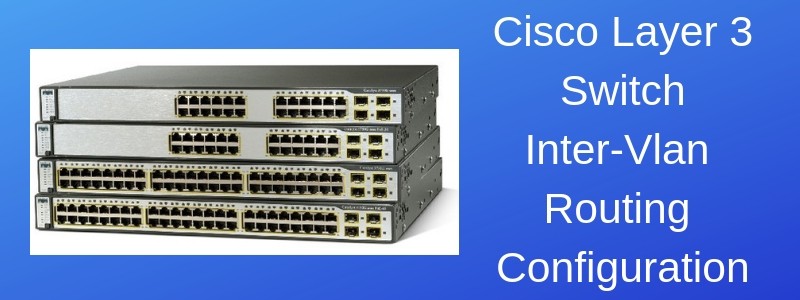
On a Layer3-capable switch, the port interfaces work as Layer 2 access ports by default, but you can also configure them as “Routed Ports” which act as normal router interfaces.
That is, you can assign an IP address directly on the routed port. Moreover, you can configure also a Switch Virtual Interface (SVI) with the “interface vlan” command which acts as a virtual layer 3 interface on the Layer3 switch.
The above feature means that you can implement Layer 3 functionality in your network without using a regular router.
If you don’t have a Layer3 switch available, you can also configure InterVLAN routing using a simple Layer2 switch and a Router (also called Router-on-a-Stick).
Inter VLAN Routing on a Layer 3 Switch
On this post I will describe a scenario with a Layer3 switch acting as “Inter Vlan Routing” device together with two Layer2 switches acting as closet access switches.
Moreover, a Cisco ASA firewall will provide Internet connectivity for all internal subnets. A Routed Port will be configured between the Layer3 Switch and ASA internal interface to route packets towards the internet (via the ASA).
The focus of this article is to show you how to configure the Layer2 and Layer3 switches to provide routing between VLANs using regular IOS based catalyst switches. A similar scenario using the new Cisco Nexus switches is described in the article here.
At the end of this article you will find also important routing configuration commands for the ASA and also how to use Access Control Lists (ACL) on the Layer 3 switch to control traffic (permit or deny) between VLANs at Layer3 level.
This is a fairly popular network scenario that I have seen in many enterprise networks.
See the diagram below to get the whole picture:
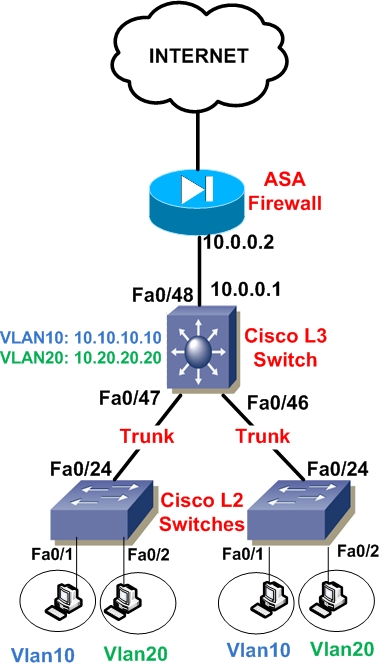
Interface Fa0/48 of the Layer3 switch is configured as a Routed Port with IP address 10.0.0.1 and connected to ASA inside interface (10.0.0.2).
Two Vlans need to be created on the L2 and L3 switches, Vlan10 and Vlan20. Of course you can expand this scenario with more Vlans and more Layer 2 switches as needed.
On the Layer3 Switch, for Vlan10 we will create an SVI with IP address 10.10.10.10 and for Vlan20 an SVI with IP address 10.20.20.20. These two IP addresses will serve as the default gateway addresses for hosts belonging to Vlan10 and Vlan20 on the Layer2 switches respectively.
That is, hosts connected to Vlan10 on the closet L2 switches will have as default gateway the IP address 10.10.10.10. Similarly, hosts connected to Vlan20 on the closet switches will have address 10.20.20.20 as their default gateway.
Traffic between Vlan10 and Vlan20 will be routed by the L3 Switch (InterVlan Routing). Also, all interfaces connecting the three switches must be configured as Trunk Ports in order to allow Vlan10 and Vlan20 tagged frames to pass between switches. Let’s see a configuration snapshot for all switches below:
Cisco L2 Switches (same configuration for both switches)
! Create VLANs 10 and 20 in the switch database
Layer2-Switch# configure terminal
Layer2-Switch(config)# vlan 10
Layer2-Switch(config)# name SALES
Layer2-Switch(config-vlan)# exit
Layer2-Switch(config)# vlan 20
Layer2-Switch(config-vlan)# name ENGINEERING
Layer2-Switch(config-vlan)# exit
! Assign Port Fe0/1 in VLAN 10
Layer2-Switch(config)# interface fastethernet0/1
Layer2-Switch(config-if)# switchport mode access
Layer2-Switch(config-if)# switchport access vlan 10
Layer2-Switch(config-if)# exit
! Assign Port Fe0/2 in VLAN 20
Layer2-Switch(config)# interface fastethernet0/2
Layer2-Switch(config-if)# switchport mode access
Layer2-Switch(config-if)# switchport access vlan 20
Layer2-Switch(config-if)# exit
! Create Trunk Port Fe0/24
Layer2-Switch(config)# interface fastethernet0/24
Layer2-Switch(config-if)# switchport trunk encapsulation dot1q
Layer2-Switch(config-if)# switchport mode trunk
Layer2-Switch(config-if)# exit
Cisco Layer 3 Switch
! Enable Layer 3 routing
Layer3-Switch(config) # ip routing
! Create VLANs 10 and 20 in the switch database
Layer3-Switch# configure terminal
Layer3-Switch(config)# vlan 10
Layer3-Switch(config)# name SALES
Layer3-Switch(config-vlan)# exit
Layer3-Switch(config)# vlan 20
Layer3-Switch(config)# name ENGINEERING
Layer3-Switch(config-vlan)# exit
! Configure a Routed Port for connecting to the ASA firewall
Layer3-Switch(config)# interface FastEthernet0/48
Layer3-Switch(config-if)# description To Internet Firewall
Layer3-Switch(config-if)# no switchport
Layer3-Switch(config-if)# ip address 10.0.0.1 255.255.255.252
! Create Trunk Ports Fe0/47 Fe0/46
Layer3-Switch(config)# interface fastethernet0/47
Layer3-Switch(config-if)# switchport trunk encapsulation dot1q
Layer3-Switch(config-if)# switchport mode trunk
Layer3-Switch(config-if)# exit
Layer3-Switch(config)# interface fastethernet0/46
Layer3-Switch(config-if)# switchport trunk encapsulation dot1q
Layer3-Switch(config-if)# switchport mode trunk
Layer3-Switch(config-if)# exit
! Configure Switch Vlan Interfaces (SVI)
Layer3-Switch(config)# interface vlan10
Layer3-Switch(config-if)# ip address 10.10.10.10 255.255.255.0
Layer3-Switch(config-if)# no shut
Layer3-Switch(config)# interface vlan20
Layer3-Switch(config-if)# ip address 10.20.20.20 255.255.255.0
Layer3-Switch(config-if)# no shut
! Configure default route towards ASA firewall
Layer3-Switch(config)# ip route 0.0.0.0 0.0.0.0 10.0.0.2
Optional ACL Configuration on L3 Switch
! Create ACL to control traffic between VLAN 10 to VLAN 20
Layer3-Switch(config)# ip access-list extended ACL1020
Layer3-Switch(config-ext-nacl)#permit ip host 10.10.10.1 host 10.20.20.1
Layer3-Switch(config-ext-nacl)#deny ip 10.10.10.0 0.0.0.255 10.20.20.0 0.0.0.255
Layer3-Switch(config-ext-nacl)#permit ip 10.10.10.0 0.0.0.255 any
Layer3-Switch(config-ext-nacl)#exit
! Apply ACL to VLAN10 SVI
Layer3-Switch(config)#interface vlan 10
Layer3-Switch(config-if)#ip access-group ACL1020 in
Layer3-Switch(config-if)#exit
The configuration above creates an Access Control List to restrict access between Vlan10 to Vlan20. Specifically, it allows host 10.10.10.1 to access only host 10.20.20.1 and denies all other traffic between Vlan10 to Vlan20. Moreover, access to anything else (i.e Internet) from vlan10 is allowed. The ACL above is applied on vlan10 SVI in the “in” direction.
Important ASA Routing Configuration
ASA(config)# route outside 0.0.0.0 0.0.0.0 2.2.2.2 <– This is default route towards internet
ASA(config)# route inside 10.10.10.0 255.255.255.0 10.0.0.1 <– static route to reach vlan10
ASA(config)# route inside 10.20.20.0 255.255.255.0 10.0.0.1 <– static route to reach vlan20
The above ASA sample configuration shows the necessary static routing required on the ASA to route packets back to vlan10 (10.10.10.0) and vlan20 (10.20.20.0) via IP 10.0.0.1 which is the Layer3 switch IP.
Inter VLAN Routing on Layer 2 Switches
People ask me the question if you can route traffic between VLANs on Layer 2 switches. The answer is NO. If there is no routing device in the network (Layer 3 switch or Router) then hosts connected to two different VLANs on the same Layer 2 switch will not be able to communicate.
The only way to provide inter vlan routing on a Layer 2 switch is to have a Layer 3 switch or Router in the network which will receive the packets for each Layer2 VLAN and then route them to the other VLAN accordingly.
See also my other article about a Layer 2 / Layer 3 Switch Design and Configuration example with aggregation and access switches and Port Channels for link redundancy.
DOWNLOAD ARTICLE ABOVE AS PDF FILE
Related Posts
- How Does a Network Switch Learn MAC Addresses?
- How to Find a Device MAC Address on a Cisco Switch (show mac address-table)
- How to Configure a Loopback Interface on Cisco Router & Switch
- Cisco Switch Layer2 Layer3 Design and Configuration
- Description of Switchport Mode Access vs Trunk Modes on Cisco Switches