Sponsored Links
This article gets back to the basics regarding Cisco ASA firewalls. I’m offering you here a basic configuration tutorial for the Cisco ASA 5510 security appliance. This device is the second model in the ASA series (ASA 5505, 5510, 5520 etc) and is fairly popular since is intended for small to medium enterprises. Like the smallest ASA 5505 model, the 5510 comes with two license options: The Base license and the Security Plus license. The second one (security plus) provides some performance and hardware enhancements over the base license, such as 130,000 Maximum firewall connections (instead of 50,000), 100 Maximum VLANs (instead of 50), Failover Redundancy, etc. Also, the security plus license enables two of the five firewall network ports to work as 10/100/1000 instead of only 10/100.
Next we will see a simple Internet Access scenario which will help us to understand the basic steps needed to setup an ASA 5510. Assume that we are assigned a static public IP address 100.100.100.1 from our ISP. Also, the internal LAN network belongs to subnet 192.168.10.0/24. Interface Ethernet0/0 will be connected to the outside (towards the ISP), and Ethernet0/1 will be connected to the Inside LAN switch. Refer to the diagram below for our example scenario.
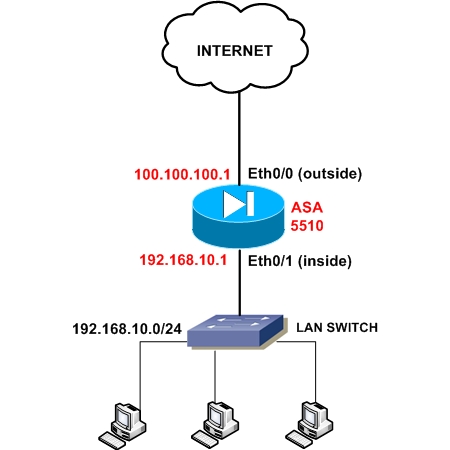
The firewall will be configured to supply IP addresses dynamically (using DHCP) to the internal hosts. All outbound communication (from inside to outside) will be translated using Port Address Translation (PAT) on the outside public interface. Let’s see a snippet of the required configuration steps for this basic scenario:
Step1: Configure a privileged level password (enable password)
By default there is no password for accessing the ASA firewall, so the first step before doing anything else is to configure a privileged level password, which will be needed to allow subsequent access to the appliance. Configure this under Configuration Mode:
ASA5510(config)# enable password mysecretpassword
Step2: Configure the public outside interface
ASA5510(config)# interface Ethernet0/0
ASA5510(config-if)# nameif outside
ASA5510(config-if)# security-level 0
ASA5510(config-if)# ip address 100.100.100.1 255.255.255.252
ASA5510(config-if)# no shut
Step3: Configure the trusted internal interface
ASA5510(config)# interface Ethernet0/1
ASA5510(config-if)# nameif inside
ASA5510(config-if)# security-level 100
ASA5510(config-if)# ip address 192.168.10.1 255.255.255.0
ASA5510(config-if)# no shut
Step 4: Configure PAT on the outside interface
ASA5510(config)# global (outside) 1 interface
ASA5510(config)# nat (inside) 1 0.0.0.0 0.0.0.0
UPDATE for ASA Version 8.3
From March 2010, Cisco announced the new Cisco ASA software version 8.3. This version introduced several important configuration changes, especially on the NAT/PAT mechanism. The “global” command is no longer supported. NAT (static and dynamic) and PAT are configured under network objects. The PAT configuration below is for ASA 8.3 and later:
object network obj_any
subnet 0.0.0.0 0.0.0.0
nat (inside,outside) dynamic interface
Step 5: Configure Default Route towards the ISP (assume default gateway is 100.100.100.2)
ASA5510(config)# route outside 0.0.0.0 0.0.0.0 100.100.100.2 1
Step 6: Configure the firewall to assign internal IP and DNS address to hosts using DHCP
ASA5510(config)# dhcpd dns 200.200.200.10
ASA5510(config)# dhcpd address 192.168.10.10-192.168.10.200 inside
ASA5510(config)# dhcpd enable inside
The above basic configuration is just the beginning for making the appliance operational. There are many more configuration features that you need to implement to increase the security of your network, such as Static and Dynamic NAT, Access Control Lists to control traffic flow, DMZ zones, VPN etc. I just tried to offer you a starting point for a basic configuration from where you can build your knowledge further.
Related posts:
- How to Configure VLAN subinterfaces on Cisco ASA 5500 Firewall
- Basic Cisco Router Configuration Steps
- ASA Firewall NAT Control Feature
- ASA Firewall Active-Standby interface configuration
- Cisco ASA Firewall with PPPoE
- How to upgrade Cisco ASA Firewall License
- Cisco ASA 5505 Firewall License Restriction for DMZ
Sponsored Links


Hi, Congratulations to the site owner for this marvelous work you’ve done. It has lots of useful and interesting data.
Thanks for sharing your knowledge. I just downloaded your ebook, legally of course
, and I can’t wait to try out all the scenarios contained in the book. One question that I have so far is how I can use my current Linksys router with my firewall. What I would like to do is just plug my firewall behind my current router instead of directly connect it to the internet (ISP) as show in your diagrams. I guess all I would have to do is configure default gateway (my router) on the firewall. Any comment regarding this set up would be appreciated.
Thanks again for a great guide.
Well, why don’t you connect your ASA directly to the ISP? Anyway, if for any reason you need to have the Linksys connected to the ISP, then configure a static IP address on the outside interface of the ASA and assign as default gateway the internal IP of the Linksys router. Assume that your linksys has internal LAN IP 192.168.1.1. Assign an IP address for the outside of ASA 192.168.1.10 and then configure a default route (gateway) for the ASA as following:
asa(config)# route outside 0.0.0.0 0.0.0.0 192.168.1.1
Also, if the Linksys does the NAT translation, then you can avoid using NAT on the ASA firewall.
I hope I clarified your question.
Regards
Harris
thanks for your response. Just to answer your question, about why I am not using my ASA as an edge device, I currently have a couple of people using the linksys for wireless connection and I have a voip phone hooked up to it as well…so I felt hesitant about having to deal with that right off the bat.
OK, that makes sense then.
I have my ASA connected directly to my ISP’s cable box. The ASA keeps dropping the ip on the outside interface. I had to call the ISP several times to refresh my ip and it would work until I reboot the cable box or the ASA and then the on the outside interface of the ASA is gone. “show ip” shows “unassigned” for outside interface. I googled around to see if anybody else has experienced this but nothing so far. Anybody has any idea why this might happen? Thanks.
One suggestion would be to fix the speed and duplex settings on your ASA outside interface. Maybe its a hardware speed negotiation problem between the ASA and the cable box. If the cable box is 100Mbps full duplex, then make the ASA interface the same:
hostname(config)# interface Ethernet0/1
hostname(config-if)# speed 100
hostname(config-if)# duplex full
Hello, I was looking around for a while searching for operational security training and I happened upon this site and your post regarding Configure a Cisco ASA 5510 Firewall – Basic Configuration Tutorial | CiscoTips, I will definitely this to my operational security training bookmarks!
Hi, I bought your books to setup my ASA-5505 for VPN access. The scenario that best fits my setup is static outside interface with 2 servers in the dmz. You state that this requires a Security Plus license. In my case, I don’t need any servers in the dmz, just the inside lan with vpn users connecting to access services on the inside lan. Would I still need a Security Plus license? Would I have to do anything different from your example or just leave out the dmz settings?
Thanks in advance,
Arif
Hello Arif,
The scenario you mention above requires Security Plus license because there is communication between the DMZ and Internal network. For such a communication to work, you need to have a Security Plus license for the ASA5505 firewall. Now, in your case you don’t need a security plus license. Just leave out the DMZ settings in the example and configure VPN on the ASA for your users. Please let me know if you need more clarifications.
Harris
Harris,
Thank you! It worked once I configured it the way you had it in the book. Now I will see how to port forward ssh port to a box on the inside vlan.
-arif
Arif,
I’m glad it worked. For the port redirection I have a specific section in the ebook which describes exactly what you need to do. Please let me know if you find any problems.
Dear Friends,
I want to reload my ASA 5510 firewall.It was configure by ASDM so How to reload the firewall,kindly send it the procedure it is really help to me.I have on doubt we the firewall directly connected to my thomson ADSl router(modem) and then we have one public ip wher i want configure,I think it should configure in firewall e0 port,If we configure like this for example my ip address is 218.248.25.X my thomson gateway is 192.168.1.254 by default, so what is my question is basically if we configure any router and firewall we should configure default to communicate out side network so how i want configure the default route.
Dear Friends,
I want to reload my ASA 5510 firewall.It was configure by ASDM so How to reload the firewall,kindly send it the procedure it is really help to me.I have on more doubt we connected the firewall directly to my Thomson ADSl router(modem) and then we have one public ip,what is my question here? where i want configure this ip address,I think it should configure in firewall e0 port,If we configure like this for example my ip address is 218.248.25.X by default my Thomson gateway is 192.168.1.254 , so what is my question here? basically if we configure any router and firewall we should configure default route to communicate out side network so how i want configure the default route in this scenario.
There should be a link under the administration section for reloading. Regarding the scenario with the Thomson ADSL router, if I understand it correctly, the default route for the ASA will be 192.168.1.254. You should assign an IP address to the outside interface (eth0 port) of the ASA in the range 192.168.1.1 – 192.168.1.253.
[...] is a Cisco ASA 5510 basic configuration tutorial. The ASA 5510 is one of the most popular ASA models since is mostly [...]
Thanks for the update!!!!!
Thanks for this. As for the Step 6, I have an internal DNS to resolve internal addresses and DHCP assigning addresses internally. Do I still need to have ASA 5510 run DHCP? I also currently have ISA server 2006 on which I had a stub copy of DNS and forwards queries to external DNSs. I would like to continue using ISA server with ASA 5510, the latter will be at the perimeter. How can I accommodate both? Also, I have several global IPs and I do not know how to define sub-interfaces to assign several global IPs to a single physical interface. Please help!
Andrew,
If you have a dedicated DHCP server in your network, then you must not activate DHCP service on the ASA appliance. If you have an ISA server, you can connect the ISA server in the internal network (or preferably on a DMZ) and force all internal users to use the ISA as proxy for their HTTP traffic. You can configure an access-list which allows only the ISA server to access the internet for ports 80/443.
Regarding the global IPs, you don’t need to configure sub-interfaces to assign them. With sub-interfaces you just create separate network security zones. If the global IPs are routed towards your outside interface, you can create static NAT commands and redirect those IP addresses to internal hosts for example.
Blog Admin,
Thanks. Regarding the access lists, well i have exchange server on the internal network as well and I am also planning to add an MS SQL 2008 internally. On the DMZ, I was thinking of putting up a web/ftp server. How do I treat this in access list as well? Excuse my ignorance, i am novice to Cisco.
Thanks
To allow communication between any two ASA interfaces (security zones) you need two things: 1) proper NAT 2)proper access lists.
So, yes if you have the proper nat in place between DMZ and inside (provided that nat-control is enabled) then you just need to apply the correct access list on the DMZ interface to allow web server to communicate with the internal SQL server.