Networks Training

  • About
  • My Books
  • IP Tools
  • HOME
  • Cisco Networking
    • Cisco General
    • Cisco IOS
    • Cisco VPN
    • Cisco Wireless
  • Cisco ASA
    • Cisco ASA General
    • Cisco ASA Firewall Configuration
  • Certifications Training
    • CCNA Training
    • Cisco Certifications
    • I.T Training
  • General
    • Tech News
    • General Networking
    • IP Telephony
    • Network Security
    • Product Reviews
    • Software
  • Cisco Routers
  • Cisco Switches
You are here: Home / Cisco ASA Firewall Configuration / Series of Steps to Forward a packet in a Cisco ASA Firewall

Series of Steps to Forward a packet in a Cisco ASA Firewall

Edited By Harris Andrea

A normal Layer3 Routing device, when receiving a packet on one of its ingress interfaces, first checks the destination IP address of the packet and then consults its routing table in order to forward the packet to the proper outgoing interface. This is the most basic operation of a router.

A stateful firewall (like the Cisco ASA), on the other hand, has a much more complicated work to do on an incoming packet. There are several steps and decision points that the packet has to go though before being allowed and forwarded by the firewall. This is called “conditional forwarding” because the packet must satisfy several rules and conditions before passing through the firewall.

The diagram below shows a simplified traffic flow of a packet through a Cisco ASA device:
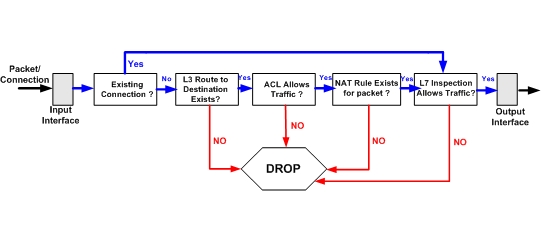
As shown on the figure above, the packet coming from the Input Interface is being checked first if it is a part of an existing connection. If yes, it skips many of the intermediate steps and is only checked if it satisfies the Layer7 inspection rules.

MORE READING:  Cisco ASA NTP and Clock Configuration with Examples

Now, if the packet is a new connection, the firewall needs to store in its state table all the pertinent information of this new connection. Some of the information that is stored in the state table include the source and destination IP addresses, the source and destination port numbers, TCP sequence numbers etc. Since the packet is a new connection, it will have to go through several steps and checks before being forwarded to the output interface.

First the firewall checks if there is a Layer3 route for the destination address of the packet in the routing table. After that, it checks if the Access Control List (ACL) on the input interface allows the specific connection to pass. If this is ok, then it checks to see if there is a NAT rule configured for this specific connection. After that, the device verifies that any Layer7 inspection rules allow the specific connection. After all the previous steps have been satisfied successfully, only then the packet is allowed to exit the output interface.

Spread the love

Related Posts

  • Prevent Spoofing Attacks on Cisco ASA using RPF
  • Configuring Connection Limits on Cisco ASA Firewalls – Protect from DoS
  • Configuring AAA Authentication-Authorization-Accounting on Cisco ASA Firewall (TACACS+, RADIUS)
  • Cisco ASA Firewall Management Interface Configuration (with Example)
  • How to Configure Access Control Lists on a Cisco ASA 5500/5500-X Firewall (with Examples)

Filed Under: Cisco ASA Firewall Configuration

Download Free Cisco Commands Cheat Sheets

Enter your Email below to Download our Free Cisco Commands Cheat Sheets for Routers, Switches and ASA Firewalls.

By subscribing to our email list you will be receiving technical tutorials and industry news from time-to-time. You can unsubscribe at any time.

About Harris Andrea

Harris Andrea is an Engineer with more than two decades of professional experience in the fields of TCP/IP Networks, Information Security and I.T. Over the years he has acquired several professional certifications such as CCNA, CCNP, CEH, ECSA etc.

He is a self-published author of two books ("Cisco ASA Firewall Fundamentals" and "Cisco VPN Configuration Guide") which are available at Amazon and on this website as well.

Comments

  1. Alfred says

    July 26, 2011 at 10:42 am

    why if there is any policy based routing ?
    in which sequence is will be check ?

  2. Blog Admin says

    July 26, 2011 at 10:44 am

    Cisco ASA does not support policy based routing. This is a feature of Cisco Routers.

  3. GarrettS says

    August 1, 2011 at 1:00 pm

    Where did you put this information together from? what’s your source that indicates this order of operations? How what if there is an inbound ACL on the input interface, as well as an egress one? How does take into effect policy inspection? It seems your diagram is lacking.

  4. Blog Admin says

    August 8, 2011 at 6:15 am

    Garrett,

    As I have written on the post, this is a high level representation of the series of steps followed by a packet. I have not included all possible combinations and details that are actually happening inside the ASA. The ingress/egress ACLs are shown on the diagram. Policy inspection is covered by the Layer7 inspection box that you see on the diagram

Leave a Reply

Your email address will not be published. Required fields are marked *

This site uses Akismet to reduce spam. Learn how your comment data is processed.

Search this site

About Networks Training

We Provide Technical Tutorials and Configuration Examples about TCP/IP Networks with focus on Cisco Products and Technologies. This blog entails my own thoughts and ideas, which may not represent the thoughts of Cisco Systems Inc. This blog is NOT affiliated or endorsed by Cisco Systems Inc. All product names, logos and artwork are copyrights/trademarks of their respective owners.

Amazon Disclosure

As an Amazon Associate I earn from qualifying purchases.
Amazon and the Amazon logo are trademarks of Amazon.com, Inc. or its affiliates.

Search

BLOGROLL

Tech21Century
Firewall.cx

Copyright © 2026 | Privacy Policy | Terms and Conditions | Contact | Amazon Disclaimer | Delivery Policy