OSPF (Open Shortest Path First) stub areas are specialized regions within an OSPF network designed to simplify routing and improve efficiency. By limiting the type of external routes that can be propagated into these areas, stub areas reduce the amount of routing information each router must process.

This configuration is particularly beneficial in large or complex networks, where it enhances performance and stability by minimizing routing table size and computational load.
In this article, we’ll take a closer look at stub areas, how they work, and what their benefits are. We will also take a look at a fundamental stub network configuration using Cisco IOS routers.
OSPF Areas
One of the features that makes OSPF highly scalable is its division into areas. Each OSPF area functions as a distinct region where routing is managed internally.
The advertising of routes between these areas is simplified through summarization at the Area Border Routers (ABRs), which are routers that connect multiple areas.
This segregation into areas results in reduced routing overhead, smaller OSPF databases, and improved network stability.
Rules Governing Areas
There are some rules that govern how OSPF areas are created. In any OSPF topology, the backbone area, known as Area 0 must exist.
If your OSPF topology has only one area, that area must be Area 0. If you create additional areas, that is, non-backbone areas, those areas must connect to the backbone area.
Those connections are made using Area Border Routers (ABRs), which are routers that have at least one interface in Area 0, and one or more interfaces in one or more non-backbone areas.
How Areas Interact
To understand the usefulness and often the need for stub areas, let’s first take a look at how connecting OSPF areas share their routes. Take a look at the following network topology:
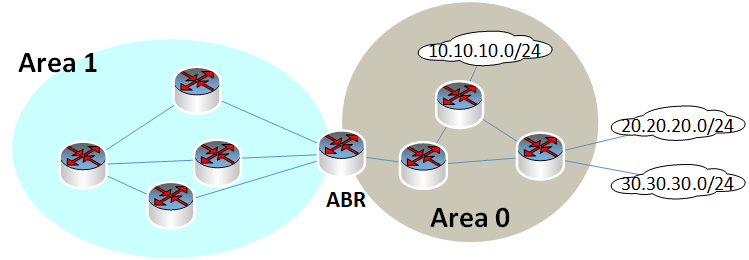
Area 0 has one internal network that it advertises, 10.10.10.0/24. Area 0 is also connected to two non-OSPF domains which contain networks 20.20.20.0/24 and 30.30.30.0/24.
These are networks that may use another routing protocol, such as EIGRP or RIP, or it may use static routing. In either case, these networks are injected, or redistributed into the OSPF area from outside of the OSPF domain.
Now as these networks are advertised within Area 0, the ABR also learns about those networks. Without any additional configuration on the ABR, it will convey those networks to all of the routers found in Area 1. So, if you take a look at the routing table of one of the routers found within Area 1, you may see something like this:
Router#show ip route ospf
O IA 10.10.10.0/24 [110/2] via 192.168.23.2, 00:08:53, FastEthernet0/0
O E2 20.20.20.0/24 [110/20] via 192.168.23.2, 00:08:25, FastEthernet0/0
O E2 30.30.30.0/24 [110/20] via 192.168.23.2, 00:01:16, FastEthernet0/0
Notice that each router will see all three networks within its routing table. One network is considered Inter Area network, indicated by IA, while the other two are shown as external networks, indicated by E2.
The IA route indicates that Type 3 LSAs are advertised by the ABR into Area 1, while the E2 routes indicate that Type 5 LSAs are advertised by the ABR into Area 1.
We won’t go into more detail concerning these types of routes and the LSAs uses. You can find out more about the fundamental operation of OSFP in another article.
The point here is that all routes appear in the routing table. This means that Type 3 and Type 5 LSAs are also advertised into the Area 1, and the Link State Database (LSDB) of each router also includes each of these distinct routes.
The case for stub areas
Stub areas are non-backbone areas that are specially configured to reduce the amount of routing information and overhead within an OSPF network.
In a stub area, external routes, those indicated with the E2 label in the routing table, are not advertised into the area.
Stated in a different way, Type 5 LSAs never enter Area 1. Instead, a default route is used to represent all such external networks, simplifying the routing table and reducing the computational load on routers within the stub area.
If Area 1 in our example above were to be configured as a stub area, then all of the routers within that stub area would have a routing table similar to the following:
R3#show ip route ospf
O IA 10.10.10.0/24 [110/2] via 192.168.23.2, 00:00:42, FastEthernet0/0
O*IA 0.0.0.0/0 [110/2] via 192.168.23.2, 00:00:42, FastEthernet0/0
The result is that all E2 routes are replaced with a default route to the ABR.
This arrangement is more efficient because it helps to keep LSA flooding to a minimum, since no Type 5 LSAs area allowed, it produces a smaller LSDB in each router, it requires fewer SPF calculations, and it also results in smaller routing tables. All of this make stub networks much more streamlined and efficient.
Stub areas defined by LSAs
So far we have explained the result of configuring Area 1 as a stub area. However, the actual definition has a lot to do with LSAs.
In a stub area, no Type 5 LSAs are allowed.
These are the LSAs that contain routes that have been learned from outside of the OSPF domain. In other words, they have been learned from an Autonomous System Border Router (ASBR).
This restriction also means that we cannot have an ASBR within our stub area either. ASBRs generate Type 5 LSAs, and if we attempted to configure an ASBR without our stub area, its advertisements would be dropped.
Configuring a Stub Area
In order to configure an OSPF area as a stub area, you must configure all OSPF routers within that area using the following command:
Router(config)#router ospf 1
Router(config-router)#area 1 stub
That’s it! It’s that simple. However, you have to make sure that you have configured it on all the routers within the area. Otherwise, you will find that the routers will not form OSPF neighbor adjacencies.
Other Stub Types
There are situations in which you may want to allow the use of an ASBR within your stub area, or you may want to restrict both Type 3 and Type 5 LSAs from entering your stub area, thus replacing all routes learned from the ABR with a single default route.
You are able to achieve these configuration parameters by creating different types of stub networks. Other than the “normal” stub area we talked about in this article, there are other types of stubs you can create with OSPF including:
- Totally stub areas
- Not so stubby areas (NSSAs)
- Totally NSSAs
The names are quite peculiar, but they do make sense when you study how they actually behave. These will not be addressed in this article, they are mentioned here simply for completeness.
Conclusion
OSPF stub networks are invaluable for enhancing network efficiency and performance, particularly in complex environments with numerous external networks.
By simplifying routing tables and reducing routing overhead, stub areas optimize the operation of OSPF domains where external routes are rarely needed within the stub area.
This makes them an ideal solution for large-scale networks seeking to maintain high performance and stability.
Related Posts
- What is a Wildcard Mask – All About Wildcard Masks Used in Networking
- What is Cisco FHRP (First Hop Redundancy Protocol) Explained With Diagrams
- Comparison of BGP Confederations vs Route Reflectors
- What are BGP Confederations-Explanation and Discussion (With Cisco Example)
- What is BGP Route Reflector – Explanation and Discussion (with Cisco Example)