Cisco is one of the leading providers of networking solutions, offering a wide set of products and services that allow businesses and organizations to connect, secure, and automate their digital operations.

Cisco provides network hardware, software-defined networks, wireless connectivity solutions, network security systems, and Internet of Things devices. In 2022, Cisco captured 41% stakes of the market in the IT infrastructure segment.
Their solutions are engineered to be highly adaptable, dependable, and secure, making them indispensable for the numerous IT management requirements of small-to-medium enterprises and large corporations.
Installing a Cisco IT infrastructure in your system requires tracking uptime and efficiency, managing configurations, and modifications, strong firewall records, diagnosing bandwidth problems, and more.
A Cisco device monitoring tool is needed to efficiently manage these tasks. In this blog, we’ll explore a reliable Cisco device monitoring solution and its management capabilities.
Overcoming the hassles of Cisco device monitoring and management
IT teams taking care of Cisco devices have the task of moving mountains designated for them. Cisco monitoring involves devices, interfaces, services, and applications across the network stack that need to be discovered and classified.
Once that is taken care of, the next step would be to start monitoring: keeping tabs on the uptime, network performance, device health, and hardware, and ensure that SLA terms are abided by.
Equally important is the responsibility of tracking bandwidth usage, monitoring the performance of critical applications, backing up configurations, keeping logs, detecting rogue actors, and managing network security. This work can be overwhelming and there’s little to no room for error.
The hassle of managing Cisco devices can be attributed to several factors, including:
i) The complexity of Cisco devices
Even in an ideal network infrastructure, multiple network devices mean chaos. Cisco devices, in particular, come with extensive features and configurations in a complex environment that is difficult to monitor and troubleshoot.
ii) Limited dashboard personalization options
Cisco’s native dashboards don’t offer the ability to add more options to the display which is often vital for tracking KPIs. The absence of customization hinders many organizations that require personalization to address their specific monitoring needs.
Relying solely on a vendor’s inadaptable dashboard, that confines an IT team to a sole ecosystem, often poses difficulties for an organization when it needs to integrate multiple data sources or third-party tools.
iii) Ineffective reactive monitoring
Conventional reactive monitoring methods concentrate on informing IT teams when a system fails rather than actively discovering possible problems.This leads to ineffective maintenance of network performance and uptime.
To tackle these obstacles, IT experts frequently resort to external monitoring tools that provide greater versatility and personalization choices. These instruments assist with simplifying network surveillance, boosting visibility, and optimizing the overall IT operations.
Strategies for simplifying Cisco device monitoring
Business networks should maintain a reliable and steady performance to ensure efficient daily operations.
Monitoring and managing your Cisco networks consumes a lot of time owing to their complexity and the typically large number of Cisco devices in use.
To effectively monitor the health, availability, and performance of each Cisco device, you need a Cisco device monitoring tool that provides an integrated approach and comprehensive management of your Cisco environment.
Maintain a reliable Cisco environment using OpManager Plus
There are numerous Cisco devices including ASR series, Catalyst series, Nexus, and UCS, as well as multiple technologies like NetFlow and IP SLA.
With ManageEngine OpManager Plus, you receive uninterrupted support from our dedicated IT support team as well as the ability to monitor key metrics from a single pane of glass directly within our application.
How OpManager Plus maintains a sustainable Cisco network
Cisco devices in the network should be monitored and analyzed periodically to detect any potential issues, and alerts sent to designated IT stakeholders to provide prompt resolutions.
To achieve this, organizations need to have the ability to monitor complex metrics and keep the system afloat. That is exactly what OpManager Plus provides.
OpManager Plus monitors more than 100 performance metrics to help businesses deliver exemplary service to their consumers.
Metrics like CPU utilization, memory utilization, back plane utilization, buffer hits and misses, input and output packet drops, interface collisions, Cyclic Redundancy Check (CRC) errors, interface input and output bits are monitored more consistently via SNMP.
With access to Cisco Management and Information Bases (MIBs), businesses can easily create custom SNMP monitors.

How do you visualize these complex Cisco networks?
Cisco systems are often complex and to simplify it, OpManager Plus provides Network Maps that enables you to visualize the connectivity of each device in the Cisco ecosystem.
A pictorial representation is often helpful. Network maps identify the seed device, the interconnected devices, and their dependencies to ensure they are always up to date. Any changes you make to the network, like adding or removing a device, will be reflected in the maps too.

Why is SNMP monitoring of no use to business critical applications?
Users often report bandwidth issues and SNMP monitoring may not be of much help if businesses need more visibility into them.
Taking on advanced technologies such as NetFlow-based monitoring, organizations can obtain intricate traffic analysis and understand bandwidth utilization patterns across critical applications, users, and devices to determine where the slip has happened.
OpManager Plus does meticulous analysis of the data collected from sources like the Cisco routers, switches, firewall and push it to the NetFlow collector embedded in OpManager where the traffic analysis is carried out and the traffic usage reports on IP address, applications, and ports, etc., are provided.
Apart from this, Cisco also supports multiple technologies like NBAR, CBQoS, IPSLA, and much more along with devices such as WLCs and WAPs. Let’s see how these technologies help businesses in general.
Cisco NBAR monitoring
Network Based Application Recognition (NBAR) monitoring helps end issues with identifying bandwidth usage of applications.
With OpManager Plus NBAR monitoring, you get the reports of the application traffic along with the name of the application, it’s source and destination IP, source, destination port, protocol and the proportion of the application.

Cisco CBQoS monitoring
Cisco Class-Based Quality of Service (CBQoS) monitoring allows you to visualize the traffic in segments. This segmentation is totally class based and is segmented by the class of service and the effectiveness of your QoS policies.
Using OpManager Plus CBQoS monitoring, IT administrators can verify the effectiveness of QoS policies by examining reports on traffic before, after, and during policy implementation, as well as dropped traffic.

Cisco IP SLA monitoring
OpManager Plus utilizes Cisco Internet Protocol (IP) Service level Agreement (SLA) technology to provide continuous, real-time information about your network’s performance by continually monitoring the environment.
The Cisco monitor enables you to assess latency and VoIP connection performance, as well as measure the round trip time between various branches in the WAN. Companies can also track performance metrics such as latency, packet drop, and round-trip time.

Cisco WLC monitoring
Wireless controller traffic can be monitored using the Cisco wireless LAN controller (WLC), drilling down to the top applications, SSIDs, APs, clients, and QoS.
With OpManager Plus for Cisco WLC monitoring, businesses can analyze conversation details to manage bandwidth consumption and protect their wireless local area network from potential threats.

Cisco Meraki monitoring
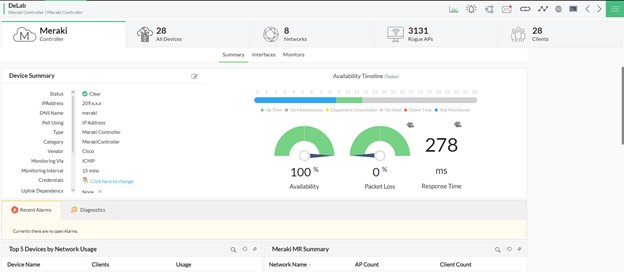
My personal favorite is Cisco Meraki monitoring. Cisco Meraki, being a cloud-based IT management solution, helps you manage, configure, and troubleshoot an entire network from anywhere in the world.
OpManager’s Cisco network monitoring facilitates the discovery and monitoring of Cisco Meraki controllers, encompassing aspects such as their accessibility, condition, productivity, and performance.
Upon enabling Cisco Meraki network monitoring, any irregularities or issues with devices connected to a Cisco Meraki controller can be identified, traced to their underlying causes, and resolved promptly.
How are security threats tackled in a complex Cisco environment?
The Cisco environment includes the use and administration of numerous security measures to safeguard the network and its information.
These measures offer visibility, control, and automation features to assist organizations in identifying and reacting to dangers, ensuring compliance, and preserving the network’s reliability and functionality.
Security devices generate a significant amount of security log data, and with an effective Cisco device monitoring tool like OpManager Plus, you can gather and analyze logs to create security and bandwidth reports.
These reports reveal information about viruses, suspicious activities, and threats that occurred in the network. Moreover, these reports provide insights into who used the bandwidth, their purposes, the protocols they employed, the websites they visited, and their bandwidth consumption in real time.
Here’s how the network security management was carried out by OpManager Plus:
Firewall policy management
The effectiveness of a network’s firewall relies solely on the strength of its policies. OpManager Plus assists by monitoring the policies to reveals any anomalies, and provide recommendations based on the policy criticality and frequency of use. This guidance helps you upgrade firewall policies and strengthen your network security.
Regulatory acts and their compliance
OpManager Plus’s Cisco network monitoring capabilities support a variety of Cisco security devices like PIX, ASA, FWSM, SSM of CSC, SSL WebVPN, SSL VPN Client, VPN Concentrator and IronPort proxy.
The solution also provides firewall compliance reports to fulfill regulatory standards such as PCI DSS, ISO 27001, SANS, NIST, and NERC CIP. Additionally, you can also get your hands on Security Audit & Configuration Analysis Report.
Pictorial representation of network security
Incorporating OpManager Plus can give you a clear picture of your security posture obtained from the firewall logs collected during every security event. You receive instant notifications during every security slip-up.

How do you take control of your network device configuration?
To satisfy the varying needs of a business, IT administrators need to carry out frequent configuration changes in the Cisco management process. And the complexity is enhanced with multiple devices from multiple vendors.
This can be simplified with OpManager Plus. IT administrators can manage the entire process of configuring Cisco devices easily and efficiently.
Here are some of the device configuration features supported by OpManager Plus:
Backup/revert/upload configurations and Instantaneous alerts
OpManager’s Cisco monitoring feature delivers comprehensive control over your network configurations.
It regularly creates backups of your settings, compares them to a reference point, enables you to restore previous configurations as needed, and transmits configurations from its web client. This feature doesn’t necessitate direct access to the devices.
A single fault in the configuration of the devices might cause the entire network to come down. OpManager Plus assists in monitoring the configuration changes applied to their Cisco devices.
If any unsolicited, unapproved configuration change is carried out, the solution triggers an alarm via SMS, chat, or your preferred mode of notification.
The solution makes sure the changes suggested are being carried out after meticulous review and approval.
Compliance management
OpManager’s Cisco monitor assists administrators in establishing and enforcing guidelines. These guidelines can involve specific strings, commands, or values.
The Cisco monitor examines the configuration for compliance with the rules and highlights any discrepancies. OpManager Plus also generates reports on adherence to policies and infractions.
How do you find a workaround to the complex Cisco switch port management?
The problem with complex networks is that you never know which ports have been occupied and which ones are not part of a switch.
OpManager Plus’s Cisco port monitor enables you to discover the devices that are connected to the desired switch ports which helps IT admins determine correct decisions and carry out maintenance efficiently.
Let’s summarize the main points:
OpManager Plus, being a vendor agnostic tool, supports complex technologies like IP SLA monitoring, WLC monitoring, CBQoS monitoring, and others. It aids in delivering a comprehensive Cisco device management experience.
To learn more about ManageEngine OpManager Plus and how the tool improves an IT admin’s day by providing comprehensive support, sign up for a 30-day free trial, or opt for a personalized demo to see if your monitoring needs are met. Get some time to explore the tool to discover how it can benefit your organization.
Author Name: Sandhya Saravanan
About the Author: Sandhya Saravanan is a Product Marketer at ManageEngine. She creates user-friendly content that drives awareness around advanced network monitoring, observability, and AIOps. Beyond work, she’s an art enthusiast and volunteers at a non-governmental organization.
Related Posts
- Beyond SNMP: API-Powered Monitoring for Cisco ACI Fabrics
- 15 Best Network IP Sniffing Software Tools (Free&Paid) – Wired and Wireless
- Automated Compliance for Network Devices using Network Configuration Management
- Beyond the Blips – The Importance of Network Traffic Analysis with the Right Tools
- The Role of Baseline Configuration Management in Network Configuration Management