If you spend sufficient time with any network infrastructure, you’ll understand that things can break at the most inconvenient moments.
A link that was stable for months suddenly flaps. SPF counters increase exponentially for reasons unknown. A small configuration mistake in the access layer echoes somewhere it shouldn’t.
Once you’ve been through a few of these issues, the initial panic gives way to something more grounded: something’s happening here that’s worth figuring out.
That thought sits at the center of failure-mode engineering. Instead of waiting for the next surprise, engineers create the failure conditions in a laboratory and watch what really happens.
It is not about proving a design on a whiteboard. It is about seeing how timers, buffers, interfaces, and silicon behave when pushed to their limits.
Why simulating failures matters
Running controlled break tests reveals things about your network that documentation rarely spells out. Control-plane noise hits different platforms, well, differently. Small faults trigger bigger ones in ways that look obvious only in hindsight.
Certain logs or counters appear long before the problem becomes visible at the edges. After learning from several of these drills, you can shift your dependence from theory to established patterns.
OSPF flap storms
Anyone familiar with the protocol Open Shortest Path First (OSPF) has probably seen it fall apart because an old router device couldn’t keep a neighbor up or a BFD tweak was a little too aggressive.
In a laboratory, the story becomes easier to follow. Build a simple adjacency, inject a little loss, nudge timers the way they’re often tuned in the field, and watch the state machine bounce between INIT, 2WAY, and FULL.
The result? SPF spikes. CPU rises. LSAs start appearing everywhere. A single unstable link can shake more of the network than expected. After you’ve seen this happen once in a controlled setting, future occurrences will seem less mysterious.
BGP session resets
BGP resets usually trace back to something small: an MD5 mismatch, a max-prefix counter that wasn’t adjusted after a new rollout, or a route-map left inconsistent.
Triggering a reset in an isolated environment shows you how long the tear down really takes and how quickly routes settle again. It also makes it clear how dependent some VRFs are on one neighbor behaving correctly.
A graceful restart and a hard drop look disparate when timed side by side. This data matters when you’re diagnosing issues on a live network because they help you separate a normal reset from one that hints at deeper routing drift.
Access-layer loops and STP issues
Loops in a network environment rarely stay local. Just add a triangle of switches or a misplaced port flap, and the whole network starts to wobble.
MAC entries churn. TCNs fire nonstop. Some switch families show noticeable CPU jumps. When you can observe this behavior in testing, loop symptoms become much more identifiable-often manifesting as an unexpected surge of unknown unicast traffic, prolonged forwarding delays, or ports switching in an incorrect order.
Asymmetric routing around firewalls
Firewalls depend on symmetry. Once a return packet comes back on the wrong leg, the firewall may drop it without hesitation.
In a test setup, this becomes obvious. Two exits, a touch of PBR, or a route map designed to create uneven traffic distribution begin to cause noticeable gaps in the session table.
What follows often looks half broken: applications that load one moment and stall the next, tunnels that look fine but act sluggish, and TCP flows that freeze.
After observing this in a controlled setup, the real-world version stands out immediately because the failure pattern is so distinct.
MPLS/VPN route leaks
Route leaks often come down to one incorrect route-target. With several virtual routing and forwarding (VRF) instances, even a tiny mismatch can open doors that were never meant to be connected.
To see it clearly, create a few VRFs, introduce a deliberate RT mistake, and trace where the prefixes wander. The leak path will probably surprise you.
Wireless roaming failures
Roaming trouble hides in overlap zones-places where the signal is fine, but two controllers make decisions the client does not love. A simple walk test helps: Establish two APs on different controllers, add steady pings and a bit of movement. Mobility logs will show you short drops or unexpected reauthorize attempts that would not appear in a static RF survey.
What to watch when things break
The biggest lesson from these exercises is not the failure itself but the order in which hints appear: a neighbor changes state, counters start climbing, queues shift, paths flip, and something subtle triggers something bigger. Once the failure timeline becomes familiar, real incidents require far less guesswork.
How Site24x7 fits into failure-mode engineering
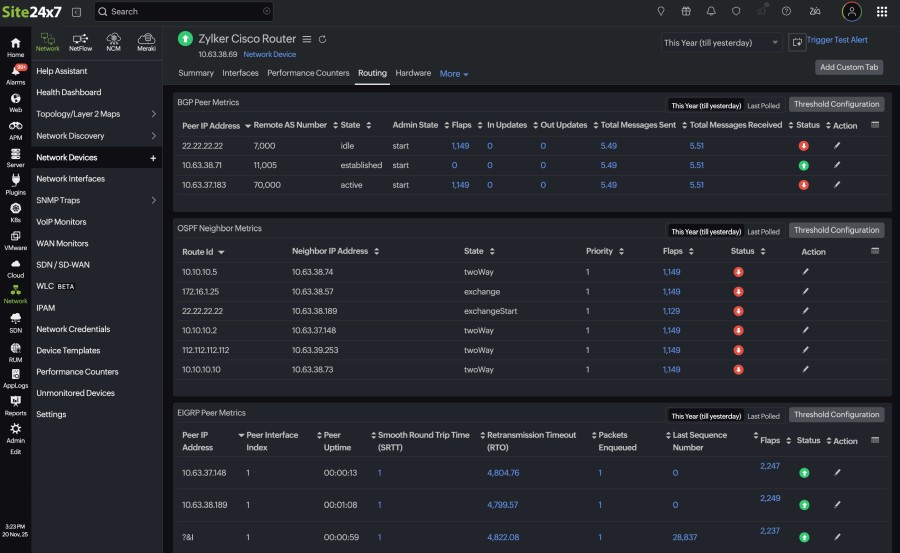
Patterns caught in the laboratory often repeat in production, and monitoring helps make them visible. Site24x7 lines up CPU movement, interface errors, and routing transitions on common timelines, giving you a cleaner view of what happened first.
Device metrics from routers, switches, firewalls, and WLCs helps show the ripple effect across platforms. Templates keep data consistent across Cisco models, and NetFlow highlights asymmetric paths or sudden bursts. Alerts tuned around typical failure signatures reduce the time you’ll spend figuring out what changed.
Final thoughts
Failure-mode engineering turns stressful moments into working knowledge. Once your team has seen how a network behaves under strain, future incidents will feel a lot less chaotic.
Pair that experience with monitoring that shows the same counters and transitions, and you’re in for smoother, steadier troubleshooting. When it comes to failure-mode engineering, the aim is not to chase failures-it’s to understand them sufficiently so that they don’t catch your team off guard.
Related Posts
- What is Cisco Virtual Port Channel (vPC) – Explained and Discussed
- What is a Wildcard Mask – All About Wildcard Masks Used in Networking
- Configuration Drift? Not on our Watch in Networks
- What is Cisco Identity Services Engine (ISE)? Use Cases, How it is Used etc
- A Practical Guide to Understanding DHCP Snooping