Networks Training

  • About
  • My Books
  • IP Tools
  • HOME
  • Cisco Networking
    • Cisco General
    • Cisco IOS
    • Cisco VPN
    • Cisco Wireless
  • Cisco ASA
    • Cisco ASA General
    • Cisco ASA Firewall Configuration
  • Certifications Training
    • CCNA Training
    • Cisco Certifications
    • I.T Training
  • General
    • Tech News
    • General Networking
    • IP Telephony
    • Network Security
    • Product Reviews
    • Software
  • Cisco Routers
  • Cisco Switches
You are here: Home / Cisco Routers / Cisco Router 851 – 871 Interfaces and Basic Configuration Guide Setup

Cisco Router 851 – 871 Interfaces and Basic Configuration Guide Setup

Edited By Harris Andrea

Cisco manufactures routers for all markets, ranging from SOHO up to large service provider models. The Cisco Router 800 series belongs to the lowest SOHO end.

The most popular models in the 800 series are the 850 and 870 broadband access models which come with different types of WAN broadband interfaces (the difference between 850 and 870 is that the 870 models have higher throughput, support 10 VPN tunnels instead of 5 and also support VLANs with the proper IOS version).

The 851 and 871 are equipped with a 10/100 Ethernet WAN interface which means that your ISP should provide you with a broadband modem offering an Ethernet connection towards the customer.

I’m getting a lot of questions about the interfaces of 851/871 routers and how they are arranged. I hope this post will clarify some things. The figure below shows the back panel of Cisco Router 851/871.
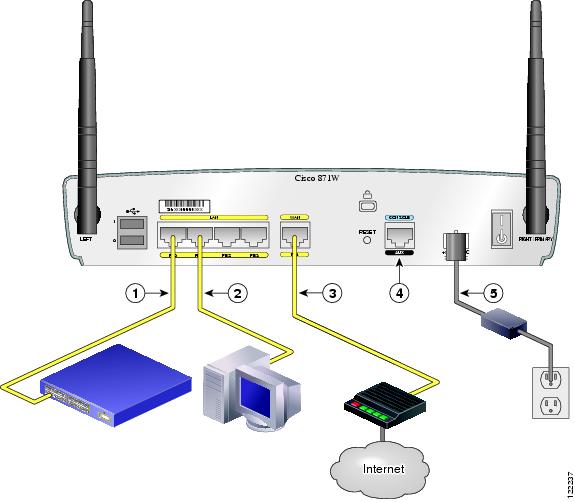
Ports FE0 up to FE3 under the LAN group can be used to connect internal computers or maybe to an internal switch to expand the number of internal ports (see points 1,2 in the figure above).

These ports are actually Layer 2 switch ports, and not regular Layer 3 router ports. They are assigned by default to VLAN 1.

You can create more VLANs and assign each port to a different VLAN (870 series), thus creating extra segmentation for your internal LAN.

You can not configure IP addresses directly to the interface ports. The IP address must be configured on the Interface VLAN 1 (we will see example below).

MORE READING:  Configuring NAT on Cisco Routers Step-by-Step (PAT, Static NAT, Port Redirection)

Port FE4 is the WAN interface which must be connected to the ISP DSL broadband modem (see point 3 in the figure above). This port is a normal Layer 3 router port, which means you can configure IP address directly on the interface port.

Default Configuration for 851 – 871 Router

The Cisco 851 and 871 routers come with some preconfigured parameters (IP addresses etc) which might be in conflict with your current network topology.

What I suggest is to erase the factory’s default startup configuration before you begin configuring your router for the first time.

This allows you to start with a clean state and configure the router with all the features you need and leave off any that you don’t want. Connect with a console cable and after you get a command prompt execute the following:

Router> enable
Router# erase start

After you confirm the command, all the default configuration will be deleted. Power off the router device and then power on again. You will get a prompt as below:

Would you like to enter the initial configuration dialog [yes/no]

Type no and press Enter. This will give you a command prompt (Router>) and you are ready to configure your router from scratch.

Type show run to see the current configuration which looks like the following:

(some output omitted)

interface FastEthernet0
no ip address
shutdown
!
interface FastEthernet1
no ip address
shutdown
!
interface FastEthernet2
no ip address
shutdown
!
interface FastEthernet3
no ip address
shutdown
!
interface FastEthernet4
no ip address
duplex auto
speed auto

MORE READING:  Cisco Show Interface Command on Routers and Switches Explained

interface Vlan1
no ip address

Initial Interface Configuration

From the above output you can see that FE0 up to FE3 are shutdown and also there are no IP addresses configured to any ports.

You need first to enable FE0 to FE4 and then configure IP address under the “interface Vlan 1” and also under the “interface FastEthernet4” port.

Notice that you CAN NOT configure IP addresses under the “interface FastEthernet0” up to “interface FastEthernet3” ports. Those ports are Layer 2 switch ports and will inherit the IP address you assign under “interface Vlan1”.

Example:

Assume that the internal LAN has IP network range 192.168.10.0/24. Also, our ISP has assigned us a static public IP address of  200.200.200.1 . Let’s see the interface configuration below:

Router(config)# interface fastethernet 0
Router(config-int)# no shutdown
Router(config-int)# exit

Router(config)# interface fastethernet 1
Router(config-int)# no shutdown
Router(config-int)# exit

Router(config)# interface fastethernet 2
Router(config-int)# no shutdown
Router(config-int)# exit

Router(config)# interface fastethernet 3
Router(config-int)# no shutdown
Router(config-int)# exit

Router(config)# interface fastethernet 4
Router(config-int)# no shutdown
Router(config-int)# ip address 200.200.200.1 255.255.255.252
Router(config-int)# exit

Router(config)# interface vlan1
Router(config-int)# no shutdown
Router(config-int)# ip address 192.168.10.1 255.255.255.0
Router(config-int)# exit

Notice that we configured IP addresses only to fastethernet 4 and vlan1. By default, interfaces fastethernet 0 to 3 are assigned to VLAN1 so anything you connect to those interfaces (internal LAN hosts) will belong to vlan1 network range 192.168.10.0/24 and they must have as default gateway the address 192.168.10.1.

Spread the love

Related Posts

  • How to Configure Port Forwarding on Cisco Router (With Examples)
  • Redistribution and OSFP – Discussion With Cisco Commands Examples
  • Cisco HSRP States and Troubleshooting (With Commands)
  • Cisco Router Login – GUI Login and How to Secure Your Access
  • Route Filtering and OSPF – Workaround With Distribute List Filtering

Filed Under: Cisco Routers

Download Free Cisco Commands Cheat Sheets

Enter your Email below to Download our Free Cisco Commands Cheat Sheets for Routers, Switches and ASA Firewalls.

By subscribing to our email list you will be receiving technical tutorials and industry news from time-to-time. You can unsubscribe at any time.

About Harris Andrea

Harris Andrea is an Engineer with more than two decades of professional experience in the fields of TCP/IP Networks, Information Security and I.T. Over the years he has acquired several professional certifications such as CCNA, CCNP, CEH, ECSA etc.

He is a self-published author of two books ("Cisco ASA Firewall Fundamentals" and "Cisco VPN Configuration Guide") which are available at Amazon and on this website as well.

Comments

  1. Sid says

    July 6, 2009 at 4:55 am

    Thanks for a nice post.

    I was wondering if you could post a basic configuration for setting up wireless interfaces?

  2. BlogAdmin says

    July 6, 2009 at 3:43 pm

    Here is a quick Wlan configuration for a Cisco 851w or 871w routers. We will use a Wlan in the same VLAN as the internal LAN (i.e the native VLAN 1) which has address subnet of 192.168.1.0/24:
    ————————————————————————-
    bridge irb
    bridge 1
    bridge 1 protocol ieee
    bridge 1 route ip
    !
    interface Dot11Radio0
    no ip address
    !
    broadcast-key vlan 1 change 45
    !
    !
    encryption vlan 1 mode ciphers tkip
    !
    ssid myhomessid
    vlan 1
    authentication open
    wpa-psk ascii 0 somestrongkey
    authentication key-management wpa
    !
    speed basic-1.0 basic-2.0 basic-5.5 6.0 9.0 basic-11.0 12.0 18.0 24.0 36.0 48.0 54.0
    rts threshold 2312
    power local cck 50
    power local ofdm 30
    channel 2462
    station-role root
    !

    interface Dot11Radio0.1
    description My Home WLAN
    encapsulation dot1Q 1 native
    no cdp enable
    bridge-group 1
    bridge-group 1 subscriber-loop-control
    bridge-group 1 spanning-disabled
    bridge-group 1 block-unknown-source
    no bridge-group 1 source-learning
    no bridge-group 1 unicast-flooding

    !
    interface Vlan1
    no ip address
    bridge-group 1
    bridge-group 1 spanning-disabled

    interface BVI1
    ip address 192.168.1.254 255.255.255.0
    ———————————————————————————

    If you have Windows XP or Vista, you need to configure your wireless card for WPA-PSK (Network Authentication) and TKIP (Data Encryption)

  3. vytrmn says

    August 11, 2009 at 2:56 pm

    I have tried to configure my 851w wlan interface with the configuration you’ve pasted, but after assigning vlan1 to bridge group, the computers connected to ethernet ports looses connectivity. Still it does not start to broadcast a radio signal.. I need it to use the vlan 1 ip adressess. My vlan1 belongs to 192.168.1.0/24 network as in an example above, and I use IOS version 12.4(11)T1.
    Could you please advice or write a guide about setting wireless on these routers?

  4. BlogAdmin says

    August 12, 2009 at 1:48 am

    Hello there,

    Check the configuration again as I added some commands that were not shown before (they were the default in my version of IOS so the show run command did not show them).

    Hope its fixed now. Also, note that on your windows wireless client you should configure WPA-PSK (Network Authentication) and TKIP (Data Encryption)

  5. Repcsi says

    August 27, 2009 at 8:07 pm

    Hi,

    Tried your config, but it wasn’t working for me…
    power local cck and power local ofdm can only be set up with maximum on my router, the are no numbers anywhere near 50 and 30.
    And I think you should use no shutdown on dot11radio, because after the config it was shut down.

    Cisco IOS Software, C850 Software (C850-ADVSECURITYK9-M), Version 12.4(15)T5, RELEASE SOFTWARE (fc4)

    It’s very funny that configuring a Wlan needs so much work…

  6. Repcsi says

    August 27, 2009 at 8:24 pm

    Ok, now it’s working, as a side not there is no ssid broadcasting, so you have to set it up manually on your computer to connect anyway. My router works now as an AP, thanks man! ;) On of these I will try to get it working with wpa2-psk(AES) and wpa2-ent(EAP). Shouldn’t be so hard ;O.

  7. Repcsi says

    August 27, 2009 at 8:26 pm

    Sorry for the typos, One of these days I will try to get it working :). It’s 2:30 AM here btw, night! :)

  8. BlogAdmin says

    August 28, 2009 at 1:09 am

    Hello Repcsi,

    The “power local cck” and “power local ofdm” values depend on the power levels allowed in your regulatory domain (different values between USA and Europe for example), so this is the reason that IOS does not allow you to configure different values (maybe you are in USA wireless regulatory domain).

  9. BlogAdmin says

    August 28, 2009 at 1:11 am

    I’m glad you made it work. Yes, configuring a Cisco wireless router its kind of a pain !!

    Cheers

  10. Repcsi says

    August 28, 2009 at 11:14 pm

    Hello there,

    I managed to make change it to AES with SSID broadcast(WPA2-Personal setup), for those who don’t know you have to add to the ssid the “guest-mode” option, and just change the “encryption vlan 1 mode ciphers tkip” to “encryption vlan 1 mode ciphers aes-ccm” (you just have to type in the latter in conf mode) it’s better to change it, than using the “no ” command then you have to enter the key again.

    Thanks for checking back(yeah country regulations make sense I know we can’t use 2 channels here in europe and there are other differencies).
    I would like to ask for your advice. I’m preparing for my ccna exam, after that (if I can make it ;|), which exams should I take to get on the track of the ASA-s? I’m configuring ASA 5505 devices for about a year now, but I have to use ASDM for advanced configuration, and however I had so many troubleshootings with VPN that usually I know how to check the crypto acls, nat exemptions etc, but I would like to know all the other stuff.

    Cisco ASA Specialist should work for me?

    As far as I know I need the following exams:
    640-802 CCNA
    640-553 IINS Implementing Cisco IOS Network Security (IINS)
    642-524 SNAF * Securing Networks with ASA Foundation (SNAF)

    Thanks in advance for you help!

    PS: On my router the cck and ofdm values are not present in the startup-config after saving the config, maybe its on max by default?

  11. BlogAdmin says

    August 29, 2009 at 9:46 am

    Hello Repcsi,

    Thanks for your feedback regarding AES configuration for wireless.
    To become a Cisco ASA specialist you need to have the following:

    CCNA Security (640-553 IINS) This requires also to have the normal CCNA
    Securing Networks with ASA Foundation (642-524 SNAF)
    Securing Networks with ASA Advanced (642-515 SNAA)

  12. Repcsi says

    September 10, 2009 at 1:26 pm

    Thank you,

    I passed my exam \o/, so I can think about another :).

  13. Mario says

    April 12, 2010 at 8:55 pm

    I’m trying to configure my 871 using Cisco SDM but it keeps saying “wrong IP” or “HPPT/HTTPS not enabled”. But I have configured an IP for FE4 (no IP on Vlan1 though) and I see “ip http server” in the configuration.

    What’s wrong?
    Is there a way to also make FE4 pickup an ISP assigned IP (dhcp client)???

  14. Mario says

    April 12, 2010 at 8:58 pm

    I just figured it out (the no http).
    there was an “access-list”. I removed it and it worked.

  15. Ivan Versluis says

    October 23, 2010 at 6:08 pm

    Thank you for posting the WLAN configuration. I am configuring a Cisco 851W. I tried to use the http interface but soon figured out I need to go on the telnet interface. I had issues configuring the BVI interface and DHCP requests. I found out that the default VLAN1 assigned IP address give me the problems.

    After getting BVI and SSID network running, I configured dhcp pool and nat. Everything worked fine now ;-) but when connecting a network cable to Fa0-Fa0/3 no DHCP address was given. Even when configuring a manual IP address I was not able to communicate to BVI1 interface.

    While reading this post I found my solution. The bridge group was not set.

    interface Vlan1
    no ip address
    ip tcp adjust-mss 1452
    bridge-group 1
    bridge-group 1 spanning-disabled
    !
    interface BVI1
    ip address 192.168.142.1 255.255.255.0
    ip nat inside
    ip virtual-reassembly
    !

    http://www.networknet.nl/apps/wp/archives/1035 for my own post about this issue I had.

  16. andis says

    December 2, 2010 at 9:12 pm

    hello,

    with only that configuration its ok ? we dont need to configure NAT or static route to be able our PCs in the LAN to have access to the internet?

    thank you

  17. Blog Admin says

    December 3, 2010 at 9:28 am

    Andis,

    The above configuration is just a snapshot of what is needed. Yes, ofcourse you need NAT (“ip nat inside” and “ip nat outside” on Vlan 1 and Fastethernet4 respectively) and also default route in order to access the Internet.

  18. Subhadip says

    December 4, 2010 at 4:22 am

    I had dhcp server in my lan network.i want to intoduce the cisco-871 router without configure local dhcp server.what will be the configuration for dhcp in the 871 rtr such that laptop take the ip from my existing dhcp server

  19. Blog Admin says

    December 4, 2010 at 10:55 am

    Subhadip,

    So you need to configure DHCP server on 871. Here is the general config:

    ip dhcp excluded-address 10.10.0.254
    !
    ip dhcp pool internalpool
    import all
    network 10.10.0.0 255.255.255.0
    default-router 10.10.0.254
    dns-server 192.168.35.2

  20. khaled sayeed says

    January 29, 2011 at 11:55 am

    hi sir,i want to connect a laptop at fa0 of one 851 cisco router and another laptop to other 851 cisco router,using the below information for 1st router.
    ip 10.172.1.2 laptop1
    ip router1 10.172.1.1

    2nd router
    ip 10.172.2.2 laptop2
    ip router 10.172.2.1

    fa4 wan interface ip between the 2 routers
    router1 wan interface ip 10.172.3.2
    router2 wan interface ip 10.172.3.1
    i have a task it is just a lab practise,i tried but came to know we cannot assign ip to the fa0-fa3 ports.and also i want rip2 to be configured on it,plz could you tell me the configuration.the main target is to make the laptops communicate as they r in diff networks.thanks

  21. khaled sayeed says

    January 29, 2011 at 12:20 pm

    sir i would also like to ask can v create more vlan on cisco 851 router,or is it only cisco router 870 can create more vlans.could i not create another vlan and connect one laptop to one vlan and other to other vlan and make them ping.plz do tell me in this regards also.
    thanks sir

  22. Blog Admin says

    January 29, 2011 at 12:23 pm

    You can not configure an IP address directly to interfaces fa0 up to fa3. Instead, you configure an IP address to “interface vlan 1” which is the internal lan network. The laptop should be connected to one port fa0 up to fa3.

    So, for first router:

    Router1(config)# interface fastethernet 4
    Router1(config-int)# no shutdown
    Router1(config-int)# ip address 10.172.3.2 255.255.255.0
    Router1(config-int)# exit
    Router1(config)# interface vlan1
    Router1(config-int)# no shutdown
    Router1(config-int)# ip address 10.172.1.1 255.255.255.0
    Router1(config-int)# exit

  23. khaled says

    January 29, 2011 at 1:43 pm

    sir how to assign more than one ip to vlan or a WAN interface is that possible

  24. khaled sayeed says

    January 30, 2011 at 5:50 am

    thanks sir,can v assign more than one IP to the WAN interface of the cisco 851 router,if yes how and if not then can v actually assign multiple IPs to the interface in other cisco router.

  25. Blog Admin says

    February 2, 2011 at 6:02 am

    why do you need multiple addresses? you can assign two address with the “secondary” keyword at the end.

  26. Jaspreet says

    February 11, 2011 at 7:04 am

    Hi,

    I am trying to configure 4 wire shdsl. The line data comes up but the data is not getting through. Please can help.
    Also I have checked 2wire shdsl, it is working fine.

  27. mario says

    February 13, 2011 at 2:46 pm

    im studying for my ccent and then my ccna and need to buy a router for home, i looked on ebay – there are a lot of 800 series and a lot of models-will it matter which model i get and will this 800 series be sufficient for what i need it thanks-

  28. mario says

    February 13, 2011 at 2:48 pm

    also what cheap switch would be adequate for me to practice with –

  29. mario says

    February 13, 2011 at 2:51 pm

    basically on ebay its mostly 820 and 830 models for sale -will that be good enough to carry me through as i cant afford to buy more things later-i wanna start correctly from the beginning-thanks

  30. zahir ahmed says

    February 17, 2011 at 3:32 pm

    Hi, I understand that you can only configure an IP address on port4 and the vlan interfaces of the 800 series router. However, my question is this:

    If this is the case, i assume that any HSRP configuration from the internal LAN can only be configured on the VLAN interfaces?

    I am thinking of purchasing two of thes routers; one connected to my WAN link (Rj45 presentation) and the other to sit before my ASA 5505. I want to run HSRP from the LAN side so that if the WAN interface on router1 fails, my traffic goes to the second 800 series which in turn will send traffic to the ASA so that it can create a VPN tunnel back to HQ.

    Is this possible?

    Thanks

  31. Blog Admin says

    February 18, 2011 at 5:53 am

    The hsrp must be running on the vlan interfaces and the internal interfaces of 800 routers must be connected on the same Layer2 switch. I’m not sure however if 800 series support HSRP.

  32. Usm says

    April 18, 2011 at 5:28 pm

    Dear Sir,

    I have Subnet of 8 Live IPs from my ISP as well as I am having Cisco Router 871.
    I want to assign one Live IP on Router’s WAN Interface (Fa 4) & 2nd Live IP on Firewall Outside Interface (Which will be connected to Rotuer’s Switch Interface from Fa0 – 3),
    I want to do NAT from Firewall itself as well as want to use Switch ports without NAT.

    Thanks in advance for your support

  33. Blog Admin says

    April 19, 2011 at 7:14 pm

    You can not do what you describe above. The router’s WAN interface and firewall’s outside interface must be in different subnets

  34. Dave Mooe says

    May 2, 2011 at 12:54 pm

    Does anyone have a configuration for an 881 connecting to an ASA via crypto ipsec cleint ezvpn?

    I would like to have home user that do not have a static IP address be able to connect these router up and have an IPSec tunnel back to the home office.

    Any working config would be most helpful!

    Dave

  35. Mohammad Rivai says

    June 15, 2011 at 11:09 am

    Thank a lot for your tutorial, my router 881 it working..

  36. sazi says

    March 2, 2012 at 9:30 am

    thank you for lot of information

  37. wendell says

    April 20, 2012 at 1:09 am

    hi, this is very informative..

    Router1(config)# interface fastethernet 4
    Router1(config-int)# no shutdown
    Router1(config-int)# ip address 61.8.xx.xx 255.255.255.xxx – WAN
    Router1(config-int)# exit
    Router1(config)# interface vlan1
    Router1(config-int)# no shutdown
    Router1(config-int)# ip address 111.123.xx.xx 255.255.255.xxx – LAN
    Router1(config-int)# exit

    we are using all 13 public ip addresses on the Vlan1, is there a way i can add something private like 192.168.1.1 to extend my LAN, inter Vlan perhaps? thanks

  38. popoymaster says

    April 20, 2012 at 4:40 am

    i successfully made the config for the intervlan, but i a m having issue with the vlan Up/down whenever nothing is connected to the device.. unable to telnet.

  39. Blog Admin says

    April 21, 2012 at 12:15 pm

    Yes you can create a second vlan (maybe vlan 2 for example) on internal interfaces and assign a new network subnet to this new vlan.

  40. Shawn says

    September 11, 2012 at 3:49 am

    Hello, I have a cisco router 861w setup with some vlans on a stick and one other interface
    I am trying to get all the vlans on the stick to be able to communicate with pcs attached to this additional interface. Here is the setup:

    Int Vlan1- Additional interface with ip address 111.111.111.1 subnet 255.255.255.0 (cannot ping beyond this interface)

    Int Fa4- Wan interface

    Int Fa4.10- vlan 4.10 ip address 100.100.100.1 subnet 255.255.255.0

    Int Fa4.20- vlan 4.20 ip address 200.200.200.1 subnet 255.255.255.0

    Int Vlan1 is the gateway to a separate network

    Int fa4.10 and fa4.20 get internet from fa4 via nat

    I can ping pc’s on fa4.20 vlan from pc’s on fa4.10 vlan no problem and vice versa.

    I can even ping the gateway of Int vlan1 from both vlans but I cannot get anything beyond the gateway.

    Maybe this is a simple fix but I am not getting it.

    This is what I have added so far for routes:
    Ip route 111.111.111.0 255.255.255.0 vlan1 255 permanent

    Should I try something else. Thank you for your help.

  41. Blog Admin says

    September 11, 2012 at 4:51 pm

    Shawn,

    First of all you don’t need the static route that you have configured. The router knows about this route already because the network 111.111.111.0 is directly attached to one of its interfaces (vlan1).

    Please attach the whole configuration to take a look.

    Harris

  42. Shawn says

    September 11, 2012 at 9:01 pm

    Harris, thank you for responding. Here is my run. I edited it for security:

    Router#sh run
    Building configuration…

    Current configuration : 12809 bytes
    !
    ! Last configuration change at 14:06:30 UTC Sat Jan 14 2006 by (Me)
    !
    version 15.0
    no service pad
    service timestamps debug datetime msec
    service timestamps log datetime msec
    no service password-encryption
    !
    hostname (My Router)
    !
    boot-start-marker
    boot-end-marker
    !
    logging buffered 51200 warnings
    enable secret (edited for security)
    !
    no aaa new-model
    memory-size iomem 10
    !
    crypto pki trustpoint TP-self-signed-(edited for security)
    enrollment selfsigned
    subject-name cn=IOS-Self-Signed-Certificate-(edited for security)
    revocation-check none
    rsakeypair TP-self-signed-(edited for security)
    !
    !
    crypto pki certificate chain TP-self-signed-(edited for security)
    quit
    ip source-route
    !
    !
    ip dhcp excluded-address 10.10.10.1
    ip dhcp excluded-address 100.100.100.1 100.100.100.50
    ip dhcp excluded-address 200.200.200.1 200.200.200.50
    ip dhcp excluded-address 122.122.122.1 122.122.122.50
    ip dhcp excluded-address 123.123.123.1 123.123.123.50
    ip dhcp excluded-address 124.124.124.1 124.124.124.50
    ip dhcp excluded-address 125.125.125.1 125.125.125.50
    ip dhcp excluded-address 126.126.126.1 126.126.126.50
    ip dhcp excluded-address 127.127.127.1 127.127.127.50
    ip dhcp excluded-address 111.111.111.1
    !
    ip dhcp pool ccp-pool
    import all
    network 10.10.10.0 255.255.255.248
    default-router 10.10.10.1
    dns-server 65.32.1.65 65.32.1.70
    lease 0 2
    !
    ip dhcp pool MAIN
    import all
    network 100.100.100.0 255.255.255.0
    default-router 100.100.100.1
    domain-name mynetwork.com
    dns-server 65.32.1.65 65.32.1.70
    !
    ip dhcp pool FNI
    import all
    network 200.200.200.0 255.255.255.0
    default-router 200.200.200.1
    dns-server 65.32.1.65 65.32.1.70
    domain-name mynetwork.com
    !
    ip dhcp pool NEW
    import all
    network 123.123.123.0 255.255.255.0
    default-router 122.122.122.1
    dns-server 65.32.1.65 65.32.1.70
    domain-name mynetwork.com
    !
    ip dhcp pool USED
    import all
    network 124.124.124.0 255.255.255.0
    default-router 123.123.123.1
    domain-name mynetwork.com
    dns-server 65.32.1.65 65.32.1.70
    !
    ip dhcp pool PARTS
    import all
    network 125.125.125.0 255.255.255.0
    default-router 124.124.124.1
    dns-server 65.32.1.65 65.32.1.70
    domain-name mynetwork.com
    !
    ip dhcp pool BODY
    import all
    network 126.126.126.0 255.255.255.0
    default-router 125.125.125.1
    domain-name mynetwork.com
    dns-server 65.32.1.65 65.32.1.70
    !
    ip dhcp pool SERVICE
    import all
    network 127.127.127.0 255.255.255.0
    default-router 126.126.126.1
    dns-server 65.32.1.65 65.32.1.70
    domain-name mynetwork.com
    !
    ip dhcp pool PRINT
    import all
    network 127.127.127.0 255.255.255.0
    default-router 127.127.127.1
    domain-name mynetwork.com
    dns-server 65.32.1.65 65.32.1.70
    !
    ip dhcp pool ADP-IF
    import all
    network 111.111.111.0 255.255.255.0
    default-router 111.111.111.126
    domain-name mynetwork.com
    dns-server 65.32.1.65 65.32.1.70
    !
    !
    ip cef
    ip domain name mynetwork.com
    ip name-server 65.32.1.65
    ip name-server 65.32.1.70
    !
    !
    license udi pid (edited for security)
    !
    !
    username (edited for security)
    !
    !
    !
    !
    !
    !
    !
    !
    !
    interface FastEthernet0
    !
    interface FastEthernet1
    !
    interface FastEthernet2
    switchport access vlan 10
    !
    interface FastEthernet3
    !
    interface FastEthernet4
    description $ES_WAN$
    ip address 11.22.33.44 255.255.255.0
    no ip redirects
    no ip unreachables
    no ip proxy-arp
    ip flow ingress
    ip nat outside
    ip virtual-reassembly
    duplex auto
    speed auto
    !
    interface FastEthernet4.10
    description MAIN
    encapsulation dot1Q 10
    ip address 100.100.100.1 255.255.255.0
    no ip redirects
    no ip unreachables
    no ip proxy-arp
    ip flow ingress
    ip nat inside
    ip virtual-reassembly
    ip tcp adjust-mss 1452
    no cdp enable
    !
    interface FastEthernet4.20
    description FNI
    encapsulation dot1Q 20
    ip address 200.200.200.1 255.255.255.0
    no ip redirects
    no ip unreachables
    no ip proxy-arp
    ip flow ingress
    ip nat inside
    ip virtual-reassembly
    ip tcp adjust-mss 1452
    no cdp enable
    !
    interface FastEthernet4.30
    description NEW
    encapsulation dot1Q 30
    ip address 122.122.122.1 255.255.255.0
    no ip redirects
    no ip unreachables
    no ip proxy-arp
    ip flow ingress
    ip nat inside
    ip virtual-reassembly
    ip tcp adjust-mss 1452
    no cdp enable
    !
    interface FastEthernet4.40
    description USED
    encapsulation dot1Q 40
    ip address 123.123.123.1 255.255.255.0
    no ip redirects
    no ip unreachables
    no ip proxy-arp
    ip flow ingress
    ip nat inside
    ip virtual-reassembly
    ip tcp adjust-mss 1452
    no cdp enable
    !
    interface FastEthernet4.50
    description PARTS
    encapsulation dot1Q 50
    ip address 124.124.124.1 255.255.255.0
    no ip redirects
    no ip unreachables
    no ip proxy-arp
    ip flow ingress
    ip nat inside
    ip virtual-reassembly
    ip tcp adjust-mss 1452
    no cdp enable
    !
    interface FastEthernet4.60
    description BODY
    encapsulation dot1Q 60
    ip address 125.125.125.1 255.255.255.0
    no ip redirects
    no ip unreachables
    no ip proxy-arp
    ip flow ingress
    ip nat inside
    ip virtual-reassembly
    ip tcp adjust-mss 1452
    no cdp enable
    !
    interface FastEthernet4.70
    description SERVICE
    encapsulation dot1Q 70
    ip address 126.126.126.1 255.255.255.0
    no ip redirects
    no ip unreachables
    no ip proxy-arp
    ip flow ingress
    ip nat inside
    ip virtual-reassembly
    ip tcp adjust-mss 1452
    no cdp enable
    !
    interface FastEthernet4.80
    description PRINT
    encapsulation dot1Q 80
    ip address 127.127.127.1 255.255.255.0
    no ip redirects
    no ip unreachables
    no ip proxy-arp
    ip flow ingress
    ip nat inside
    ip virtual-reassembly
    ip tcp adjust-mss 1452
    no cdp enable
    !
    interface FastEthernet4.90
    description ADP
    encapsulation dot1Q 90
    no ip redirects
    no ip unreachables
    no ip proxy-arp
    ip flow ingress
    ip nat inside
    ip virtual-reassembly
    ip tcp adjust-mss 1452
    no cdp enable
    !
    interface wlan-ap0
    description Service module interface to manage the embedded AP
    ip unnumbered Vlan1
    arp timeout 0
    !
    interface Wlan-GigabitEthernet0
    description Internal switch interface connecting to the embedded AP
    !
    interface Vlan1
    description $ETH-SW-LAUNCH$$INTF-INFO-HWIC 4ESW$$ES_LAN$
    ip address 111.111.111.1 255.255.255.0
    no ip redirects
    no ip unreachables
    no ip proxy-arp
    ip flow ingress
    ip nat inside
    ip virtual-reassembly
    ip tcp adjust-mss 1452
    !
    interface Vlan10
    description ADP-IF
    no ip address
    no ip redirects
    no ip unreachables
    no ip proxy-arp
    ip flow ingress
    ip flow egress
    ip nat outside
    ip virtual-reassembly
    ip tcp adjust-mss 1452
    shutdown
    !
    router rip
    network 200.200.200.0
    network 127.127.127.0
    network 100.100.100.0
    network 111.111.111.0
    network 123.123.123.0
    network 124.124.124.0
    network 125.125.125.0
    network 126.126.126.0
    network 127.127.127.0
    !
    ip forward-protocol nd
    ip http server
    ip http authentication local
    ip http secure-server
    ip http timeout-policy idle 60 life 86400 requests 10000
    !
    ip nat pool ADP-IF 124.124.124.0 124.124.124.0 netmask 255.255.255.0
    ip nat inside source list 1 interface FastEthernet4 overload
    ip nat inside source list 2 interface FastEthernet4 overload
    ip nat inside source list 3 interface FastEthernet4 overload
    ip nat inside source list 4 interface FastEthernet4 overload
    ip nat inside source list 5 interface FastEthernet4 overload
    ip nat inside source list 6 interface FastEthernet4 overload
    ip nat inside source list 7 interface FastEthernet4 overload
    ip nat inside source list 8 interface FastEthernet4 overload
    ip nat inside source list 9 interface FastEthernet4 overload
    ip nat inside source route-map 40_TO_ADP interface Vlan10 overload
    ip nat outside source list 91 interface FastEthernet4.10
    ip nat outside source list 92 interface FastEthernet4.20
    ip nat outside source list 93 interface FastEthernet4.30
    ip nat outside source list 94 interface FastEthernet4.40
    ip nat outside source list 95 interface FastEthernet4.50
    ip nat outside source list 96 interface FastEthernet4.60
    ip nat outside source list 97 interface FastEthernet4.70
    ip nat outside source list 98 interface FastEthernet4.80
    no ip route static inter-vrf
    ip route 0.0.0.0 0.0.0.0 11.22.33.121
    ip route 111.93.14.0 255.255.255.0 111.111.111.126
    !
    access-list 1 remark INSIDE_IF=Vlan1
    access-list 1 remark CCP_ACL Category=2
    access-list 1 permit 10.10.10.0 0.0.0.7
    access-list 1 remark INSIDE_IF=Vlan1
    access-list 1 remark CCP_ACL Category=2
    access-list 1 permit 111.111.111.0 0.0.0.128
    access-list 2 remark INSIDE_IF=FE4.10
    access-list 2 remark MAIN Category=2
    access-list 2 permit 100.100.100.0 0.0.0.255
    access-list 3 remark INSIDE_IF=FE4.20
    access-list 3 remark FNI Category=2
    access-list 3 permit 200.200.200.0 0.0.0.255
    access-list 4 remark INSIDE_IF=FE4.30
    access-list 4 remark NEW Category=2
    access-list 4 permit 123.123.123.0 0.0.0.255
    access-list 5 remark INSIDE_IF=FE4.40
    access-list 5 remark USED Category=2
    access-list 5 permit 124.124.124.0 0.0.0.255
    access-list 6 remark INSIDE_IF=FE4.50
    access-list 6 remark PARTS Category=2
    access-list 6 permit 125.125.125.0 0.0.0.255
    access-list 7 remark INSIDE_IF=FE4.60
    access-list 7 remark BODY Category=2
    access-list 7 permit 126.126.126.0 0.0.0.255
    access-list 8 remark INSIDE_IF=FE4.70
    access-list 8 remark SERVICE Category=2
    access-list 8 permit 127.127.127.0 0.0.0.255
    access-list 9 remark INSIDE_IF=FE4.80
    access-list 9 remark PRINT Category=2
    access-list 9 permit 127.127.127.0 0.0.0.255
    access-list 15 permit 0.0.0.0 255.255.255.0
    access-list 15 permit 124.124.124.0 0.0.0.255
    access-list 91 remark OUTSIDE_IF=VLAN10
    access-list 91 remark ADP-IF Category=2
    access-list 91 permit 111.111.111.0 0.0.0.128
    access-list 92 remark OUTSIDE_IF=VLAN10
    access-list 92 remark ADP-IF Category=2
    access-list 92 permit 111.111.111.0 0.0.0.128
    access-list 93 remark OUTSIDE_IF=VLAN10
    access-list 93 remark ADP-IF Category=2
    access-list 93 permit 111.111.111.0 0.0.0.128
    access-list 95 remark OUTSIDE_IF=VLAN10
    access-list 95 remark ADP-IF Category=2
    access-list 95 permit 111.111.111.0 0.0.0.128
    access-list 96 remark OUTSIDE_IF=VLAN10
    access-list 96 remark ADP-IF Category=2
    access-list 96 permit 111.111.111.0 0.0.0.128
    access-list 97 remark OUTSIDE_IF=VLAN10
    access-list 97 remark ADP-IF Category=2
    access-list 97 permit 111.111.111.0 0.0.0.128
    access-list 98 remark OUTSIDE_IF=VLAN10
    access-list 98 remark ADP-IF Category=2
    access-list 98 permit 111.111.111.0 0.0.0.128
    no cdp run

    !
    control-plane
    !
    banner exec ^C
    % Password expiration warning.
    ———————————————————————–

    Cisco Configuration Professional (Cisco CP) is installed on this device
    and it provides the default username “cisco” for one-time use. If you have
    already used the username “cisco” to login to the router and your IOS image
    supports the “one-time” user option, then this username has already expired.
    You will not be able to login to the router with this username after you exit
    this session.

    It is strongly suggested that you create a new username with a privilege leve
    of 15 using the following command.

    username privilege 15 secret 0

    Replace and with the username and password you
    want to use.

    ———————————————————————–
    ^C
    banner login ^CAuthorized access only!
    Disconnect IMMEDIATELY if you are not an authorized user!^C
    !
    line con 0
    login local
    no modem enable
    line aux 0
    line 2
    no activation-character
    no exec
    transport preferred none
    transport input all
    line vty 0 4
    privilege level 15
    login local
    transport input telnet ssh
    !
    scheduler max-task-time 5000
    end

  43. Blog Admin says

    September 13, 2012 at 1:40 pm

    Where do you connect the PC that belongs to Vlan1? It should be on port fasteth0, fasteth1 or fasteth3.

    Try to do another test. Create interface vlan2 and insert interface fasteth0 into vlan2. Then put ip 111.111.111.1 in int vlan2

  44. Shawn says

    September 15, 2012 at 2:41 am

    Harris,
    I figured out why I could not ping the other pc’s attached to int vlan1. They can be pinged when you attach all of them to your router as the gateway:) Here is the dilemna, I am attaching my router to the existing network using vlan1 as the gateway to that network. All the pc’s on that network are connected to their gateway router which is at ip 111.111.111.126. So what was happening was, I pinged a pc on that network (ex. 111.111.111.3) and the traffic went to my router looking for that IP and no dice because my router was not the default gateway on that pc. I changed the default gw on the pc to my router and voila I got it. YOu may ask why on earth I am doing this…it is becuase I am creating a separate wan gateway for my users to get around the slow network their former provided built for them. They still need to use some resources on that network and that is why I am using vlan1 as the gateway back to that network. I figured out the issue above but now I cannot get the vlans on the sub interfaces to route to the other router. This is the setup I have for the routing:

    ip route 111.93.0.0 255.255.0.0 111.111.111.126 255

    I try to ping 111.111.111.126 from pc’s on the other interfaces such as int fa4.10 (100.100.100.0 network) and int fa4.20 (200.200.200.1 network) and I get no response. I am still able to ping the gateway for int vlan1 (111.111.111.1) from these other vlans but not past it. I even tried to ping the pc on the route i created just for giggles and of course no dice. What key aspect am I missing here. I also forgot to mention that this router they have is a pix router and i suspect it may be dropping the other subnet traffic. I tried applying a nat config to vlan1 but still nothing.

  45. Shawn says

    September 15, 2012 at 2:46 am

    correction to statement above…

    I can ping the gateway to vlan1 (111.111.111.1) and other pc’s who I have changed to have my router as their gateway (such as 111.111.111.3, 111.111.111.4, etc.) For some reason I CANNOT ping the other router (111.111.111.126). Thank you for your help.

  46. Shawn says

    September 15, 2012 at 3:57 am

    I also suspect this is a big repeat of what was going on before. I suspect that router needs to be configured to know about my router also just like the gateway issue. What are your thoughts?

  47. Shawn says

    September 15, 2012 at 8:09 pm

    This is a test. I believe some of my posts are getting cut out.

  48. Shawn says

    September 15, 2012 at 8:11 pm

    It is interesting that after I posted the last post, my postings popped up. I guess it is okay since I believe you can see my post.

  49. Blog Admin says

    September 16, 2012 at 10:31 am

    Shawn,

    I believe the problem is that router 111.111.111.126 does not know how to reach networks 100.100.100.0 etc. You must configure a static route on gateway router .126 as following:

    ip route 100.100.100.0 255.255.255.0 111.111.111.1
    ip route 200.200.200.0 255.255.255.0 111.111.111.1

    The above static route must be configured on router with IP 111.111.111.126

    Harris

  50. Shawn says

    September 16, 2012 at 10:02 pm

    Thank you Harris. That is what I was afraid of. The problem is that this company is going to charge my clients an arm and a let to do any config on that router for them. I do not have the log in for that router which is understandable, they want to make sure they maintain their equipment (and their profit). I was doing some research and I wonder if I can create my own routing connection between these two using a cheap linksys router with routing capability and program the route from my router to go to the linksys and then the linksys to the other router and program the other router as the gateway in the linksys. Like a bridge of some type. Or even better I could add a pc in the middle and bridge the link so that each interface has its own gateway. Basically, I am trying to find a solution that would work to bridge to that router without having to have my clients come out of pocket. It would be interesting to know if you have any suggestions. Thank you again.

  51. Blog Admin says

    September 17, 2012 at 3:37 pm

    Yes you can do that with a cheap router which is going to allow configuration of static routes. Users will have gateway the cheap router which is going to reroute the traffic accordingly.

  52. JERRY JAMES says

    May 3, 2017 at 7:21 am

    I done Nat in Cisco 861 giving ISP IP on Fe4 Wan port (ip nat Outside) &(FE0-FE3 ,interface vlan1 ) L2 switch ports in Router i give private IP 192.168.1.1 255.255.255.0 (IP NAT inside ) on vlan 1& made dhcp pool Network 192.168.1.0 255.255.255.0 default-Router 192.168.1.1 Dns-server XXX.XXX.XXX.XXX ,access-list 55 permit any & Ip Nat inside source list 55 interface fastethernet4 overload & after nating i connected to the pc in one of the port of FE0-FE3 (default vlan1 )ip address was automaticcally assigned in pc but internet was limited & not even worked & i configured in another cisco 800 series result was same i chosse another maipu router it is working fine on that …………why it is not workingin cisco 800? & there is a default access list23 in this & default ip pool & excluded ip 10.0.0.1-7 is there should i remove this all?

  53. Harris Andrea says

    May 3, 2017 at 1:10 pm

    JERRY,

    No, there is not default access list on this. Try the following: Log in to the router itself (either via console or via telnet) and then try to access a host on the internet (ping a public IP address from the router) to make sure that the problem is not somewhere else.

    Harris

  54. Roosevelt Woodley Jr. says

    October 3, 2019 at 7:39 am

    Blog Admin,

    This tutorial really helped me, thanks. I do have one question. I couldn’t get the configs to work. It told me something about having a duplicate IP on FE4, so I created a Bridge Group, and it worked.

    Can you expound? I’m wondering what I’m missin, and my FE4 shows unassigned, yet it works. I guess I can change that to a static private address.

    Regards,

  55. Roosevelt Woodley Jr. says

    October 3, 2019 at 7:57 am

    Blog Admin,

    This is an continuation of the same question. I noticed that I cannot ping 192.168.1.1, yet it works fine. Would this have to do something with me bridging the FE4 and the vlan1 interfaces?

    Regards,

  56. Harris Andrea says

    October 3, 2019 at 5:00 pm

    It will really help if you post your configuration in the comments to have a look.

    Thanks

Leave a Reply

Your email address will not be published. Required fields are marked *

This site uses Akismet to reduce spam. Learn how your comment data is processed.

Search this site

About Networks Training

We Provide Technical Tutorials and Configuration Examples about TCP/IP Networks with focus on Cisco Products and Technologies. This blog entails my own thoughts and ideas, which may not represent the thoughts of Cisco Systems Inc. This blog is NOT affiliated or endorsed by Cisco Systems Inc. All product names, logos and artwork are copyrights/trademarks of their respective owners.

Amazon Disclosure

As an Amazon Associate I earn from qualifying purchases.
Amazon and the Amazon logo are trademarks of Amazon.com, Inc. or its affiliates.

Search

BLOGROLL

Tech21Century
Firewall.cx

Copyright © 2026 | Privacy Policy | Terms and Conditions | Contact | Amazon Disclaimer | Delivery Policy