The ever-growing complexity of networks, driven by technological advancements and device proliferation, is pushing manual network management to its breaking point. These intricate systems become difficult to track and maintain, increasing the risk of human error—a leading cause of network downtime.

Even a brief period of downtime can have significant financial implications, ranging from tens to thousands of dollars lost, resulting in chaos within the organization.
Manual network management always tends to foster a reactive approach rather than a proactive one, which can be costly and impractical. A proactive approach is impossible without a network configuration management tool to assist.
While numerous configuration management tools exist in the market, the true clarity emerges when the right tool is selected—one that is capable of evolving alongside growing networks.
This is where ManageEngine Network Configuration Manager steps in, addressing the pressing need to manage today’s networking demands.
Why choose ManageEngine Network Configuration Manager?
This comprehensive network change and configuration management (NCCM) tool goes beyond simple configuration.
It streamlines network administration, making it easier, more scalable, and more secure. By automating repetitive tasks and providing real-time network insights, it significantly reduces downtime and boosts overall network productivity.
With ManageEngine Network Configuration Manager, the chaos of potential downtime transforms into the clarity of a well-managed, scalable network.
Major challenges faced without a configuration management tool
Without a configuration management tool, admins face several challenges in managing and maintaining their networks efficiently. Some of these challenges include:
Without a configuration management tool, IT teams face several challenges in managing and maintaining their systems efficiently. Some of these challenges include:
- Manual configuration tasks: Without automation provided by a configuration management tool, IT administrators have to manually configure each system, which is time-consuming and prone to errors.
- Consistency issues: Manual configuration increases the likelihood of inconsistencies across systems, leading to compatibility problems and security vulnerabilities.
- Difficulty in scaling: As the number of systems and devices in an organization grows, managing configurations manually becomes increasingly difficult and inefficient.
- Version control problems: Without a central tool for managing configurations, tracking changes and maintaining version control becomes a challenge, leading to confusion and potential rollback issues.
- Compliance risks: Organizations may struggle to ensure compliance with industry standards and regulations without a systematic approach to configuration management, potentially leading to audit failures and penalties.
- Limited visibility: Manual configuration management often lacks comprehensive reporting and monitoring capabilities, making it difficult for IT teams to identify and address issues proactively.
- Difficulty in disaster recovery: Without a configuration management tool, restoring systems to a previous state after a disaster or outage can be complex and time-consuming, leading to prolonged downtime and increased business impact.
- Maintaining vulnerability-free firmware: Without a tool, visibility into device vulnerabilities is limited, and by the time a vulnerability is detected, it may already have been exploited, rendering proactive measures ineffective.
Must-haves in a configuration management tool
To empower IT teams with efficient infrastructure control, a configuration management tool needs a robust feature set. Here are some key capabilities to prioritize:
- Vendor-agnostic device template support: The tool must support device templates from multiple vendors, ensuring versatility and ease of use for administrators.
- Extensive backup functionality: The tool should offer scheduled, bulk, and automated backup features across multiple devices, guaranteeing that essential devices are consistently backed up—always ready for swift restoration in the event of downtime.
- Proactive vulnerability management: The tool should provide up-to-date vulnerability insights and remediation steps to keep your devices secure and stay a step ahead of security threats.
- Compliance enforcement: The tool should help you monitor configurations against industry standards, internal policies, and compliance requirements, minimizing security risks and loopholes.
- Automated workflows: The tool should have automation capabilities for repetitive tasks like provisioning, configuration adjustments, and deployments to boost efficiency and minimize human error.
- Version control and audit trails: The tool should offer version control to track configuration modifications over time, enabling easy rollbacks and comprehensive audit logs.
- Data-driven insights: Seek a tool with powerful reporting and analytics functions that enable users to delve into network activities—like configuration patterns, vulnerability assessments, compliance status, etc.—thereby empowering informed decision-making.
- Streamlined integrations: The tool should seamlessly integrate with other platforms such as network monitoring or ticketing systems, enhancing efficiency and productivity in overall IT management.
- Mobile accessibility: The tool should offer a mobile application for Android or iOS, empowering users to remotely access critical functions and maintain operational continuity—even when they are away from the desktop interface.
How Network Configuration manager steps in with all these must-haves
ManageEngine Network Configuration Manager is a comprehensive network change and configuration management (NCCM) tool to monitor and manage configurations of all your network devices such as routers, switches, and firewalls.
Now, let’s look at its core functionalities, which cover all the must-haves.
Configuration backup
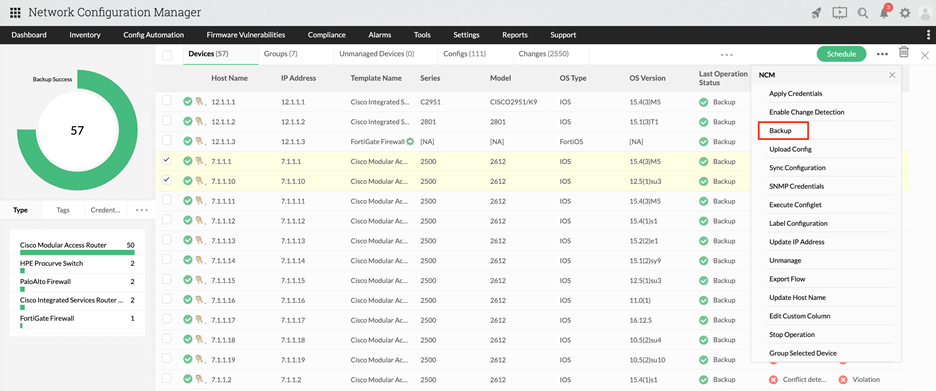
- Easily back up configurations for multiple devices simultaneously with a single click.
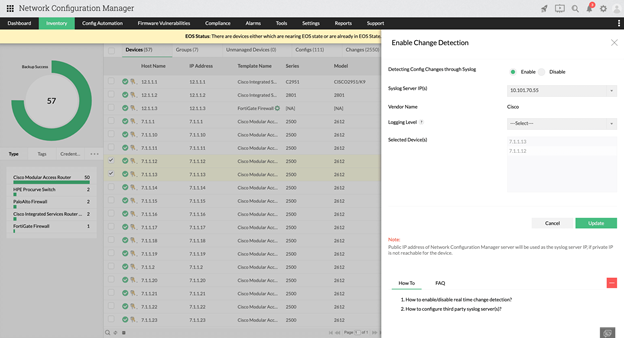
- Enable change detection for core devices to automatically back up configurations upon detection of changes.
- Schedule backups for devices at specific dates and times for automated execution.

Real-time change management
- Change notifications: Receive immediate notifications via email, SNMP traps, syslogs, or tickets upon detection of changes.

- Implement rule-based access control (RBAC), ensuring administrators have full authority.With RBAC, no changes can be made without appropriate approval and administrators can assign specific devices for users to manage.

- Label configurations for immediate use during downtime. Also, there is automatic version creation upon any detected changes.

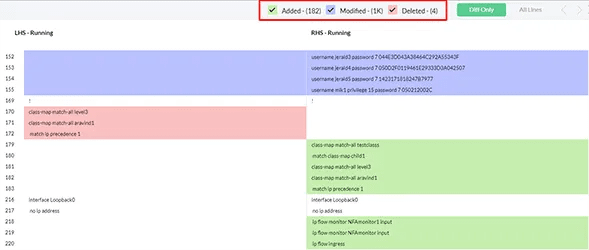
- Quickly compare configurations of the same or different devices side-by-side with color-coded differentiation for easy identification of changes.
Firmware vulnerability management
- Stay updated with daily vulnerability data from NIST and other major vendors.
- Scans for potential vulnerabilities and lists them with relevant details such as CVE ID, base score, severity level, and links to potential patch fixes.
- Utilize advanced CVE search and specific tabs for exposed devices and vulnerable device versions for more clarity into vulnerabilities.
- Access various vulnerability reports for auditing purposes.

Compliance management
- Leverage compliance policies—such as CIS, SOX, HIPAA, and PCI DSS—or create custom policies as needed.
- Network Configuration Manager generates a comprehensive compliance report listing non-compliant devices and relevant details.
- Push Configlets for immediate non-compliant rule remediation.

Automation with Configlets
- Utilize Configlets to automate tasks—such as configuration pushes, password changes, compliance remediation, etc.—across multiple devices simultaneously.
- Enjoy support for REST Configlets from select vendors.

Reports
- Choose from over 20 report types across five categories including network, configuration, vulnerability, user, and other

Integrations
- Seamlessly integrate with various in-house and third-party tools, including ServiceDesk Plus, ServiceNow, Password Manager Pro, and PagerDuty. Also, if you have OpManager or NetFlow Analyzer, you can seamlessly integrate Network Configuration Manager with them.

Scheduling
- Schedule critical tasks—such as backup, report generation, compliance checks, Configlets execution, device discovery, and configuration syncs—to ensure timely execution and prevent oversights.

Mobile apps
- Access Network Configuration Manager’s functionality on-the-go with Android and iOS mobile apps. Note that this can be utilized only when you have installed a working desktop version of Network Configuration Manager.
Conclusion
Network Configuration Manager stands as your comprehensive network automation solution, ideal for efficiently managing device configurations. It encompasses all essential features and more, elevating your network management capabilities.
Furthermore, its Enterprise edition enables centralized management of geographically dispersed networks through its Central-Probe architecture. This tool leaves no stone unturned in providing comprehensive network configuration management.
To experience its benefits first-hand, download and try Network Configuration Manager now, and instantly transform your network into a scalable, efficient, and secure environment.
Interested in a 30-day trial? Download Network Configuration Manager today.
Curious about the exact pricing for your network? Simply fill out our quote form to get precise information.
Looking to gain insights into the product’s functionalities from expert hands? Fill out our demo form for a comprehensive demonstration.
About author:
Author name: Nikhil Frederick J
Bio: Nikhil Frederick J is a product marketer for the IT Operations Management suite of ManageEngine, a division of Zoho Corporation. In this role, he spearheads product marketing efforts, collaborating across diverse domains like sales, product management, and customer support. He delivers meticulously researched strategies focused on simplifying network complexity, enhancing network management capabilities, and optimizing network efficiency for organizations.
Related Posts
- Beyond SNMP: API-Powered Monitoring for Cisco ACI Fabrics
- 15 Best Network IP Sniffing Software Tools (Free&Paid) – Wired and Wireless
- Automated Compliance for Network Devices using Network Configuration Management
- Beyond the Blips – The Importance of Network Traffic Analysis with the Right Tools
- The Role of Baseline Configuration Management in Network Configuration Management