Dynamic Host Configuration Protocol (DHCP) plays a crucial role in automating the assignment of IP addresses in networks, ensuring seamless communication between devices without manual configuration.
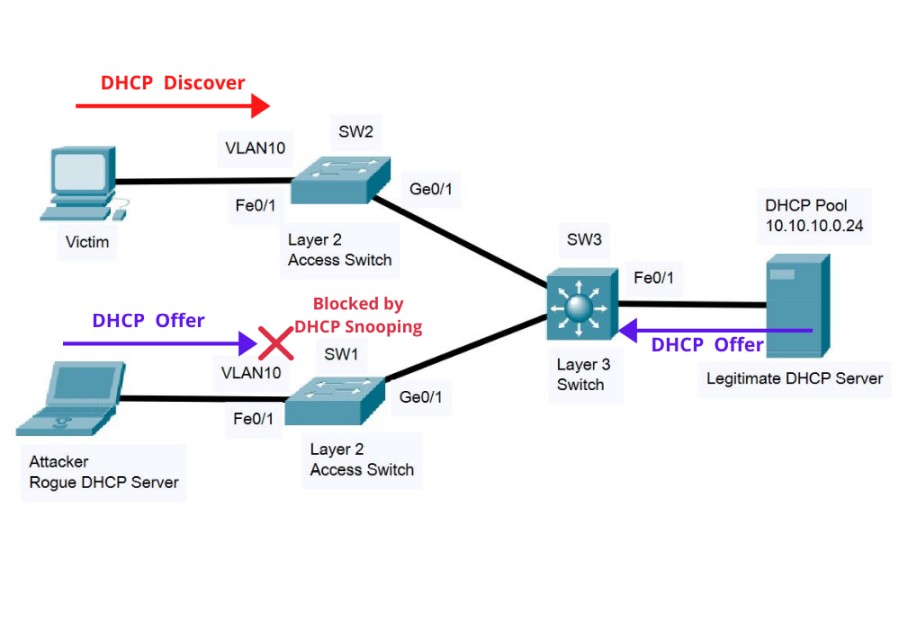
However, this ease of use also introduces vulnerabilities, making it a potential target for network attacks. To mitigate these risks, DHCP snooping is implemented as a security measure, helping to protect the integrity of your network by preventing unauthorized or rogue DHCP servers from distributing IP addresses.
What is DHCP Snooping?
DHCP snooping is a security feature deployed at the switch level within a network infrastructure. It acts as a firewall that monitors and filters DHCP messages exchanged across the network, ensuring that only legitimate DHCP servers can assign IP addresses.
This prevents malicious devices from launching DHCP-related attacks, such as IP address spoofing or man-in-the-middle attacks, which can lead to network disruptions or data interception.
How DHCP Snooping Works
In practice, DHCP snooping classifies switch interfaces into two categories: trusted and untrusted.
-
Trusted Interfaces: These ports are connected to legitimate DHCP servers, and DHCP messages received on these interfaces are assumed to be from valid sources, allowing them to pass through unimpeded.
-
Untrusted Interfaces: All other ports, typically connected to client devices, are classified as untrusted broad and DHCP messages from these interfaces are scrutinized. Only responses from trusted DHCP servers are allowed, while unauthorized responses are dropped, effectively blocking rogue DHCP servers.
To further enhance security, DHCP snooping maintains a binding table, which is a dynamic database recording the IP addresses assigned to each client, along with their MAC addresses and the switch port through which they are connected. This binding table is then used to validate future DHCP requests and to cross-check the source of incoming packets, reducing the risk of IP spoofing.
Benefits of DHCP Snooping
-
Enhanced Network Security: DHCP snooping protects the network by blocking unauthorized DHCP servers, reducing the risk of common network attacks like rogue DHCP server attacks and IP address spoofing.
-
Improved Network Reliability: By ensuring that only legitimate IP addresses are distributed, DHCP snooping maintains consistent network performance and helps prevent conflicts that could lead to outages or degraded services.
-
Compliance with Security Policies: Many organizations have strict security policies that require the implementation of measures like DHCP snooping to protect sensitive data and maintain network integrity.
-
Protection Against Man-in-the-Middle Attacks: By filtering and validating DHCP traffic, DHCP snooping helps prevent attackers from intercepting or redirecting network traffic, which is crucial for protecting sensitive information.
Potential Challenges and Considerations
While DHCP snooping offers robust security benefits, there are some challenges to consider:
-
Complexity in Large Networks: Implementing DHCP snooping across a large and complex network can be challenging, the configuration requires careful planning and coordination to ensure effectiveness.
-
Performance Overhead: DHCP snooping can introduce a slight performance overhead as switches need to process and filter DHCP traffic, although this impact is generally negligible in most modern networks.
-
Compatibility Issues: Ensure that all network devices, especially older ones, are compatible with DHCP snooping. Some legacy equipment may not support this feature, which could lead to gaps in your security.
Take Control of Your DHCP Servers with OpUtils
While DHCP snooping is a critical component for securing your network, effective DHCP server monitoring and management are equally important for ensuring smooth IP address provisioning and minimizing network vulnerabilities. This is where ManageEngine OpUtils comes into play, offering a comprehensive suite of tools designed to monitor and manage DHCP servers seamlessly.
Flexible DHCP Server Discovery
OpUtils supports a wide range of DHCP servers, allowing for easy discovery and monitoring of these servers. It offers flexible, server-appropriate discovery options and allows for automated scanning by setting periodic scan schedules. This flexibility helps network admins to manage different DHCP servers across increasingly agile networks efficiently.
Active Directory Integration
OpUtils integrates seamlessly with your network’s Active Directory, enabling you to link DHCP servers with AD domains.
This integration allows for the tracking of the status of your IP address space, including leased and available IP addresses specific to each domain. This linkage ensures that your network’s IP allocation is always aligned with your AD policies and structures.
Detailed Insights into DHCP Servers
With OpUtils, network admins gain a clear, comprehensive view of their DHCP servers’ status and performance. The tool displays critical information, such as the total number of IPs, leased IPs, DNS names, and other DHCP pool metrics. These insights are essential for effective capacity planning and for anticipating and preventing potential network issues like resource exhaustion.
Real-time DHCP Scope Monitoring
OpUtils provides real-time monitoring of DHCP scopes, offering visibility into scope names, scope addresses, total IPs, leased IPs, and more. This feature helps admins quickly identify scopes that are low on available IP addresses, facilitating proactive management and preventing IP address shortages before they impact network operations.
Automated Granular Reports
OpUtils includes a robust reporting engine that generates detailed reports on DHCP server metrics, such as leased and available IPs. These reports can be customized, scheduled, and delivered directly to your inbox, helping you conduct thorough network audits and optimize your network resources effectively.
Instant Alerts and Effective Troubleshooting
OpUtils comes equipped with a threshold-based alerting system that notifies network admins of emerging issues before they escalate. These alerts are delivered via email or syslog files, ensuring that you stay ahead of potential network mishaps. With over 30 built-in network tools, OpUtils also enables effective diagnosis and troubleshooting of DHCP-related issues in real time.
Getting Started with OpUtils
OpUtils is a comprehensive IP address and switch port management solution that includes advanced tools like IP and port scanners, Wake on LAN, and DHCP scope monitoring. It integrates seamlessly with existing network infrastructures, making it an indispensable tool for network admins looking to enhance their DHCP server management capabilities. To experience OpUtils firsthand, you can download a 30-day free trial or schedule a live demo with a product expert.
Author Name: Arjun Sudhakar

Bio: Arjun is a member of product marketing team within the IT Operations Management suite at ManageEngine, a division of Zoho Corporation. He actively contributes to ManageEngine’s efforts to demystify ITOM for its avid users through a myriad of blogs, articles, and web pages focused on IT infrastructure management, observability and beyond.
Related Posts
- Failure-Mode Engineering: Turning Network Adversity Into an Advantage
- What is Cisco Virtual Port Channel (vPC) – Explained and Discussed
- What is a Wildcard Mask – All About Wildcard Masks Used in Networking
- Configuration Drift? Not on our Watch in Networks
- What is Cisco Identity Services Engine (ISE)? Use Cases, How it is Used etc