How do you know when a rogue device is on your network? With the advent of technologies such as the Internet of Things (IoT) and the increasing reliance on wireless connectivity, the risk of rogue devices infiltrating networks has become a pressing concern.
These rogue devices, whether intentionally introduced by malicious actors or inadvertently connected by employees, pose a significant threat to network integrity, data security, and overall organizational resilience.
For instance, an attacker can introduce a malicious hardware implant into a network-connected device, such as a printer or a router.
This device enables the attacker to carry out a manipulator-in-the-middle attack by eavesdropping on network communications or facilitating unauthorized access.
Understanding Rogue Devices
A rogue device is any unauthorized device that connects to a network without proper authorization or oversight. These can range from unauthorized laptops and smartphones to malicious hardware implants and compromised IoT devices. Rogue devices can undermine network security in several ways:
- Security breaches: Rogue devices can serve as entry points for cyberattackers, providing them with unauthorized access to sensitive data and critical network resources.
- Network congestion: Unauthorized devices can consume bandwidth and network resources, leading to performance degradation and potential disruptions to essential services.
- Data leakage: Rogue devices may exfiltrate sensitive information from the network, compromising data confidentiality and integrity.
Best practices for rogue device detection and prevention
Given the severity of the risks posed by rogue devices, organizations must implement robust rogue device detection mechanisms to identify and mitigate potential threats effectively. Some best practices include:
- Network segmentation: This helps isolate critical resources from potentially compromised areas, limiting the impact of rogue devices. By dividing the network into distinct segments and enforcing strict access controls, organizations can contain potential threats and prevent lateral movement by attackers.
- Continuous monitoring: Utilize rogue detection tools such as ManageEngine OpUtils to continuously scan for new or unauthorized devices connecting to the network. Automated monitoring systems can detect anomalies in device behavior and alert security teams to potential rogue devices promptly.
- Implement network access controls (NACs): NACs enable organizations to enforce security policies and controls based on the identity and security posture of devices attempting to connect to the network.
- User education and awareness: Educate employees about the risks associated with connecting unauthorized devices to the corporate network. Establish clear policies and guidelines for device usage, emphasizing the importance of obtaining proper authorization before connecting to the network.
- Device profiling and authentication: Implement device profiling techniques to identify and categorize authorized devices based on their unique characteristics, such as MAC addresses, device types, and operating systems. Additionally, enforce strong authentication mechanisms, such as IEEE 802.1X, to ensure that only authorized devices can access the network.
Secure IT with an effective rogue device detection tool
Rogue device detection is a critical component of modern cybersecurity strategies, requiring a proactive and multilayered approach to effectively mitigate risks.
ManageEngine OpUtils, a comprehensive IP address management and switch port mapping solution, helps organizations strengthen their defenses against rogue devices and safeguard their networks in an increasingly interconnected world.
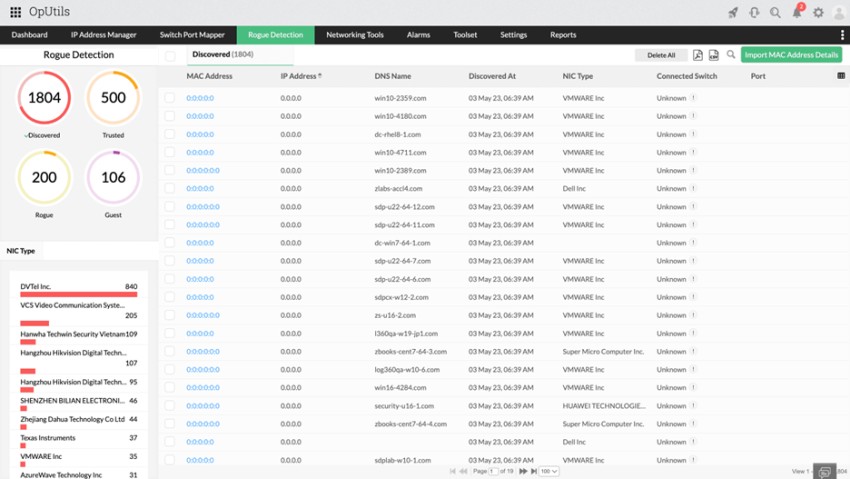
Key feature highlights:
- Scheduled network scans: OpUtils performs periodic scans to detect new systems or devices on the network.
- Device classification: Mark systems and devices as trusted, guest, or rogue based on predefined criteria.
- Switch and port identification: OpUtils displays the switch and port information associated with each system or device identified by the rogue detection module.
- Alerting system: Configure alerts for when a new system or device is detected or when the guest access validity expires.
- Port blocking: OpUtils supports the blocking of switch ports to prevent unauthorized access by rogue devices.
If you are new to OpUtils, schedule an online demo with a product expert or download a 30-day, free trial and get started with OpUtils in as little as an hour!
Author Name: Sharon A Ratna
Bio:
 Sharon A Ratna is a Product consultant for ManageEngine’s ITOM suite that has helped IT teams in Fortune 100 worldwide for over 20 years. She researches and writes on technologies that develop, enhance, and simplify the current solution capabilities and new opportunities in the ITOM domain. With an exceptional understanding of marketing trends and consumer pain points, she works with the product management, development, and support teams to fine-tune and execute engaging marketing strategies.