QUIC (Quick UDP Internet Connections) is a new generation Internet protocol that speeds online web applications that are susceptible to delay, such as searching, video streaming etc., by reducing the round-trip time (RTT) needed to connect to a server.

By replacing TCP with UDP and encrypting most of its payload, QUIC reduces the time it takes to start viewing the content two to three times, while maintaining data security. Currently more than 8% of all the websites on the Internet are using the QUIC protocol.
Although all these sound great, the encryption used in QUIC protocol causes headaches to security administrators who want to enforce application restrictions on their next-generation firewalls (more on this below).
Original QUIC Implementation by Google (gQUIC)
QUIC was initially implemented and deployed by Google in 2012 (runs on Chrome & Opera) and was designed to compensate for HTTP/2 deficiencies, providing robust and strong encryption and reducing server / client handshake and packet loss.
Although gQUIC is still used in some environments, the focus has shifted towards the standardized QUIC protocol which is developed by IETF (RFC 9000 and other related RFCs) as we will discuss next.
IETF Standardized QUIC Protocol
Starting with RFC 9000, IETF has formed the QUIC Working Group to advance and further develop the protocol and to be the focal point for any QUIC-related work in the IETF. The focus now of all vendors is to use the standardized IETF version of QUIC instead of the original gQUIC version.
The IETF QUIC protocol uses a 4-byte identifier in the Version field to identify different versions. The IETF has standardized:
- QUIC Version 1 (0x00000001) as defined in RFC 9000
- QUIC Version 2 (defined in RFC 9369), which is nearly identical to Version 1 with only trivial differences
The IANA maintains a registry of QUIC versions, including both permanent and provisional versions.
The QUIC Working Group continues to evolve the protocol, maintaining its core properties while improving its capabilities as a modern transport protocol for the internet.
Most Important Features of QUIC
These are the most important technical features of QUIC:
- Uses UDP instead of TCP, thus reducing overhead and increasing performance.
- Connection Multiplexing. It multiplexes several independent streams within a single connection. This solves Head-of-Line (HOL) blocking found in TCP connections.
- Exchange packets in steps to reduce data loss.
- Integrated congestion control mechanism.
- Built-in Encryption. The newest version uses TLS 1.3.
- The new HTTP major revision (HTTP/3) is based on QUIC.
- Connection ID management that allows connections to survive changes in the underlying IP address or port (e.g., switching from Wi-Fi to cellular data).
- Fast 0-RTT and 1-RTT Handshakes connectivity.
- Forward Error Correction (FEC).
- And much more
Port Used By QUIC
In terms of network ports, QUIC uses UDP port 443 instead of TCP 443 which is used by traditional HTTPs (TLS).
Chrome browsers have QUIC enabled by default and also by accessing a Google server (such as Youtube) the session is established using QUIC instead of the traditional TLS. Tests have shown that there is a 30% improvement in retransmissions on Google applications (such as Youtube) using QUIC.
Monitor QUIC Traffic on Your Computer Browser
If you want to check that your Chrome browser and network connection uses QUIC, do the following:
- Type the following on your Chrome URL toolbar: chrome://net-export/
- You will get a screen like the following:
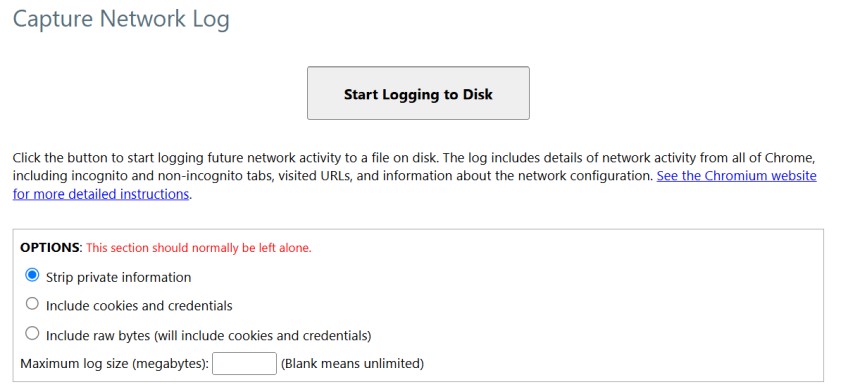
- Click “Start Logging to Disk” and save the log file on your computer.
- Open a second browser tab, go to youtube and start watching some videos. The browser will start capturing packets which will be saved to the file in step 3 above.
- Click Stop Logging.
- Go to https://netlog-viewer.appspot.com/#import and select the log file above (chrome-net-export-log).
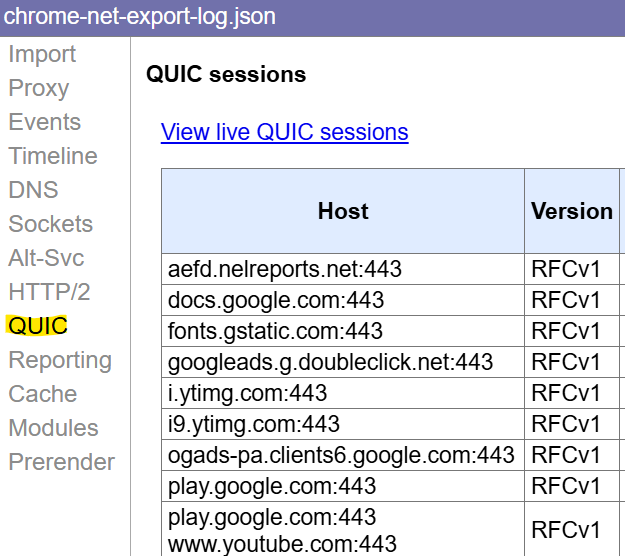
- As you can see from above, the Chrome log file shows the QUIC protocol used when visiting youtube etc.
Firewall Considerations
Past
In the original version of gQUIC, encryption used was proprietary and not standardized like TLS.
Therefore, next generation firewalls that provided application control and visibility had a hard time to control and restrict Google applications (such as Gmail, Youtube etc) that were using the original protocol, because of this proprietary encryption mechanism. Therefore, firewall devices and security solutions were “blind” when QUIC was used.
The solution back then was to just block UDP 443 on the firewall, and therefore forcing the protocol to fall-back to TCP 443.
Present
Nowadays, because the new QUIC versions utilize the standardized TLS 1.3 encryption protocol, there is still an inherent difficulty of inspecting this strongly encrypted traffic (TLS 1.3) with firewalls. Moreover, the fact that it runs over UDP, makes it even more difficult with some TCP-focused security tools.
However, newer Next Generation Firewalls (NGFWs) and security solutions are developing capabilities to specifically identify and apply policies to QUIC traffic beyond just blocking the port. This might involve heuristics, SNI parsing (if not encrypted early), or specific QUIC protocol decoding.
Blocking QUIC on the Firewall (Block UDP Port 443)
Security vendors often recommend administrators to block UDP port 443 on the firewalls in order to force Chrome browsers to fall-back to regular TCP 443 connections instead of QUIC. Connectivity of the users will not be lost since the browser will silently fall-back to normal TCP based TLS (TCP443).
Therefore, if you have an older firewall and want to block some Google applications (such as Youtube, Gmail etc) you will need to block UDP443 in order to block QUIC.
Newer Firewalls and QUIC
Popular security vendors like Cisco have developed capabilities in their firewall products to decrypt QUIC protocol in order to inspect the traffic within instead of just blocking UDP 443.
Although this is still experimental feature, I’m sure the security vendors will catch-up to the trend and find ways to securely allow QUIC traffic to pass (with the proper controls and inspection) so that users will be able to enjoy the faster performance and speed offered by this protocol.
Related Posts
- Boost Network Security with Automated CIS Compliance
- What is Cisco Identity Services Engine (ISE)? Use Cases, How it is Used etc
- 5 Best Practices to Keep Rogue Devices at Bay
- Cisco Talos Year in Review – Top Cyber Security Threats in 2023 and Beyond
- How to Scan an IP Network Range with NMAP (and Zenmap)