The usage of object groups (network objects, service object etc) is becoming more popular on Cisco ASA firewalls especially with newer OS versions ( 8.3(x) and later) . In the newer versions, network object groups are used extensively for the configuration of NAT mechanisms in addition to other uses.
In this post I will show some simple examples of using network objects and service objects with access lists etc.
Moreover, I will expand the above to show how object groups are used with NAT as well (especially with the new NAT mechanism introduced after version 8.3).
Network Objects and Service Objects Examples
Suppose we have a few Web servers located on a DMZ which are accessed from the Internet. We want to enable http (80) and https (443) access from internet towards these web servers.
Assume that we have configured static NAT for those web servers and translated their real private IP addresses to the following Public IP addresses:
Web Server1: Private IP (192.168.1.1) translated to Public IP (50.50.50.1)
Web Server2: Private IP (192.168.1.2) translated to Public IP (50.50.50.2)
Web Server3: Private IP (192.168.1.3) translated to Public IP (50.50.50.3)
Configuration of access list using object groups
! create a service group for the http and https protocols
object-group service http-protocols tcp
port-object eq 80
port-object eq 443
! create a network object group for the web servers
object-group network webservers
network-object host 50.50.50.1
network-object host 50.50.50.2
network-object host 50.50.50.3
! create the access list applied inbound on the outside interface
access-list OUTSIDE-IN extended permit tcp any object-group webservers object-group http-protocols
access-group OUTSIDE-IN in interface outside
EDIT (ASA Versions after 8.3):
In newer ASA versions after 8.3, the access list must always reference the Real IP address of a host and NOT the translated IP address. So, in our example above, the “webservers” object-group must include the Real (private) IP addresses of the servers and not the translated public IP.
! create a network object group for the web servers with their Real private IP
object-group network webservers
network-object host 192.168.1.1
network-object host 192.168.1.2
network-object host 192.168.1.3
! create the access list applied inbound on the outside interface
access-list OUTSIDE-IN extended permit tcp any object-group webservers object-group http-protocols
access-group OUTSIDE-IN in interface outside
As you can see from above, you first create the network object-group and give it a name, and then add “network-object” of specific hosts to the above created object-group. You can add new network-object hosts later on under the same object-group or remove older entries (with the “no network-object host x.y.z.w”)
Configuration of NAT using object groups
If you administer any of the Cisco ASA 5500 firewall family products some things should be noted about the differences in configuration for 8.3 and newer versions of code. One of the most significant changes to be noted is NAT (Network Address Translation).
In the Cisco ASA 8.3 version of code Cisco has introduced the concept of objects. Within the specified objects the NAT configuration is applied.
This means that NAT configuration is now completely different from the traditional “global” and “static” commands that we had been using in versions prior to 8.3. Lets take a closer look at each of the three basic types of NAT.
Dynamic NAT: (Many to One)
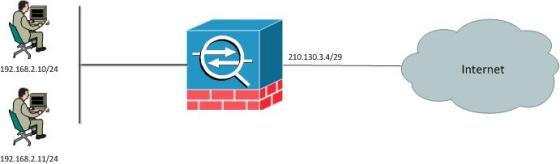
Steps:
1- Create object group.
2- Define object IP Address or Subnet.
3- Create NAT statement within object group.
object network INSIDE_LAN
subnet 192.168.2.0 255.255.255.0
nat (inside,outside) dynamic interface
Lets take a closer look!
object network INSIDE_LAN
Creates a network object called “INSIDE_LAN”
subnet 192.168.2.0 255.255.255.0
Defines the subnet or host IP Address for the object “INSIDE_LAN”
nat (inside,outside) dynamic interface
States that when traffic is entering the inside interface (ingress) and exiting the outside interface (egress) dynamically translate the IP address to the IP address of the egress interface. In our case the outside interface IP address of 210.130.3.4 will be used.
Static NAT: (One to One)
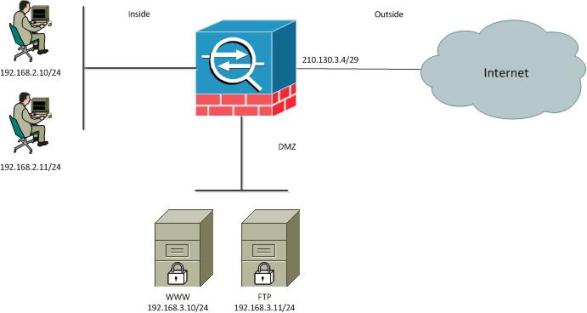
Steps:
1- Create object group.
2- Define object IP address.
3- Create NAT statement within object group.
object network WEB_SERVER
host 192.168.3.10
nat (DMZ,outside) static 210.130.3.5
Again, lets dive a little deeper into the commands.
Object network WEB_SERVER
Creates a network object called “WEB_SERVER”.
host 192.168.3.10
Defines the host IP Address for the object “WEB_SERVER”.
nat (DMZ,outside) static 210.130.3.5
States that the host 192.168.3.10 sits behind the “DMZ” interface also known as the “Real Interface” and should be mapped to the “Outside Interface” known as the “Mapped Interface”. When this happens host from the Internet can reach the WEB_SERVER object using the 210.130.3.5 IP address.
PAT (Port Address Translation):
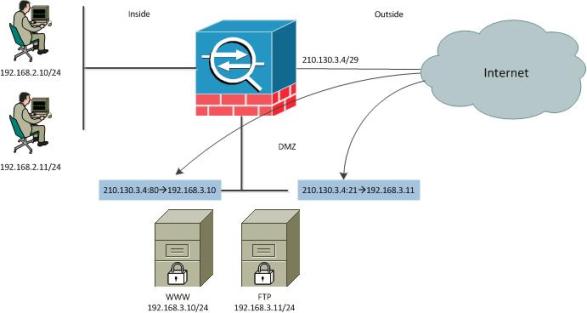
Steps:
1- Create object group.
2- Define object IP address.
3- Create NAT statement within object group.
object group WWW_SERVER
host 192.168.3.10
nat (DMZ,outside) static 210.130.3.4 service tcp 80 80
object group FTP_SERVER
host 192.168.3.11
nat (DMZ,outside) static 210.130.3.4 service tcp 21 21
Once more, lets take a closer look at the configuration.
object group WWW_SERVER
Creates an object group for our web server named “WWW_SERVER”.
host 192.168.3.10
Defines the real IP address for the object “WWW_SERVER”.
nat (DMZ,outside) static 210.130.3.4 service tcp 80 80
States that traffic from the outside destined to 210.130.3.4 on destination port 80 should be translated back to address 192.168.3.10 using the same destination port of 80 (http).
object group FTP_SERVER
Creates an object group for our FTP server named “FTP_SERVER”.
host 192.168.3.11
Defines the real IP address for the object “FTP_SERVER”.
nat (DMZ,outside) static 210.130.3.4 service tcp 21 21
States that traffic from the outside destined to 210.130.3.4 on destination port 21 should be translated back to address 192.168.3.11 using the same destination port of 21 (ftp).
Verification Commands:
Show object-group
Shows all object groups within the running configuration.
Show run nat
Shows all NAT configurations within the running config.
Show nat
Show the NAT table within the ASA. The NAT table will be used during traffic processing to check for matching NAT statements. The table is checked in sequential order going from top down. The “show nat” command will also show how many times a “nat’ed” address has been hit.
Related Posts
- Prevent Spoofing Attacks on Cisco ASA using RPF
- Configuring Connection Limits on Cisco ASA Firewalls – Protect from DoS
- Configuring AAA Authentication-Authorization-Accounting on Cisco ASA Firewall (TACACS+, RADIUS)
- Cisco ASA Firewall Management Interface Configuration (with Example)
- How to Configure Access Control Lists on a Cisco ASA 5500/5500-X Firewall (with Examples)