In the market of networking devices, you can find both wireless routers (just like the WiFi devices we have in our homes) and wired routers which can be great performers in both small home networks and in business environments as well.
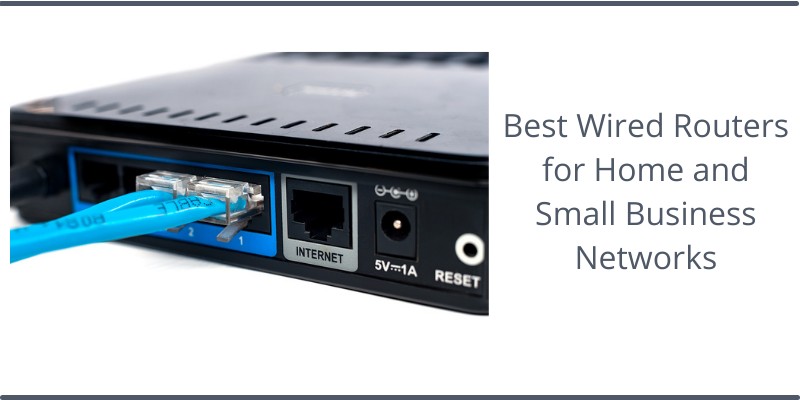
In this article I have researched some great wired router models for both home and small business networks.
In this blog I mostly write about configuring Cisco routers and other networking devices that are usually used in enterprise/corporate environments.
However, the router models you will see in this article have their place in smaller networks and they have capabilities and features that sometimes resemble those of larger enterprise devices.
If you are in a hurry and don’t want to read the whole article below, here are my top Recommendations for Wired Network Routers:
- Best overall Home Wired Router: Ubiquiti Unifi Security Gateway (USG)
- Best Value for Money Home Router: MikroTik hEX S
- Best overall Small Business Router: Cisco RV345 VPN Router
- Best for VPNs: Linksys LRT214 Business Gigabit VPN Router
When we say “Wired Routers” we mean networking devices which only have wired Ethernet ports for connecting Local Area Network (LAN) devices to them (such as local computers, laptops, gaming consoles, smart TVs etc).
The Wired Router is then connected to the Internet (via its WAN port) in order to route traffic from the local network (LAN) devices towards the Internet.
Although these devices might seem somewhat old… nothing beats them in terms of connectivity, speed, and firewall protection.
Especially if you’re looking for a bit of “Hands-On” management of things. Usually, wired routers are much more flexible and powerful than regular SOHO wireless devices but you might need a little bit of networking skills to utilize their full capabilities.
Wired routers are capable to handle high-speed broadband connections and can usually support even Gigabit Internet plans without lag or packet losses.
Another important characteristic of wired router devices is their powerful software features. You will find deep packet inspection for application security, Quality of Service features, firewall controls, VPN and much more.
Quick Recommendations
- Best overall Home Wired Router: Ubiquiti Unifi Security Gateway (USG)
- Best Value for Money Home Router: MikroTik hEX S
- Best overall Small Business Router: Cisco RV345 VPN Router
- Best for VPNs: Linksys LRT214 Business Gigabit VPN Router
Let’s first see a quick comparison of the Home and Small Business router models suggested in this article:
Home Wired Routers – Comparison Table


Last update on 2026-07-09 at 03:10 / Affiliate links / Images from Amazon Product Advertising API
Ubiquiti Unifi Security Gateway (USG)
- Integration with Unifi Controller. Powerful firewall performance
- Convenient VLAN support. QoS for enterprise VoIP
- VPN server for secure communications. 10/100/1000Base-T
Last update on 2026-07-09 at 03:10 / Affiliate links / Images from Amazon Product Advertising API
Don’t go by the size or look of this wired router model when measuring its mettle on the job.
Ubiquity is a brand known for its excellent networking devices (WiFi access points, ethernet switches, routers etc). The Unifi Security Gateway (USG) is no exception.
As the name suggests, USG runs under the UniFi umbrella and is a great option if you already have other Ubiquity devices in your network (although it works perfectly as standalone device as well).
If you have other Ubiquity devices (access points, switches etc) you can have a centralized management system (Unify Network Controller) which provides a single point of access and management for all devices in your network.
USG is a very cost-effective option as well. Although the device is marketed as a hardware firewall, it is also a very powerful router as well.
The device is equipped with 1 WAN port (Gigabit), 1 LAN port (Gigabit) and another LAN/WAN port (Gigabit).
USG operates with MIPS64 processor with hardware capable of packet acceleration when you need it.
If you use the USG just for routing, you can achieve full 1 Gbps speed if you are connected to a gigabit Internet service. However, if you enable Deep Packet Inspection (DPI) then throughput will drop.
Trust me, security is one of my prime concerns when setting up a home network. Luckily for you, this USG device offers both excellent firewall features in addition to routing capabilities.
It is unbelievable that this little device also includes IDS (Intrusion Detection System). The IDS inspects network traffic for known signatures of attacks and blocks them on the network level.
One other thing I like about this router model is the fact that it’s silent and capable of operating non-stop for hours. Ubiquity doesn’t even have a fan inside.
Pros
- Solid and trusted vendor with excellent products.
- Great hardware acceleration and performance.
- Advanced security features such as Deep Packet Inspection, IDS, encryption, VPN etc.
- Advanced routing features that you usually find in high-end enterprise routers.
- Excellent management tool.
Cons
- No Power over Ethernet (PoE) ports.
MikroTik hEX S
- Mikrotik hEX S (RB760iGS) is a five port Gigabit Ethernet router for locations where wireless connectivity is not required.
- It comes with a very powerful dual core 880 MHz CPU and 256 MB RAM, capable of all the advanced configurations that RouterOS supports.
- The device has a USB 2.0, PoE output for Ethernet port #5 and a 1.25Gbit/s SFP cage.
Last update on 2026-07-09 at 01:58 / Affiliate links / Images from Amazon Product Advertising API
MikroTik is a European company (from Latvia) founded in 1996. They managed to become one of the top SOHO router manufacturers with fanatic users worldwide.
Their router devices are based on RouterBOARD hardware running on RouterOS software.
MikroTik is an excellent option for home networks where you don’t need a wireless connection for PCs, laptops, and phones.
hEX S comes with 5 -Gigabit ports with two of them supporting Power over Ethernet (PoE), one of them to power the router itself (PoE in) and one to power other devices (PoE out).
This little thing competes neck to neck with Ubiquity in terms of hardware.
Ubiquity USG beats Mikrotik hEX S in terms of RAM (512MB on USG compared to 256MB on hEX S device), however the Mikrotik model is powered by Dual-Core 880Mhz CPU compared to Dual-Core 500 Mhz on USG.
Before I forget, you get also a MicroSD slot and USB 2.0 to take advantage of as well. Using this and a flash drive, people can store necessary data for future usage.
This MicroTik product can deliver up to 1GBps bandwidth at its peak and 470Mbps when doing IPSec (used in VPN configurations). You can even aggregate any combination of its ports to create link-aggregated ports.
MicroTik comes with RouterOS (their very own OS) installed which is flexible, powerful, but a little bit hard to learn.
Pros
- Great value-for-money router.
- Two of its ports support PoE (either to power the device itself or to power other devices).
- SFP port for fiber optic connection.
- Supports link aggregation of all ports (even the SFP port) in order to create a bundle port which is above Gigabit speed.
- Powered by advanced features that you only find in very expensive router models.
Cons
- PoE-out is weak (500mA max).
- Steep learning curve for advanced configurations.
Mikrotik hEX RB750Gr3
- hEX also known as RB750Gr3 is a five port Gigabit Ethernet router for locations where wireless connectivity is not required
- The device has a full size USB port. This new updated revision of the hEX brings several improvements in performance
- It is affordable, small and easy to use, but at the same time comes with a very powerful dual core 880MHz CPU and 256MB RAM
Last update on 2026-07-09 at 03:10 / Affiliate links / Images from Amazon Product Advertising API
Don’t blame me for including another Mikrotik hEX product on my list of the best wired routers for home networks. I love MikroTik routers!!
The hEX RB750Gr3 model is exactly the same as the previous hEX S model (in terms of CPU, RAM, software etc) except that it does not have an SFP and PoE ports. This makes it a little cheaper than the MikroTik hEX S.
For basic home network setup, just plug your Internet connection (or modem) to port 1 and then connect your devices to ports 2 to 5.
The device does NAT so that you can have private IPs on the LAN to be translated to a public IP (WAN interface) for internet access.
As all other MikroTik routers, you can manage it with WinBox (Windows software for management).
Basic features are easy to setup, but more advanced features (VPN, bridging, advanced routing etc) have a steep learning curve (you need to know some networking concepts etc).
Pros
- Cheap and powerful router.
- Advanced routing features such as bridging, dynamic routing protocols (RIP, OSPF, BGP etc), VPN etc.
- Supports many VPN protocols such as IPSec, OpenVPN, PPTP, L2TP etc.
- Stable and flexible operating system.
Cons
- Steep learning curve for advanced features.
- No PoE ports.
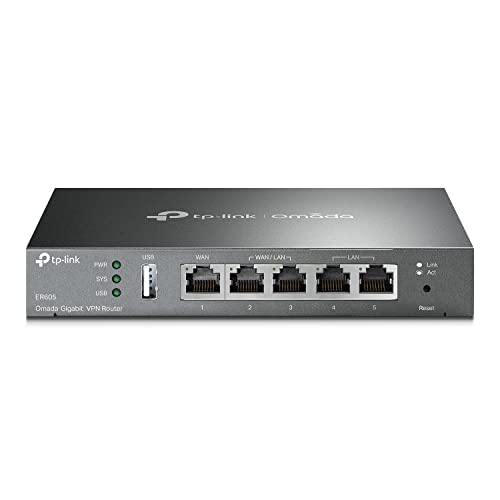
TP-Link Multi-WAN VPN Router
- 【Five Gigabit Ports】1 Gigabit WAN Port plus 2 Gigabit WAN/LAN Ports plus 2 Gigabit LAN Port. Up to 3 WAN ports optimize bandwidth usage through one device.
- 【One USB WAN Port】Mobile broadband via 4G/3G modem is supported for WAN backup by connecting to the USB port. For complete list of compatible 4G/3G modems, please visit TP-Link website.
- 【Abundant Security Features】Advanced firewall policies, DoS defense, IP/MAC/URL filtering, speed test and more security functions protect your network and data.
Last update on 2026-07-09 at 01:58 / Affiliate links / Images from Amazon Product Advertising API
TP-Link is well known for manufacturing value-for-money networking devices.
The TL-R605 is the successor of the successful TL-R600VPN Safestream model which has been in the market for many years.
This model is classified as SDN Router which is part of the Omada cloud SDN offering from TP-Link.
Although it can be managed and work as a standalone device, the main purpose of this router is to work as part of the SDN Omada cloud.
As the model name suggests, this router comes with integrated VPN support and multiple WAN ports. One 1Gigabit WAN port and four additional WAN/LAN ports.
What I like with this router is that it can be great to connect remotely to your Home or small office network via the variety of VPN protocols supported.
For example, you can use PPTP, L2TP, and IPSEC protocols which are the most popular for remote access VPN connections.
This is perfect for small offices as well. Especially, if you want a reliable VPN system in place while connecting to the internet, TP-Link SafeStream is a very good choice.
Ofcourse, if you want to use this in your home network, you can use it as standalone and manage it via the Web GUI on the device itself.
The SPI firewall means that it can perform Stateful Packet Inspection on packets with advanced firewall policies.
Pros
- Offers very good features for its price.
- Multiple VPN protocols supported.
- Can be used for both home or small office networks.
- TP-Link manufactures reliable networking devices.
Cons
- People complain about the DHCP not being very stable.
Small Business Wired Routers – Comparison Table


Last update on 2026-07-09 at 01:58 / Affiliate links / Images from Amazon Product Advertising API
Now that we are done with my top candidates for home networks, let’s focus on the business side of things. Wired Routers for Small businesses in particular.
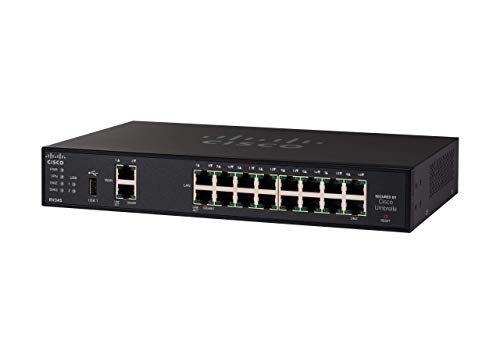
Cisco RV345 VPN Router
- PERFECT FOR BUSINESSES: High-speed Ethernet connectivity with up to 900-Mbps TCP throughput for faster downloads
- CONNECTIVITY: Robust and secure VPN - secure interconnectivity, including standard IPsec, Layer 2 Tunneling Protocol (L2TP) over IPsec, and Cisco IPsec
- LAN PORTS: 16 ports for high-performance connectivity
Last update on 2026-07-09 at 01:58 / Affiliate links / Images from Amazon Product Advertising API
I have ranked this model as the “Best Overall Option for Small Business” for a good reason.
When it comes to network routers for small or large business networks, Cisco is my favorite brand.
Many would agree with me, I hope. Now, I have my reasons for liking Cisco as a networking brand. Each and every product of this brand carries a signature feature that makes our lives easier.
Take the RV345 for example. One of the reasons I have chosen this model as an excellent choice for small business networks is that you will get 16 Gigabit Ethernet LAN ports with the device to work with. Add two WAN ports with them and you’ll open up a wide array of possibilities.
This means that you will probably not need an additional Ethernet switch to connect your business hosts to the network since you have plenty of ports on the router itself.
Moreover, this little router supports up to 900 Mbps data transfer which means you can even connect a Gigabit internet line.
If you want to provide Internet redundancy to your network, you can use one of the USB ports to connect a 3G/4G modem as a backup option for connecting to Internet (via the mobile network) in case the WAN is down.
What I also like about this device is the built-in Cisco Umbrella support. Cisco Umbrella is a cloud security protection service, based on DNS, to protect all of the devices in your LAN network from all kinds of security risks (phishing, ransomware, malware, bad domains etc).
Some people complain about this router model but the main reason is that they don’t know how to configure it.
Pros
- Has 16 Gigabit LAN ports so you may not need an additional Ethernet switch.
- You can do multi-WAN load balancing (outgoing traffic) using the main WAN connection and also a 4G/LTE ISP modem (connected to USB).
- Many advanced router features.
- Cisco is probably the top vendor in networking gear.
- Supports Cisco Umbrella for security.
- Robust VPN.
Cons
- Do not buy this model if you are a novice in networking.
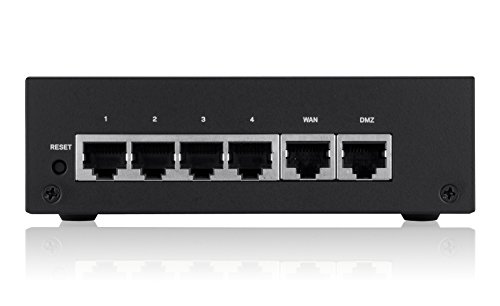
Linksys LRT214 Gigabit VPN Router
- Gigabit Ethernet ports
- Up to 50 IPsec tunnels (for site to site and client to site VPN) and 5 OpenVPN tunnels for iOS and Android users
- 900 Mbps firewall and 110 Mbps IPsec throughputs
Last update on 2026-07-09 at 01:58 / Affiliate links / Images from Amazon Product Advertising API
Linksys is another networking giant. Being part of Cisco and then acquired by Belkin, Linksys manufactures solid wired and wireless devices.
I have ranked this Linksys model as the best option in this list for VPN connectivity.
Many people use this router as home or small-business main router in order to connect remotely into the local network via VPN tunnels. It even supports OpenVPN for smartphone devices (iOS and Android).
In addition to VPN functionality, it has all the necessary wired router features such as dual-WAN failover and load-balancing support, VLANs, Firewalling, Quality of Service (Qos) and much more.
If you don’t use VPN, its bandwidth can reach over 900Mbps. If you are doing Lan-to-Lan IPSEC VPN tunnels, the throughput drops to 110 Mbps.
I also like the fact it supports URL filtering to control users’ traffic. This can be handy if you place the router in a business network to control what your users visit.
Pros
- Great for VPN usage.
- Supports OpenVPN for smartphone devices.
- Many advanced router features.
- Dual WAN for failover and load balancing.
- Excellent for remote-access from Internet into your home/office network.
- URL filtering support.
Cons
- People complain that the GUI interface is slow.
Ubiquiti EdgeRouter 4
- (3) 10/100/1000 Mbps Ethernet ports, (1) RJ45 Serial and (1) SFP port
- Max power consumption: 13 Watts
- Desk, wall and rack mount options
Last update on 2026-07-09 at 01:58 / Affiliate links / Images from Amazon Product Advertising API
I covered EdgeRouter 4 in the article here where I compared it with another Ubiquity product, the USG (Unifi Security Gateway).
It is one of the most powerful router models in this article, but if you are a novice in networking concepts then maybe it is not for you.
The EdgeRouter 4 is managed by its own full-fledged management GUI (web based) which provides all configuration options available and is very powerful. However, you need to know some networking concepts to make full use of its capabilities.
If you have Gigabit Internet connection, then ER-4 can easily handle gigabit speeds, provided that you don’t enable any Deep Packet Inspection (DPI) or QoS features that slow-down the device.
However, even with the above features enabled, the speed of the device can reach 500 Mbps which is still impressive.
Another thing I like about the ER-4 is that you can use all of its interfaces (3xGigabit plus one Gigabit optical SFP port) wherever you want, e.g as LAN ports, WAN ports, mixed etc.
For a business environment with demanding internet traffic needs, the ER-4 is a great choice.
Pros
- Great speed and packets/sec performance.
- EdgeOS offers enterprise grade routing and security features.
- Full-fledged Web management for configuring anything.
- Trusted networking vendor.
- Supports dual-WAN with full 1Gbps speed (if you don’t enable DPI).
Cons
- Should have good networking knowledge to configure.
D-Link VPN Router (DSR-250V2)
- ALL-IN-ONE VPN SOLUTION FOR REMOTE WORK: Extends your corporate network to homes or remote offices, enabling access with enhanced security to resources without complex setup. Ideal for small businesses, entrepreneurs, and enterprises supporting remote or hybrid teams
- ENTERPRISE-GRADE SECURITY & ENCRYPTION: Helps protect sensitive data using IPSec, PPTP, L2TP, OpenVPN, SSL, and strong encryption (DES, 3DES, AES), reducing risk from external threats in an increasingly digital landscape
- FOLLOWS NDAA & TAA FOR ENHANCED TRUST: Made in Taiwan. Meets government and industry standards, making it well-suited for agencies and businesses under strict regulations, while providing reassurance for any organization seeking elevated data protection
Last update on 2026-07-09 at 01:58 / Affiliate links / Images from Amazon Product Advertising API
D-Link mainly manufactures SOHO routing devices but they have also some notable options for business networks as well.
The DSR 250V2 features one WAN Gigabit port and four LAN Gigabit ports with a high Firewall Throughput of 950Mbps (which means you can fully utilize the wired speed).
I was pleasantly surprised to know I could run at least 50,000 concurrent network sessions using this small device. This is important in a business network with multiple people using the Internet at once.
The dynamic Web content filtering is handy also in business environments where you may need to block access to some websites for users.
SSL VPN support is very important for allowing remote users (on the go) to connect remotely to your network without having to install any VPN client. SSL VPN works via the browser and uses SSL tunnel encryption.
Pros
- Very high Firewall Throughput (950 Mbps) and VPN Throughput (200 Mbps) for such a small device.
- Multiple VPN protocols supported.
- Very good price for a business router model.
- Dynamic Web content filtering.
Cons
- No support for OpenVPN.
- Manual instructions are not straightforward.
Why Am I Suggesting a Wired Router for Home or Business?
Wired routers vs. Wireless ones, which category is better? It’s an intriguing debate to have. Well, wireless WiFi routers have gained popularity because of the ease of use. These devices grant us the flexibility of sharing network and bandwidth without the extra hassle of connecting wires.
Wired routers on the other hand offer us a point-to-point dedicated connection over the wire.
The result? You’ll have an uninterrupted connection which utilizes the full speed/bandwidth of the line without any packet loss. You’ll have low latency, no spikes, and the highest speed.
Wireless routers are prone to network hacking where a hacker can guess or decipher your SSID WiFi passwords without actually getting close to you. The more devices you have connected to the WiFi network, the lower the bandwidth available.
Wired routers, on the other hand, are hard-wired. These things are more secure and robust. Many of the companies offer their own solutions and VPN options to secure it further.
Buying Guide for Wired Routers
It’s quite obvious that wired routers are still the best choice when you’re considering home and business connections and want to have the best possible performance in terms of speed and numbers of connections.
Below I will discuss the factors you should consider while shopping for a router yourselves.
Number of Ethernet Ports Your Router Has
This is very important when you’re looking for a router that runs your office. Most routers for small business networks will have at least 4 gigabit LAN ports. This is perfect when you’re looking to buy one for your house as well. We don’t need too many ports for our homes anyway.
When it comes to offices, you’ll have to go with more than 4-6 LAN ports in order to avoid purchasing an extra Ethernet switch (just like the Cisco RV345 which has 16 LAN ports).
More ports ensure effortless connections between PCs and the switch. Some of the routers on my list can be used as devices connecting between multiple switches as well.
Your Internet Speed Plan
If you have Gigabit Internet plan, then try to find a device that can utilize the full speed of your line. Keep in mind though that if you enable demanding features on the router (such as Deep Packet Inspection or QoS or IPS etc) then the maximum throughput of the router will drop significantly.
My advice would be to choose a router for your home that can support at least 200-300 Mbps and for your Small Business Network that can support at least 500 Mbps.
Ease of Management
It’s no use buying a device that you don’t know how to configure. If you don’t have experience in setting up networks, then find a router model that has user-friendly GUI (such as USG, Linksys etc).
If you are a networking expert you can go with a more powerful model (such as the EdgeRouter 4 or the Cisco RV345).
Security Features of Your Router
Nowadays, cyber attacks are on the rise. I recommend getting a router that has also good security features.
Most of the models in this article have basic security features such as packet-control firewall, access control lists etc. Some other models like the Ubiquity USG or the Cisco (using Umbrella service) offer more advanced security features such as IPS, malware protection etc.
Related Posts
- 12 Best Computer Networking Books for Beginners & Experts
- Comparison of Cisco Meraki MX64 vs MX65 vs MX67 vs MX68
- 10 Best Hardware Firewalls for Home and Small Business Networks
- Fortinet Fortigate 30E vs 50E/51E vs 60E/61E/60F – Firewall Comparison
- Ubiquiti Unifi Security Gateway (USG) Vs Edgerouter 4/Lite