IPSEC VPN is a great technology for encrypting and securing communications between networks (used also in VPN software clients as well). The only drawback is that IPSEC supports ONLY pure IP unicast traffic and nothing else.
If you want to securely pass multicast or non-IP traffic between sites then IPSEC alone will not work. Fortunately Cisco routers support the GRE protocol (Generic Routing Encapsulation) which is a tunneling protocol that can encapsulate a variety of network layer packet types into a GRE tunnel.
GRE therefore can encapsulate multicast traffic, routing protocols (OSPF, EIGRP etc) packets, and other non-IP traffic inside a point-to-point tunnel.
The downside of GRE is that it’s not as secure as IPSEC. Now, by using GRE over IPSEC, we can have the best of both technologies: Security and support for many network protocols. Some applications of using GRE over IPSEC are the following:
- Pass multicast traffic from a video server of one site to another site over the Internet.
- Pass routing protocol updates (multicast traffic) between sites working in an IPSEC VPN topology.
- Running Novel IPX between IPSEC VPN sites.
- Use load balancing with a routing protocol between IPSEC VPN sites.
Configuration example
Below we will describe a configuration example between two Cisco routers running GRE over IPSEC via the Internet.
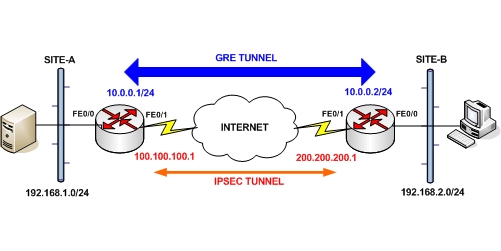
From the diagram above, we have two private LAN networks 192.168.1.0/24 and 192.168.2.0/24 and we want to send non-IP traffic between them (e.g multicast video server traffic from Site-A to Site-B or any other non-IP non-unicast traffic).
For each router we have a static Public IP address on the FE0/1 outside interface (100.100.100.1 and 200.200.200.1) over which we will set up the IPSEC tunnel.
The GRE tunnels will be running between two private IP addresses (10.0.0.1 and 10.0.0.2) configured on each router (with the interface Tunnel command). The scenario also involves NAT for general internet access of the local networks.
SITE-A
version 12.3
service timestamps debug datetime msec
service timestamps log datetime msec
no service password-encryption
!
hostname SITE-A
!
boot-start-marker
boot-end-marker
!
enable secret 5 xxxxxxxxxxxxxxxxxxxxxxxxxxxxxxxx
!
no aaa new-model
ip subnet-zero
!
!— This is the IPsec configuration.
!
crypto isakmp policy 10
authentication pre-share
crypto isakmp key testkey123 address 200.200.200.1
!
crypto ipsec transform-set ESPDES-TS esp-des esp-md5-hmac
!
crypto map myvpn 10 ipsec-isakmp
!
set peer 200.200.200.1
set transform-set ESPDES-TS
match address 101
!
!— This is one end of the GRE tunnel.
!
interface Tunnel0
ip address 10.0.0.1 255.255.255.0
!— Associate the tunnel with the physical outside interface.
tunnel source FastEthernet0/1
tunnel destination 200.200.200.1
!— Attach the IPSEC crypto map to the GRE tunnel.
crypto map myvpn
!— This is the internal network.
interface FastEthernet0/0
ip address 192.168.1.1 255.255.255.0
ip nat inside
!— This is the external interface and one end of the GRE tunnel.
interface FastEthernet0/1
ip address 100.100.100.1 255.255.255.0
ip nat outside
crypto map myvpn
!— Define the NAT pool.
ip nat pool NATPOOL 100.100.100.2 100.100.100.20 netmask 255.255.255.0
ip nat inside source route-map nonat pool NATPOOL overload
ip classless
ip route 0.0.0.0 0.0.0.0 100.100.100.254
!— Force the private network traffic into the tunnel.
ip route 192.168.2.0 255.255.255.0 10.0.0.2
!— All traffic that enters the GRE tunnel is encrypted by IPsec.
access-list 101 permit gre host 100.100.100.1 host 200.200.200.1
!— Use access list in route-map to address what to NAT.
access-list 175 deny ip 192.168.1.0 0.0.0.255 192.168.2.0 0.0.0.255
access-list 175 permit ip 192.168.1.0 0.0.0.255 any
route-map nonat permit 10
match ip address 175
end
SITE-B
version 12.3
service timestamps debug datetime msec
service timestamps log datetime msec
no service password-encryption
!
hostname SITE-B
!
boot-start-marker
boot-end-marker
!
enable secret 5 xxxxxxxxxxxxxxxxxxxxxxxxxxxxxxxx
!
no aaa new-model
ip subnet-zero
!
!— This is the IPsec configuration.
!
crypto isakmp policy 10
authentication pre-share
crypto isakmp key testkey123 address 100.100.100.1
!
crypto ipsec transform-set ESPDES-TS esp-des esp-md5-hmac
!
crypto map myvpn 10 ipsec-isakmp
!
set peer 100.100.100.1
set transform-set ESPDES-TS
match address 101
!
!— This is one end of the GRE tunnel.
!
interface Tunnel0
ip address 10.0.0.2 255.255.255.0
!— Associate the tunnel with the physical outside interface.
tunnel source FastEthernet0/1
tunnel destination 100.100.100.1
!— Attach the IPSEC crypto map to the GRE tunnel.
crypto map myvpn
!— This is the internal network.
interface FastEthernet0/0
ip address 192.168.2.1 255.255.255.0
ip nat inside
!— This is the external interface and one end of the GRE tunnel.
interface FastEthernet0/1
ip address 200.200.200.1 255.255.255.0
ip nat outside
crypto map myvpn
!— Define the NAT pool.
ip nat pool NATPOOL 200.200.200.2 200.200.200.20 netmask 255.255.255.0
ip nat inside source route-map nonat pool NATPOOL overload
ip classless
ip route 0.0.0.0 0.0.0.0 200.200.200.254
!— Force the private network traffic into the tunnel.
ip route 192.168.1.0 255.255.255.0 10.0.0.1
!— All traffic that enters the GRE tunnel is encrypted by IPsec.
access-list 101 permit gre host 200.200.200.1 host 100.100.100.1
!— Use access list in route-map to address what to NAT.
access-list 175 deny ip 192.168.2.0 0.0.0.255 192.168.1.0 0.0.0.255
access-list 175 permit ip 192.168.2.0 0.0.0.255 any
route-map nonat permit 10
match ip address 175
end
Related Posts
- What is a Wildcard Mask – All About Wildcard Masks Used in Networking
- What is Cisco FHRP (First Hop Redundancy Protocol) Explained With Diagrams
- Description & discussion of OSPF Stub Areas-What They Are and Use Cases
- Comparison of BGP Confederations vs Route Reflectors
- What are BGP Confederations-Explanation and Discussion (With Cisco Example)