DHCP stands for Dynamic Host Configuration Protocol. Basically it’s a mechanism which assigns IP addresses to computers dynamically. Usually DHCP is a service running on a server machine in the network in order to assign dynamic IP addresses to hosts.
However, Cisco Routers (and other devices such as ASA firewalls etc) can work also as DHCP server thus replacing a dedicated machine for this task.
One of the most exciting pieces of configuration within Cisco IOS, in my opinion, is IP DHCP Pools. With this feature you can configure a Cisco switch or router to act as a DHCP server.
This feature is useful in several cases including some of the following; small business DHCP sever, disaster recovery DHCP server or helping with configuring static IP address devices. Lets look at each case in more detail.
Cisco IOS DHCP pools can be configured for small businesses where purchasing a standalone DHCP is not economically sound. Small businesses have to “work with what they have” and using a router or Layer 3 switch that is already in the network environment is a great way to do this.
Having a disaster recovery plan is pivotal to business continuity. Having Cisco Router DHCP in you back pocket can make you a hero at the end of an unexpected day. Using this technology you can have a backup config. template in you arsenal for a bad day.
More and more network devices are coming with DHCP enabled by default these days. Some devices like, IP cameras, printers, wireless access point and other devices. Using a configured DHCP pool makes it much easier to remotely access these devices and assign static IP addresses as desired.
Lets take a closer look at the configuration and design.
Steps:
1- Create DHCP Pool
2- Specify the following:
- Network (Subnet Address with Network Mask)
- Default Router (Better known as “Default Gateway”)
- DNS Servers
- DHCP Options (Optional)
3- Exclude any addresses reserved for static address assignment, including the default gateway.
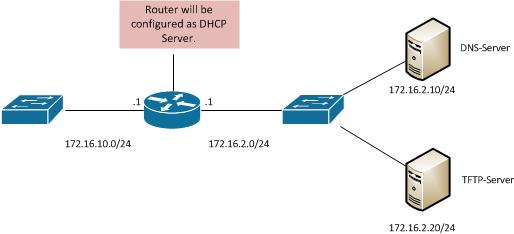
DHCP Configuration Commands:
Router(config)# ip dhcp pool VLAN_10
Creates a DHCP Pool named VLAN_10. Within this Pool we will specify the items mentioned above.
Router(dhcp-config)# network 172.16.10.0 255.255.255.0
Specifies the network for the DHCP Pool VLAN_10 as the 172.16.10.0/24 network.
Router(dhcp-config)# default-router 172.16.10.1
Specifies the “default gateway” for the dhcp clients will be 172.16.10.1.
Router(dhcp-config)# dns-server 172.16.2.10
Specifies the DNS Server will be 172.16.2.10
Router(config)# ip dhcp excluded-address 172.16.10.1 172.16.10.20
The above command tells the router to exclude addresses 172.16.10.1 thru 172.16.10.20 from DHCP allocation. These addresses will not be handed out to clients. The first address to be used will be 172.16.10.21.
Optional
Router(dhcp-config)# option 150 ip 172.16.2.20
Specifies optional DHCP options needed. Above the DHCP option of 150 for TFTP Server has been set to 172.16.2.20.
Verification:
Show ip dhcp binding
The above command will display all allocated DHCP IP Addresses and their lease time.
Forwarding DHCP Requests using ip helper address Command
DHCP, as we all know, is a broadcast protocol (shame on you if you don’t know that already :) !!) which normally works only on the same Layer 2 broadcast domain.
Does this mean that you need to have your DHCP Server connected to the same network subnet as the DHCP clients? If this was the case it would not be flexible or economical at all.
What if you have segmented your internal network into many different subnets and you have DHCP clients in all those subnets. Would this mean that you must have a DHCP server for every subnet?
Fortunately, you don’t need to have this situation. With the Cisco “ip helper-address” command configured on the Layer3 interface which receives the client’s DHCP broadcast, you can transform the broadcast request into a unicast and send it to a centralized DHCP server which can be located to a different subnet in your network.
The unicast DHCP request will be routed normally to the destination DHCP Server within the network, even if the server is far away from the DHCP client.
The DHCP server must have an appropriate IP Pool scope configured for the specific subnet from where the DHCP request came.
Using this IP scope, the server will assign an appropriate IP address to the requesting client. For example, if the DHCP client subnet is 192.168.1.0/24, then the remote DHCP server must have an IP Pool configured to assign addresses within the range 192.168.1.0/24.
The source DHCP client subnet is determined by the IP address assigned to the Layer3 interface which has the ip helper-address configured.
Let’s see an example scenario below with a configuration snapshot.
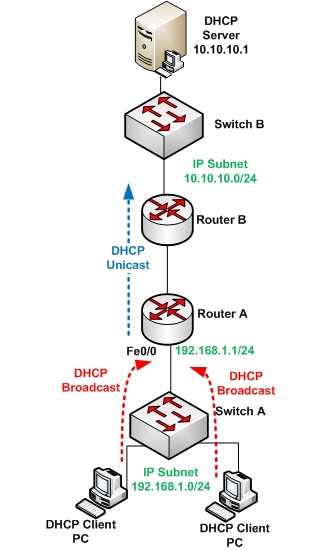
From the network diagram above, two DHCP client PCs are located behind Router A.
Interface Fe0/0 of the router has IP address 192.168.1.1/24.
The DHCP clients will start broadcasting DHCP requests in order to get their IP address information assigned from a server.
By default, these DHCP broadcast requests will be confined within Switch A and will never reach any other subnet beyond Router A.
By configuring an “ip helper-address 10.10.10.1” under interface Fe0/0 of Router A, we tell the router to turn the DHCP broadcast into a DHCP unicast and send it to destination DHCP server 10.10.10.1.
The server will see that the DHCP request came from source subnet 192.168.1.0/24 and will therefore assign an appropriate IP address from a configured IP pool scope within the range 192.168.1.0.
Configuration on Router A
RouterA# conf t
RouterA(config)# interface fastethernet0/0
RouterA(config-if)# ip address 192.168.1.1 255.255.255.0
RouterA(config-if)# ip helper-address 10.10.10.1
Some other important considerations for ip helper-address
By default, the ip helper-address command forwards also some other broadcast protocols in addition to the DHCP (BOOTP) protocol. It forwards by default the following eight UDP broadcast protocols:
- UDP 37 (Time protocol)
- UDP 49 (TACACS)
- UDP 53 (DNS)
- UDP 67 (DHCP Server)
- UDP 68 (DHCP Client)
- UDP 69 (TFTP)
- UDP 137 (NetBios)
- UDP 138 (NetBios Datagram service)
If you want to add more broadcast protocols to be forwarded, or even remove some of the default forwarded protocols, you can use the “ip forward-protocol” command under global config mode.
Example: Remove the NetBios protocols (137,138) from being forwarded by default, and add NTP protocol 123 to be forwarded by ip helper-address.
RouterA(config)# no ip forward-protocol udp 137
RouterA(config)# no ip forward-protocol udp 138
RouterA(config)# ip forward-protocol udp 123
Configuration Example of DHCP on Cisco Routers
All Cisco series models have the ability to work as DHCP servers, thus assigning addresses to the internal LAN hosts. Without a DHCP server in the network, you would have to assign IP addresses manually to each host. These manually assigned addresses are also called “static IP addresses”.
In the following section I will show you how to configure a Cisco 851 or 871 router to work as DHCP server. The same configuration applies for other router series models as well.
Router> enable
Router# config t
! define an IP address pool name and range
Router(config)# ip dhcp pool LANPOOL
! define a network range for the addresses that will be assigned
Router(dhcp-config)# network 192.168.1.0 255.255.255.0
! define a dns name to assign to clients
Router(dhcp-config)# domain-name mycompany.com
! define a default gateway for the clients
Router(dhcp-config)# default-router 192.168.1.1
! define the dns server for the clients
Router(dhcp-config)# dns-server 100.100.100.1
! define a WINS server if you have one
Router(dhcp-config)# netbios-name-server 192.168.1.2
Router(dhcp-config)# exit
!The following addresses will not be given out to clients
Router(config)# ip dhcp excluded-address 192.168.1.1 192.168.1.10
Related Posts
- How to Configure Port Forwarding on Cisco Router (With Examples)
- Redistribution and OSFP – Discussion With Cisco Commands Examples
- Cisco HSRP States and Troubleshooting (With Commands)
- Cisco Router Login – GUI Login and How to Secure Your Access
- Route Filtering and OSPF – Workaround With Distribute List Filtering