Computer networking has been around for several decades, which is the backbone of what we all know as the Internet today. The Internet is simply a network of networks, which connects the world’s networks together for a holistic communication infrastructure.
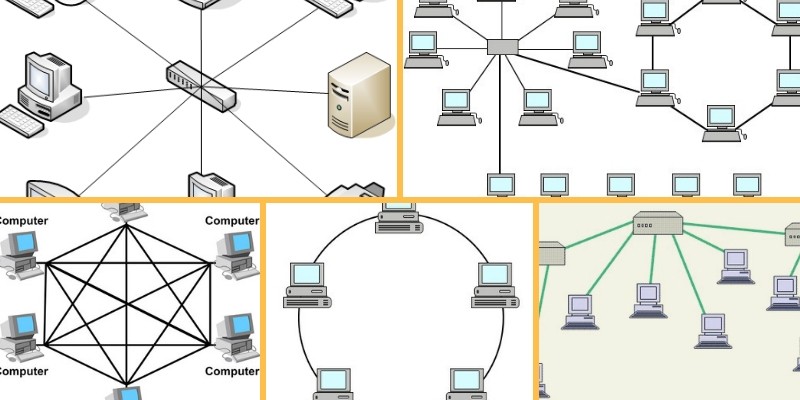
For a user or host computer to participate in data and resource sharing, it has to be connected to some form of network topology.
This has brought about the evolution of computer networking to include more devices, which will further enhance the process of information sharing across different geographical locations.
Most people are already familiar with terminologies such as Local Area Networks (or LANs), which means the computers are within the same geographical location or building, or Wide Area Networks (WANs), which means the devices are separated by geographical distance.
However, there are several other terminologies used in computer networking topologies such as Metropolitan Area Network or MAN, Personal Area Network or PAN etc.
In this article we will compare and discuss the most prevalent network topologies and also describe the pros and cons of each one, so let’s get started.
Physical or Logical Network Topologies
With the brief introduction provided above, we simply understand what a basic computer network is all about.
A network topology can either be the physical or logical arrangement of devices on a network.
These connected devices can be routers, switches, firewalls, network printers, wireless access points, user computers etc (basically anything that can be assigned an IP address). Note that end user devices are also part of the network topology.
Logical topology deals with how data is transferred and flows on the network, while physical topology is concerned with the physical layout of the devices on the network and how they are physically connected.
Types of Network Topologies
Network topology goes beyond logical or physical arrangement of devices. This brings us to the various types of network topologies available today. These topologies are Bus, Star, Ring, Tree, Hybrid and Mesh network topologies. Let us take a closer look at each of these types mentioned.
Bus Topology – Advantages and Disadvantages
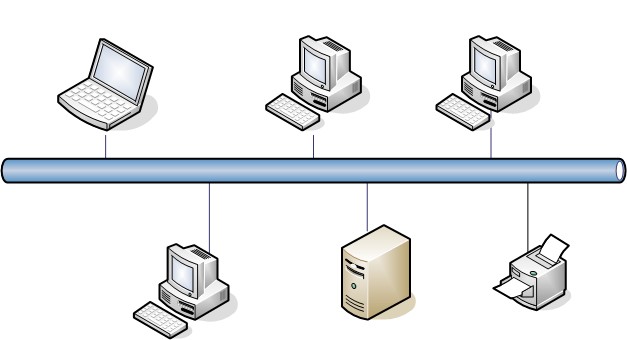
Bus topology has a network arrangement where nodes make use of a single communication line for data transmission.
Many networks at the beginning of computer networking era made use of this topology due to easy implementation.
Advantages
- Since there is a single communication line, means the same medium is shared. Therefore, the major advantage of using this topology is its simplicity.
- Easy to setup and extend.
- Less costly. Less cabling needs.
Disadvantages
- On the other hand, having a single communication line for data transmission makes it easier for collision to occur, which is seen as a disadvantage of using this network topology.
- If the single network cable has a problem or disconnection, the whole network breaks.
- Difficult to identify a problem.
- All devices receive all signals from every other host. This is not efficient.
Star Topology – Advantages and Disadvantages
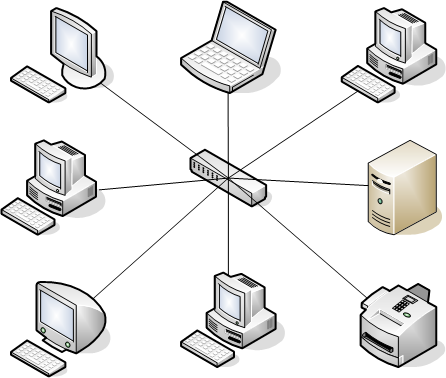
The star network topology is one of the most commonly used topologies today because of its simplicity and efficiency.
In this kind of topology, a centralized node is located at the core of the network topology, in which all the other nodes must communicate through.
This topology is mostly used in homes and offices today. For example, the classic Ethernet LAN networks are using the Star Topology. There is an Ethernet Switch (centralized node) on which all computers and network devices are connected to.
Advantages
- Easy to install and implement with wiring etc.
- Easy to troubleshoot and detect problems in the network.
- If one device fails, it does not affect the other devices in the network.
- You can easily add or remove devices without affecting the rest of the network.
- Centralized management and monitoring through the central switch/hub.
Disadvantages
- The main disadvantage of using this topology is that it has a single point of failure, i.e. when the central switch node is down, there will be a break in communication for all connected devices.
- More cabling is needed since you connect each individual devices to the central node.
- Performance of the whole network depends on the performance of the central node.
Ring Topology – Advantages and Disadvantages
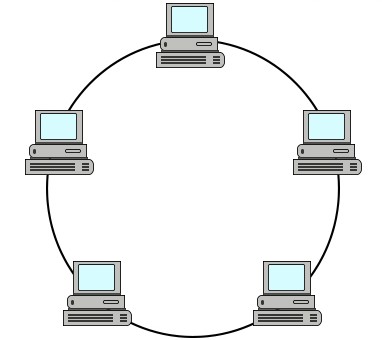
Ring topology presents devices that are arranged in a circular form or just like a ring.
Although the layout of the devices is very similar to bus a topology, ring topology is a closed loop.
Ring networks are not used much nowadays.
Advantages
- The advantage of using this network topology is the ability to have fast network throughput.
- Less packet collisions.
- High speed transfers.
- Token is used between nodes thus making this performing better than bus topology.
Disadvantage
- The disadvantage is the point of failure, as a single node can break the transmission of data on the network.
Hybrid Topology – Advantages and Disadvantages
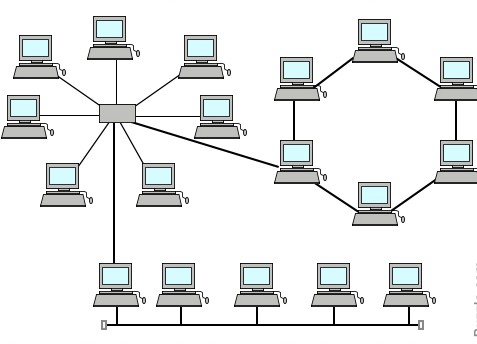
This network topology is basically made up of several topologies i.e. a combination of two or more topologies, which could be bus, star, ring, etc. The whole Internet can be considered a Hybrid Topology network.
Advantages
- In terms of the advantages of using this kind of topology, we find that it has a high level of fault tolerance, which makes it reliable and flexible.
- Scalable as you can add new nodes easily.
- You can design it in such a way as to use the best features of various other topologies.
Disadvantages
- The disadvantages include things such as high cost and complexity of maintenance. This topology is used in real-life where scalability and high performance is important, for example Internet Service Providers.
- Costly infrastructure.
Tree Topology – Advantages and Disadvantages
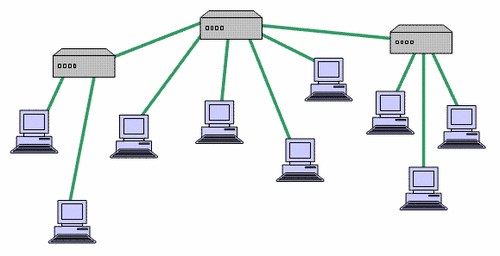
This network topology is ideal for when you have a device acting as the root device on the network.
Note this this topology works with the design of a star and bus topology combined. This has to do with linking star topologies together to form a single network topology, which is linked using a bus topology.
The disadvantage of using this topology is the multiple points of failures that are created, i.e. both the star and bus topology needs to be up at all times.
Mesh Topology – Advantages and Disadvantages
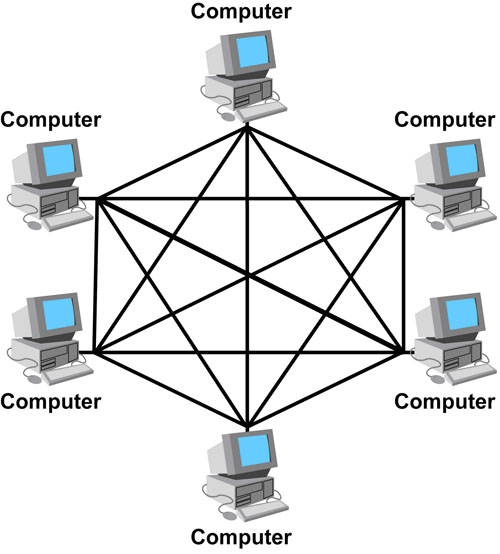
Mesh network topologies create a scenario where there is connection to and from each node that is connected on the network. That is, all network nodes are interconnected between them just like a mesh.
Mesh topologies are used in mission critical network environments such as hospitals or financial institutions, where availability is of utmost importance.
Advantages
- The main advantage of this type is fault tolerance, which is because of the redundant links that are created.
- If one device/node in the network fails, the rest of the devices can work normally without interruption.
- Adding more devices in the network does not affect the rest of the devices.
Disadvantages
- The obvious disadvantage of using this type of network is the high cost of implementation.
- Implementation and maintenance of such a topology is time consuming and difficult.
- Cabling cost is high.
The most common network topology used today
The Star Topology (and its close relatives, the extended or hierarchical-star) is the most common computer network topology today.
Almost any office, school campus, home network, or data center in modern infrastructures work in a star topology mostly.
Here are some examples:
• Wired LANs: Almost every Ethernet LAN installed since the late 1990s uses a physical star. Each PC, printer, VoIP phone, camera, etc. has its own cable that terminates on a switch port in a wiring closet.
• Wi-Fi: In infrastructure mode (the way >95 % of WLANs are run), every client talks only to an access point; the AP is the hub of a one-hop star.
• Campus/backbone: Several stars are usually cascaded (star-of-stars), creating an extended-star or tree.
• Data centers: Even leaf-spine “Clos” fabrics are built by interconnecting multiple star layers.
Why star topology is more common than others?
- Easy fault isolation- one bad cable or NIC affects only one device.
- Scalability – just add switch ports; no shared-collision domain limits.
- Speed – supports full-duplex 1 Gb/s, 10 Gb/s, 40 Gb/s and higher links.
- Cost – switch prices plummeted, while coax and MAU/Token-Ring gear disappeared.
- Flexibility – works equally well for copper, fiber, and wireless uplinks.
Related Posts
- Difference Between Routers and Switches in TCP/IP Networks
- 11 Different Types of IP Addresses Used in Computer Networks
- 11 Networking Companies Like Cisco (Competitors)
- What is a Wildcard Mask – All About Wildcard Masks Used in Networking
- Comparison of Interface MTU vs IP MTU vs MSS in Computer IP Networks