Networks Training

  • About
  • My Books
  • IP Tools
  • HOME
  • Cisco Networking
    • Cisco General
    • Cisco IOS
    • Cisco VPN
    • Cisco Wireless
  • Cisco ASA
    • Cisco ASA General
    • Cisco ASA Firewall Configuration
  • Certifications Training
    • CCNA Training
    • Cisco Certifications
    • I.T Training
  • General
    • Tech News
    • General Networking
    • IP Telephony
    • Network Security
    • Product Reviews
    • Software
  • Cisco Routers
  • Cisco Switches
You are here: Home / Cisco Routers / Configuring PPPoE for Cisco Router 520 and for series 850 and 870

Configuring PPPoE for Cisco Router 520 and for series 850 and 870

Edited By Harris Andrea

The Cisco 520 Ethernet to Ethernet router can be used as a PPPoE Client (Point to Point over Ethernet) to connect a small office to a DSL service for Internet access. Also, using Network Address Translation (NAT), you can connect multiple computers to the Internet using the same router. The same configuration applies also for the newest Cisco 850 and 870 series ISR routers.

PPPoE is a protocol which encapsulates the older dial-up PPP protocol into Ethernet frames for sending over ADSL networks. The physical interface needed for PPPoE is still Ethernet, but you need to configure some sort of dial-up configuration on the router, as we will see below. A simple network diagram of a small SOHO network using a Cisco 520 (applicable also for 850 and 870 series models) with PPPoE connection is shown below:
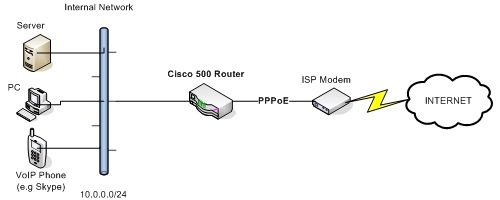
 

pppoe cisco router

Configuration Example

Assume that the internal network range is 10.0.0.0 /24. Also, FastEthernet4 is the WAN facing interface. We will configure the PPPoE using a Virtual Private Dialup Network (VPDN) group and make this group work with pppoe protocol. A sample of the configuration is shown below:

MORE READING:  Configuring GRE Tunnel Through a Cisco ASA Firewall

vpdn enable
vpdn-group 1
request-dialin
protocol pppoe
!
interface vlan 1
ip address 10.0.0.1 255.255.255.0
ip nat inside
!
interface FastEthernet 4
pppoe-client dial-pool-number 1
ip nat outside
!
interface dialer 1
ip address negotiated
ip mtu 1492
dialer pool 1
dialer-group 1
encapsulation ppp
ppp authentication chap pap callin
ppp chap hostname [email protected]
ppp chap password MyISPpassword
ppp pap sent-user [email protected] password MyISPpassword
ip nat outside
no shut
!
dialer-list 1 protocol ip permit
access-list 1 permit 10.0.0.0 0.0.0.255
ip nat inside source list 1 interface dialer 1 overload
ip route 0.0.0.0 0.0.0.0 dialer 1

Spread the love

Related Posts

  • How to Configure Port Forwarding on Cisco Router (With Examples)
  • Redistribution and OSFP – Discussion With Cisco Commands Examples
  • Cisco HSRP States and Troubleshooting (With Commands)
  • Cisco Router Login – GUI Login and How to Secure Your Access
  • Route Filtering and OSPF – Workaround With Distribute List Filtering

Filed Under: Cisco Routers

Download Free Cisco Commands Cheat Sheets

Enter your Email below to Download our Free Cisco Commands Cheat Sheets for Routers, Switches and ASA Firewalls.

By subscribing to our email list you will be receiving technical tutorials and industry news from time-to-time. You can unsubscribe at any time.

About Harris Andrea

Harris Andrea is an Engineer with more than two decades of professional experience in the fields of TCP/IP Networks, Information Security and I.T. Over the years he has acquired several professional certifications such as CCNA, CCNP, CEH, ECSA etc.

He is a self-published author of two books ("Cisco ASA Firewall Fundamentals" and "Cisco VPN Configuration Guide") which are available at Amazon and on this website as well.

Leave a Reply

Your email address will not be published. Required fields are marked *

This site uses Akismet to reduce spam. Learn how your comment data is processed.

Search this site

About Networks Training

We Provide Technical Tutorials and Configuration Examples about TCP/IP Networks with focus on Cisco Products and Technologies. This blog entails my own thoughts and ideas, which may not represent the thoughts of Cisco Systems Inc. This blog is NOT affiliated or endorsed by Cisco Systems Inc. All product names, logos and artwork are copyrights/trademarks of their respective owners.

Amazon Disclosure

As an Amazon Associate I earn from qualifying purchases.
Amazon and the Amazon logo are trademarks of Amazon.com, Inc. or its affiliates.

Search

BLOGROLL

Tech21Century
Firewall.cx

Copyright © 2026 | Privacy Policy | Terms and Conditions | Contact | Amazon Disclaimer | Delivery Policy