Basically Cisco Easy VPN is usually used for Cisco easy VPN Client termination. In this post however, let’s consider the configuration of Cisco Easy VPN between two Cisco routers.
Just keep in mind that an EasyVPN scenario involves a Server and Remote Clients. The basic configuration is performed on the Server and the configuration done on the Remote router is almost similar to the configuration done on Cisco easy VPN client.
Let’s consider an example as shown on diagram below: configure R1 as an easy VPN Remote and configure R2 as an easy VPN Server and force the traffic to flow via the VPN Tunnel between the Loopback interfaces.
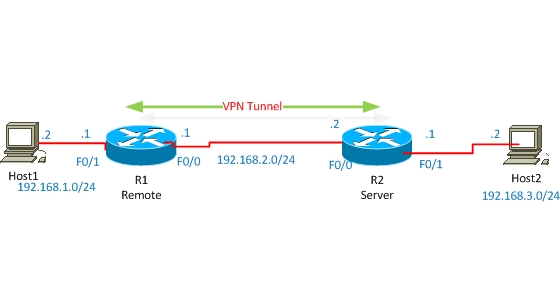
Before starting the configuration between the two routers, check the connectivity between the Loopback interfaces. For simplicity I configured default route on both routers to each other.
Now let’s start configuration. First of all configure R2 as the Server in our scenario.
R2 Configuration
!enable AAA new-model
aaa new-model
! enable local authentication method list with name userauthen for X-AUTH
aaa authentication login userauthen local
! enable local authorization method list with name groupauthor for X-AUTH
aaa authorization network groupauthor local
!create username, by which authorization of Easy VPN Remote will occur later.
username cisco password 0 cisco123
!create ISAKMP PHASE #1 Negotiation
crypto isakmp policy 3
encr 3des
authentication pre-share
group 2
!Create group with pre-shared key for IKE authentication. Save-password Feature allows Remote to save password.
crypto isakmp client configuration group vpngrp
key cisco123
save-password
!create IPSEC Transform-set for DATA Encryption
crypto ipsec transform-set TS esp-3des esp-sha-hmac
!Create Dynamic-map , which will be used to crypto-map later.
crypto dynamic-map dynmap 10
set transform-set myset
! Create crypto map, which will be used to AAA authentication, authorization lists and also in dynamic-crypto map.
crypto map clientmap client authentication list userauthen
crypto map clientmap isakmp authorization list groupauthor
crypto map clientmap 10 ipsec-isakmp dynamic dynmap
!Now attach the crypto-map to outside interface.
interface FastEthernet0/0crypto map clientmap
By this, easy vpn server configuration is completed. Now let’s start Remote configuration. Configuration is almost similar to the Cisco Easy VPN Client configuration.
R1 Configuration
! Create VPN Profile.
crypto ipsec client ezvpn ez
! Connect automatically to Easy VPN Server. If we don’t do this, then we’ll have to connect manually to Easy VPN server every time the network is down.
connect auto
! Easy VPN group username and password, which are created on server.
group vpngrp key cisco123
!Indicate Mode as network-extension.
mode network-extension
!Indicate the IP address of Easy VPN Server.
peer 192.168.2.2
! Use Username and password saved in profile for connecting to Easy VPN Server.
xauth userid mode local
! Save user and password in Profile.
username cisco password cisco123
! Determine Inside interface. Inside and outside interfaces must be determined on Easy VPN Remote.
interface Loopback0
ip address 10.12.130.1 255.255.255.255
crypto ipsec client ezvpn ez inside
!
interface FastEthernet0/0
ip address 192.168.2.1 255.255.255.0
crypto ipsec client ezvpn ez outside
Both sites are completed now, so let’s do some testing:
R2#show crypto isakmp sa
IPv4 Crypto ISAKMP SA
dst src state conn-id slot status
192.168.2.1 192.168.2.2 QM_IDLE 1008 0 ACTIVE
R2#show crypto ipsec sa
interface: Fastethernet 0/0
Crypto map tag: clientmap, local addr 192.168.2.2
protected vrf: (none)
local ident (addr/mask/prot/port): (0.0.0.0/0.0.0.0/0/0)
remote ident (addr/mask/prot/port): (10.12.130.1/255.255.255.255/0/0)
current_peer 192.168.2.1 port 500
PERMIT, flags={}
#pkts encaps: 5, #pkts encrypt: 5, #pkts digest: 5
#pkts decaps: 5, #pkts decrypt: 5, #pkts verify: 5
#pkts compressed: 0, #pkts decompressed: 0
#pkts not compressed: 0, #pkts compr. failed: 0
#pkts not decompressed: 0, #pkts decompress failed: 0
#send errors 0, #recv errors 0
As shown from the red color above, there are packets encrypted/encapsulated and also decrypted/decapsulated which means that traffic passes actually through the VPN tunnel securely.
Related Posts
- How to Configure Port Forwarding on Cisco Router (With Examples)
- Redistribution and OSFP – Discussion With Cisco Commands Examples
- Cisco HSRP States and Troubleshooting (With Commands)
- Cisco Router Login – GUI Login and How to Secure Your Access
- Route Filtering and OSPF – Workaround With Distribute List Filtering