This article describes the security levels concept as used in the Cisco ASA firewall appliance. The following information applies to both the older 5500 series and the newer 5500-X series of appliances.
What is Security Level
A Security Level is assigned to interfaces (either physical or logical sub-interfaces) and it is basically a number from 0 to 100 designating how trusted an interface is relative to another interface on the appliance.
The higher the security level, the more trusted the interface (and hence the network connected behind it) is considered to be, relative to another interface.
Since each firewall interface represents a specific network (or security zone), by using security levels we can assign ‘trust levels’ to our security zones.
The primary rule for security levels is that an interface (or zone) with a higher security level can access an interface with a lower security level.
On the other hand, an interface with a lower security level cannot access an interface with a higher security level, without the explicit permission of a security rule (Access Control List – ACL).
Security Level Examples
Let us see some examples of security levels below:
- Security Level 0: This is the lowest security level and it is assigned by default to the ‘Outside’ Interface of the firewall. It is the least trusted security level and must be assigned accordingly to the network (interface) that we don’t want it to have any access to our internal networks. This security level is usually assigned to the interface connected to the Internet. This means that every device connected to the Internet can not have access to any network behind the firewall, unless explicitly permitted by an ACL rule.
- Security Levels 1 to 99: These security levels can be assigned to perimeter security zones (e.g. DMZ Zone, Management Zone, Database Servers Zone etc).
- Security Level 100: This is the highest security level and it is assigned by default to the ‘Inside’ Interface of the firewall. It is the most trusted security level and must be assigned accordingly to the network (interface) that we want to apply the most protection from the security appliance. This security level is usually assigned to the interface connecting the Internal Corporate network behind it.
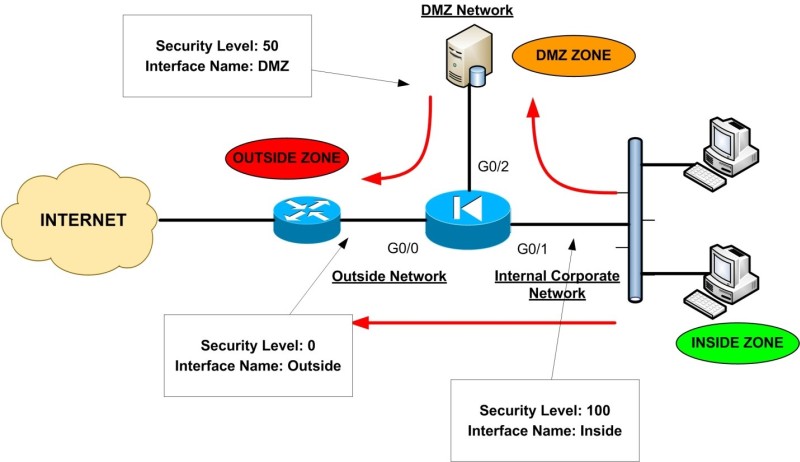
The diagram above illustrates a typical example of security levels assignment in a network with an Inside, Outside, and DMZ zones.
This represents a pretty common network setup of an enterprise/corporate network whereby users are connected to the Inside (internal) network, some public servers (e.g web server, email server etc) are located in a DMZ network and the outside of the ASA is connected to the Internet.
Throughout this website, I represent the Cisco Firewall with the “Electrical Diode” symbol. As you can see, the Internal Corporate Network is connected to the Interface with the highest security level (Interface G0/1 with Security Level 100) which is also named as ‘Inside’.
The Interface name ‘Inside’ is given by default to the interface with the highest security level. Also, the INTERNET facing interface (G0/0) is named ‘Outside’ and is assigned a security level of 0.
A Perimeter Zone (DMZ) is also created with a Security Level of 50. The Red Arrows in the diagram represent the flow of traffic.
As you can see, the Inside Zone can access both DMZ and Outside Zones (Security Level 100 can access freely the Security Levels 50 and 0).
The DMZ Zone can access only the Outside Zone (Security Level 50 can access Level 0), but not the Inside Zone. Lastly, the Outside Zone cannot access either the Inside or the DMZ zones.
What is described in the example above is the default behavior of the Cisco ASA Firewalls. We can override the default behavior and allow access from Lower Security Levels to Higher Security Levels by using Static NAT (only if required) and Access Control Lists.
Rules for Traffic Flow between Security Levels
- Traffic from Higher Security Level to Lower Security Level: Allow ALL traffic originating from the higher Security Level unless specifically restricted by an Access Control List (ACL). If NAT-Control is enabled on the device, then there must be a dynamic NAT translation rule between High-to-Low Security Level interfaces (e.g PAT etc).
- Traffic from Lower Security Level to Higher Security Level: Drop ALL traffic unless specifically allowed by an ACL. If NAT-Control is enabled on the device then there must be a Static NAT between High-to-Low Security Level interfaces.
- Traffic between interfaces with same Security Level: By default this is not allowed, unless you configure the same-security-traffic permit inter-interface command (ASA version 7.2 and later).
Using Interfaces with Same Security Levels on Cisco ASA
Most Cisco ASA firewall models allow you to have a maximum number of VLANs greater than 100 (e.g 150, 200, 250).
Each Layer 2 VLAN on the ASA is essentially a different security zone, with its own Security Level number.
As we know, security levels can range from 0 to 100 (i.e we have 101 security levels). One obvious question arises here: How can we have lets say 150 VLANs on the firewall, but we have only 101 possible security levels?
The answer is simple: We can have the same security level number on different interfaces / subinterfaces (security zones). This feature will allow us to have more than 101 communicating interfaces on the firewall.
By default, interfaces with the same security level can not communicate between them. To allow traffic to flow freely between interfaces with same security level, use the following command:
ASA(config)# same-security-traffic permit inter-interface
There is another option also for this command:
ASA(config)# same-security-traffic permit intra-interface
The last command above allows traffic to enter and exit the same interface, which by default is not allowed. This is useful in networks where the ASA firewall acts as a HUB in a HUB-and-SPOKE VPN topology, where spokes need to communicate with each through the hub (this is also called “hairpinning“).
Security level is one of the core concepts of ASA firewalls. You must carefully plan the assignment of security levels on a per-interface basis and then control traffic between interfaces accordingly.
Let me know in the comments section below if you have any questions or if you need any help configuring security levels.
Related Posts
- What is Cisco ASA Firewall – All you need to Know
- Traffic Rate and Bandwidth Limiting on Cisco ASA Firewall
- Cisco ASA 5505-5510-5520-5540-5550-5580 Performance Throughput and Specs
- Password Recovery for the Cisco ASA 5500 Firewall (5505,5510,5520 etc)
- Cisco ASA 5505, 5510 Base Vs Security Plus License Explained