The Cisco 520 Ethernet to Ethernet router can be used as a PPPoE Client (Point to Point over Ethernet) to connect a small office to a DSL service for Internet access. Also, using Network Address Translation (NAT), you can connect multiple computers to the Internet using the same router. The same configuration applies also for the newest Cisco 850 and 870 series ISR routers.
PPPoE is a protocol which encapsulates the older dial-up PPP protocol into Ethernet frames for sending over ADSL networks. The physical interface needed for PPPoE is still Ethernet, but you need to configure some sort of dial-up configuration on the router, as we will see below. A simple network diagram of a small SOHO network using a Cisco 520 (applicable also for 850 and 870 series models) with PPPoE connection is shown below:
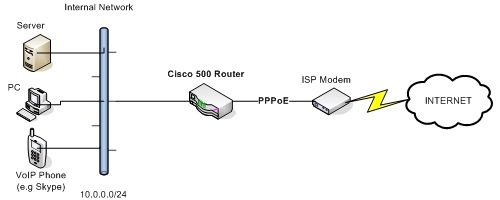
Configuration Example
Assume that the internal network range is 10.0.0.0 /24. Also, FastEthernet4 is the WAN facing interface. We will configure the PPPoE using a Virtual Private Dialup Network (VPDN) group and make this group work with pppoe protocol. A sample of the configuration is shown below:
vpdn enable
vpdn-group 1
request-dialin
protocol pppoe
!
interface vlan 1
ip address 10.0.0.1 255.255.255.0
ip nat inside
!
interface FastEthernet 4
pppoe-client dial-pool-number 1
ip nat outside
!
interface dialer 1
ip address negotiated
ip mtu 1492
dialer pool 1
dialer-group 1
encapsulation ppp
ppp authentication chap pap callin
ppp chap hostname [email protected]
ppp chap password MyISPpassword
ppp pap sent-user [email protected] password MyISPpassword
ip nat outside
no shut
!
dialer-list 1 protocol ip permit
access-list 1 permit 10.0.0.0 0.0.0.255
ip nat inside source list 1 interface dialer 1 overload
ip route 0.0.0.0 0.0.0.0 dialer 1
Related Posts
- How to Configure Port Forwarding on Cisco Router (With Examples)
- Redistribution and OSFP – Discussion With Cisco Commands Examples
- Cisco HSRP States and Troubleshooting (With Commands)
- Cisco Router Login – GUI Login and How to Secure Your Access
- Route Filtering and OSPF – Workaround With Distribute List Filtering