The Cisco Unified Communications Manager Express (CUCME) is the new brand name given by Cisco to the older Call Manager Express (CME) system. The concept is the same however: IP Telephony software running on Cisco routers. Therefore, the CUCME is a normal Cisco router (models supported are 1800, 2800, 2900, 3800, 3900 series) with a special IP Telephony software (call manager software) installed on the router’s flash memory. The CUCME system serves as the call control node to facilitate IP Telephony communications in a small to medium size Enterprise.
Usually there is a single CUCME system in each LAN network, with several IP phones connected on the LAN switches. An enterprise with several sites connected over a private IP WAN network can establish full IP voice communications between sites by configuring H323 communication between each CUCME router. A simple example with a two-node topology is shown below.
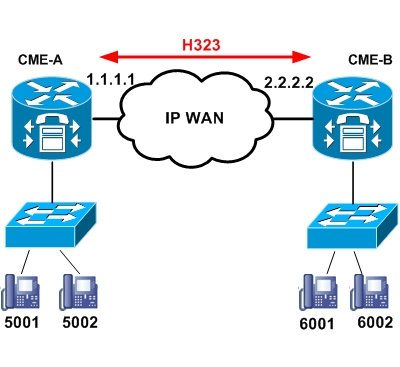
CME-A node has local IP phones with numbering 500x and a WAN IP address of 1.1.1.1. On the other site, CME-B has local IP phones with numbering 600x and a WAN IP address of 2.2.2.2. By establishing H323 voip communication over the WAN (between 1.1.1.1 and 2.2.2.2) we can have full IP telephony conversations between the IP phones of both sites.
CAUTION: Because the actual VoIP RTP traffic communication between site A and site B will be running from one IP phone to another IP phone, there must be full IP routing established between the IP phone subnets.
The CUCME configuration to establish H323 between the two sites is shown below:
CME-A
CME-A#show running-config
dial-peer voice 6000 voip
destination-pattern 60..
session target ipv4:2.2.2.2
dtmf-relay h245-alphanumeric
codec g729r8
CME-B
CME-B#show running-config
dial-peer voice 5000 voip
destination-pattern 50..
session target ipv4:1.1.1.1
dtmf-relay h245-alphanumeric
codec g729r8
The dial-peer configuration on CME-A tells the system that in order to reach the destination pattern 60xx the session will be established with IP address 2.2.2.2 (i.e CME-B). The inverse applies for CME-B.
Note: Make sure to select one of the high compression codecs ( such as g729, g723) in order to save bandwidth for voice calls over the WAN network. Each VoIP conversation using a high compression codec (g729, g723) will use significantly less bandwidth compared with the traditional G711 codec.