Having visibility in the traffic flowing through your network from specific hosts is an excellent way to troubleshoot problems or gather useful information and data.
Cisco switches offer the capability to copy packets from specific ports or VLANs and send them to other ports for capturing and analyzing.
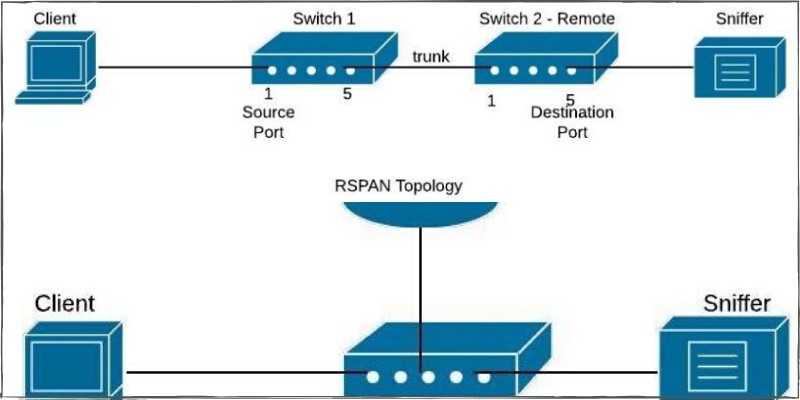
The traffic can be captured and analyzed using for example Wireshark. This is also useful when you want to send traffic to an Intrusion Detection System (IDS) for security purposes.
In Cisco environments you can use a feature called SPAN (Switch Port Analyzer) for this purpose.
There are three kinds of SPAN modes that are available for different scenarios: SPAN, RSPAN & ERSPAN all of them having the following key features:
- Require a source port or vlan and a destination port where the traffic will be collected.
- Source port can be a routed port, switchport, trunk or etherchannel.
- Destination port does not support 802.1x, private vlan, CDP, STP, VTP.
Something to keep in mind also is that you can monitor three kinds of traffic:
- Incoming (rx) – monitored traffic is sent towards the destination port before any policy modification (ACL, QoS, Policy-Map etc)
- Transmitting (tx) – monitored traffic is sent towards the destination port after any policy is applied.
- Encapsulation replicate – Forwards CDP,STP,VTP traffic that usually is ignored by SPAN.
Basic SPAN configuration
For Network Engineers, the ability to mirror switch traffic and send it to a sniffer for analysis is an essential troubleshooting technique.
All Cisco Catalyst switches support the Switched Port Analyzer (SPAN) feature which copies traffic from specified switch source ports or VLANs and mirrors this traffic to a specified destination switch port (SPAN port).
Then, you can connect your PC having a sniffer tool (like WireShark) on the destination SPAN port to capture all mirrored traffic. The diagram below shows this:
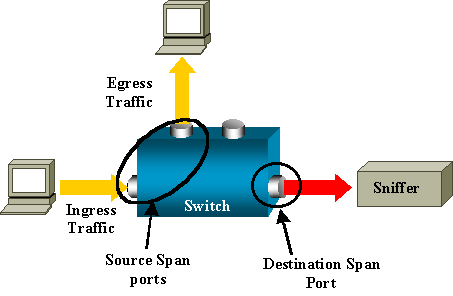
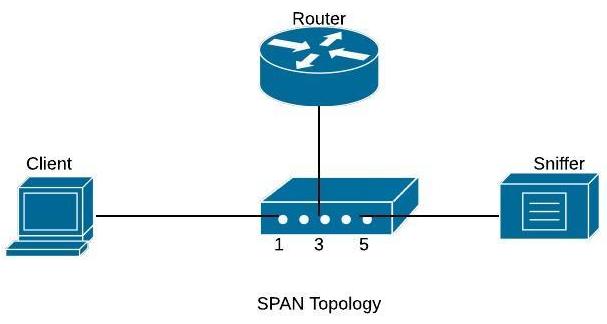
Basic SPAN captures traffic from one source port or VLAN and sends the traffic to another port on the same switch.
On the diagram shown below, we will capture traffic from source port fa0/1 (connected to a user computer) and send the traffic to destination port fa0/5.
Configuration Commands
Switch(config)# monitor session 1 source interface fa0/1
Switch(config)# monitor session 1 destination interface fa0/5
With this simple configuration, traffic sourced from interface fa0/1 will be mirrored to interface fa0/5 where you will be able to capture it.
We can also monitor the traffic of a whole Vlan and send a copy of the traffic to a destination physical port as shown below:
Configuration Example – Monitoring an entire VLAN traffic
c3750(config)#monitor session 1 destination interface fastethernet 0/5
The configuration above will capture all traffic of VLAN 5 and send it to SPAN port fastethernet 0/5.
Use the command show monitor session 1 to verify your configuration.
Basic RSPAN configuration
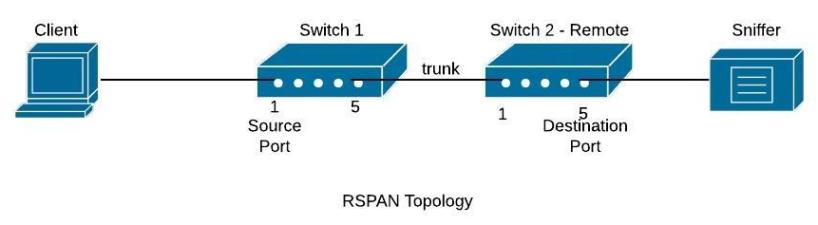
RSPAN (Remote SPAN) feature allows traffic that is sourced from a switch to be mirrored to a remote switch within a layer 2 network over trunk ports. To accomplish this you will have to configure the destination VLAN across the entire path between the switches.
In the diagram below, we want to capture traffic from Switch1 (port fa0/1) and send the traffic to Switch2 (port fa0/5).
Although here we show a direct connection with a Layer2 trunk port between Switch1-Switch2, you can have multiple switches between them with no problem (the capturing vlan must be active on the whole path though).
Configuration Commands
Switch1 (config)# vlan 100 < —This is the capturing VLAN
Switch1 (config-vlan)# remote span
Switch1(config-vlan)# exit
Switch1 (config)# monitor session 10 source interface fa0/1
Switch1 (config)# monitor session 10 destination remote vlan 100Switch2_Remote# config term
Switch2_Remote (config)# vlan 100 < —This is the capturing VLAN
Switch2_Remote (config-vlan)# remote span
Switch2_Remote (config-vlan)# exit
Switch2_Remote (config)# monitor session 11 source remote vlan 100
Switch2_Remote (config)# monitor session 11 destination interface fa0/5
All traffic sourced from interface fa0/1 on switch 1 will be forwarded using vlan 100 towards the destination port on remote switch2 where you can sniff the traffic.
Basic ERSPAN configuration
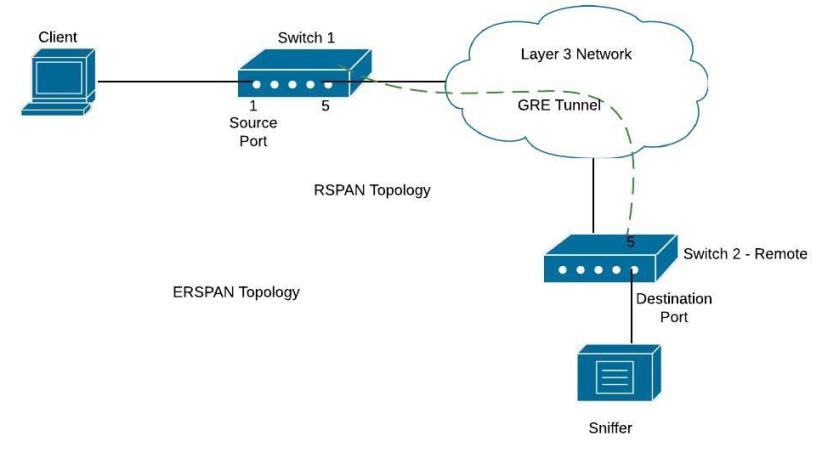
ERSPAN (Encapsulated Remote Switched Port Analyzer) is a feature present on the new IOS-XE on ASR1000 but is also available on Catalyst 6500 or 7600. It is used to send traffic for sniffing over layer3 networks and it works by encapsulating the traffic using a GRE tunnel.
On the diagram below, there is a GRE tunnel between Switch1 (again this is usually an ASR1000 or 7600 etc) and remote Switch2. The GRE tunnel is established between IP address 172.16.10.10 (on switch1) and 10.10.10.10 (on switch2). We want to send traffic from fa0/1 on Switch1 to fa0/5 on Switch2.
Configuration Commands
Switch1
Switch1(config)# monitor session 1 type erspan-source
Switch1 (config-mon-erspan-src)# source interface fa0/1
Switch1 (config-mon-erspan-src)# destination
Switch1 (config-mon-erspan-src-dst)# erspan-id 110 < — This ID must be the same on Switch2
Switch1 (config-mon-erspan-src-dst)# ip address 10.10.10.10 < — ip address on switch2
Switch1(config-mon-erspan-src-dst)# origin ip address 172.16.10.10 < — ip address on switch 1
Switch2
Switch2_Remote (config)# monitor session 1 type erspan-destination
Switch2_Remote (config-mon-erspan-dst)# destination interface fa0/5
Switch2_Remote (config-mon-erspan-dst)# source
Switch2_Remote (config-mon-erspan-dst-src)# erspan-id 110
Switch2_Remote (config-mon-erspan-dst-src)# ip address 10.10.10.10 < — IP address on switch 2
Some final notes:
- You can monitor specific vlan traffic using the command:
“monitor session 1 source vlan 10”
- You can monitor incoming or outgoing traffic using
“monitor session 1 source vlan 10 rx/tx”
- Verification is done issuing:
“show monitor session 1”
DOWNLOAD ARTICLE AS PDF FILE HERE
Related Posts
- Failure-Mode Engineering: Turning Network Adversity Into an Advantage
- What is Cisco Virtual Port Channel (vPC) – Explained and Discussed
- What is a Wildcard Mask – All About Wildcard Masks Used in Networking
- Configuration Drift? Not on our Watch in Networks
- What is Cisco Identity Services Engine (ISE)? Use Cases, How it is Used etc