A Remote Access VPN (Virtual Private Network) is a connection technology to provide secure and confidential connection of remote users to internal company resources through the Internet.
The remote company user needs to have a VPN client software (e.g Cisco VPN client) installed on his/her laptop plus a normal Internet connection (cable internet, broadband ADSL, wifi hotspot etc).
Since traffic from the remote user will be passing through the untrusted Internet, it has to be encrypted to keep data confidential. To achieve confidentiality, the IPSEC protocol is used to encrypt and secure the user data.
Cisco VPN client is the most popular software used to provide remote access connectivity to the corporate home network.
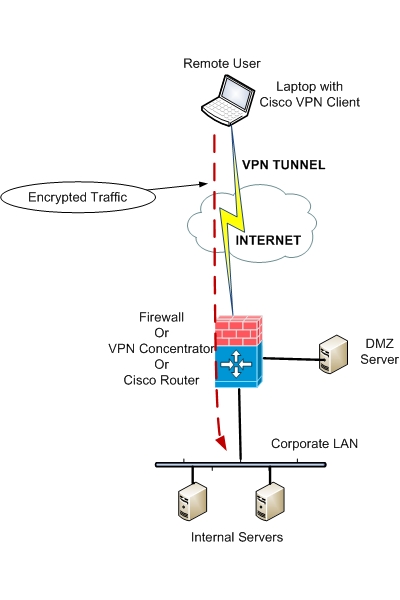
The figure above shows a basic setup for a remote employee using Cisco VPN client to connect securely over the Internet to his corporate network.
First, the remote user connects to his public Internet Service Provider. Next, the user starts his Cisco VPN client installed on his laptop and initiates a VPN connection to the company VPN server.
This can be a Cisco firewall (PIX or ASA), a Cisco VPN concentrator, or a Cisco Router with IPSEC software. Once the VPN connection has been established, the remote vpn user can communicate with internal company servers and resources just as if it were a local host.
The above applies for the older VPN client software which is not available any more. The new client is called Anyconnect and can be configured on an ASA device as described here.
The Cisco VPN Software Client used to be the most popular “Remote Access tool” for teleworkers and for remote mobile employees for any organization.
It allowed the user to establish a secure IPSec tunnel from any internet connection towards a central location (usually the user’s corporate central network).
Once the tunnel is established, the user is attached to the central network and has full connectivity just like as he was connected locally.
The latest release (at the time of writing) is 5.0.03. This release can be installed on the following operating systems:
- Windows 2000
- Windows XP
- Windows Vista (x86 / 32-bit only)
- Linux (Intel based)
- Mac OS X 10.4
- Solaris UltraSparc (32 and 64-bit)
Furthermore, the Cisco VPN Client is compatible with all Cisco VPN hardware products as listed below:
- Cisco Firewall ASA 5500 Series Software Version 7.0 and higher.
- Cisco Firewall PIX Security Appliance Software Version 6.0 and later.
- Cisco VPN 3000 Series Concentrator Software Version 3.0 and later.
- Cisco Routers with VPN IOS support Software Release 12.2(8)T and later.
- Cisco 6500 / 7600 IPSec VPNSM and VPN SPA IOS Software Release 12.2SX and later.
To obtain the Cisco VPN Client software you need a Cisco SMARTNet support contract and you can download the client from Cisco Software Center.
Also, a CD with the VPN software client comes with any purchase of a Cisco ASA 5500 series firewall (except ASA 5505).