In addition to IPSEc VPN support, Cisco firewalls support also the SSL Web VPN technology for providing access to resources for remote users. The main difference between IPSEc VPN and SSL VPN is that the first one requires a VPN client installed on the user’s computer while the SSL VPN requires only a secure browser (HTTPs). Another difference is that IPSEc VPN provides full network connectivity to the central site for the remote user with the ability for the user to have full access to applications just like local LAN access. On the other hand, SSL VPN provides limited application access compared with IPSEc VPN. The applications that can be accessed by SSL VPN include Internal websites, Web-enabled applications, NT/Active Directory file shares, E-mail proxies, including POP3S, IMAP4S, and SMTPS, MS Outlook Web Access, and port forwarding access to some other TCP-based applications.
EDIT: The above statement about SSL VPN was valid for the older SSL VPN technology which was supported only through a web portal on the ASA. Now, Cisco ASA supports the Anyconnect SSL VPN which is similar with the IPSEC VPN client. With Anyconnect VPN you can have full remote network access to the central site.
The diagram below shows a high level network topology for SSL VPN connectivity:
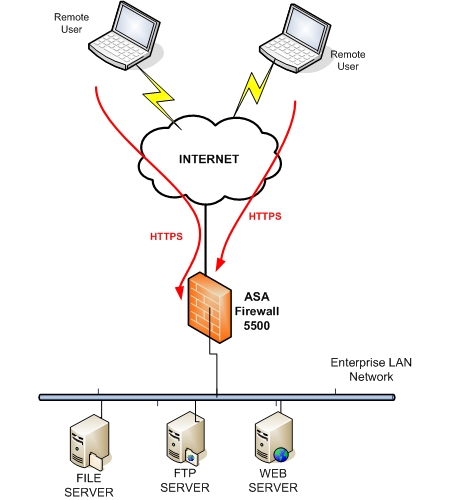
As you can see, the remote users can establish a secure SSL tunnel over the Internet and access application resources located in their central Enterprise LAN using a web browser (HTTPs).
Next we will describe how to enable SSL VPN on the firewall, and discuss how you can avoid a port conflict with ASDM (Web GUI management) when both are enabled on the same firewall interface.
Both SSL VPN and ASDM use the HTTPs protocol for communication which uses port 443 by default. If we need to enable ASDM management access on the same interface as SSL VPN (usually the “outside” interface), then we must change the listening port of either the SSL VPN or the ASDM. In our example below we will describe both scenarios.
A. Change the port of ASDM
ASA(config)# http server enable 444
ASA(config)# http 100.100.100.1 255.255.255.255 outside
ASA(config)# webvpn
ASA(config-webvpn)# enable outside
For the above scenario, ASDM listens on port 444 while SSL VPN uses the default port 443. With this configuration, the remote administrator user on address 100.100.100.1 initiates ASDM sessions by entering https://<Outside-Address>:444 in the browser. Normal SSL VPN users initiate SSL VPN sessions by entering https://<Outside-Address>
B. Change the port of SSL VPN
ASA(config)# http server enable
ASA(config)# http 100.100.100.1 255.255.255.255 outside
ASA(config)# webvpn
ASA(config-webvpn)# port 444
ASA(config-webvpn)# enable outside
For the above scenario, ASDM listens on default port 443 while SSL VPN uses port 444. With this configuration, the remote administrator user on address 100.100.100.1 initiates ASDM sessions by entering https://<Outside-Address> in the browser. Normal SSL VPN users initiate SSL VPN sessions by entering https://<Outside-Address>:444