In this post I will explain how to provide routing between two VLANs on a simple Layer 2 switch using a Cisco router with just one interface. This is called also Router-on-a-stick. This configuration is usually asked as a question in CCNA exams, so I hope it will be helpful for people preparing for certification. Lets see the diagram below to get us started:
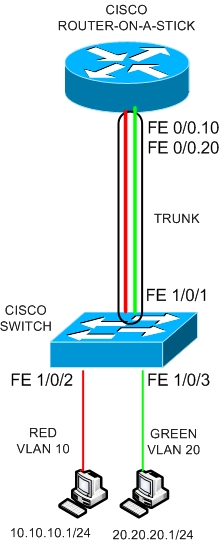
A Cisco Layer 2 switch carries two VLANs (VLAN 10 – RED and VLAN 20 – GREEN) with two hosts connected to them as shown on the diagram above. The two ports of the switch with the hosts connected to them (FE1/0/2 and FE1/0/3) must be access ports.
The first host belongs to Network 10.10.10.0/24 (VLAN10) and the second one to 20.20.20.0/24 (VLAN20).
By default, if the switch is just a normal Layer 2 switch the two hosts can not communicate between them because they belong to different VLANs and there is no routing.
Thus, if we want to provide network connectivity between the two VLANs we need to have a Layer 3 engine somewhere in the network.
This can be accomplished either if the switch is Layer 3 (using Layer3 InterVLAN Routing) or if there is a router in place. In our example we use a router to provide Layer 3 connectivity as shown in our diagram.
The router uses just a single interface connected to a trunk port on the switch. The Router interface can be divided into two subinterfaces, with each subinterface belonging to the appropriate VLAN.
The switch port connected to the router must be a trunk port in order to be able to carry both VLANs towards the router port. Lets see the configuration below:
SWITCH CONFIGURATION
# conf t
(config)# vlan 10
(config-vlan)# exit
(config)# vlan 20
(config-vlan)# exit
(config)# interface FastEthernet1/0/1
(config-if)# description trunk-to-router-on-a-stick
(config-if)# switchport trunk encapsulation dot1q
(config-if)# switchport mode trunk
(config-if)# spanning-tree portfast trunk
(config-if)# exit
(config)# interface FastEthernet1/0/2
(config-if)# description connection-to-RED-VLAN
(config-if)# switchport mode access
(config-if)# switchport access vlan 10
(config-if)# exit
(config)# interface FastEthernet1/0/3
(config-if)# description connection-to-GREEN-VLAN
(config-if)# switchport mode access
(config-if)# switchport access vlan 20
(config-if)# exit
(config)# exit
# copy run start
NOTE:
The “spanning-tree portfast trunk” command on interface FastEthernet1/0/1 is used to bypass spanning-tree delay when connecting the interface to the router. This command should not be used if the interface is connected to another switch in order to avoid possible spanning-tree loops.
ROUTER CONFIGURATION
# conf t
(config)# interface fastethernet 0/0.10
(config-if)# encapsulation dot1q 10
(config-if)# ip address 10.10.10.2 255.255.255.0
(config-if)# exit
(config)# interface fastethernet 0/0.20
(config-if)# encapsulation dot1q 20
(config-if)# ip address 20.20.20.2 255.255.255.0
(config-if)# exit
Now, in order for the two hosts to communicate between them, they must set as default gateway the IP address of the corresponding router subinterface address (e.g for host in VLAN 10 the gateway must be 10.10.10.2 and for host in VLAN 20 the gateway must be 20.20.20.2).
Restricting Traffic Between VLANs
If you want to restrict traffic between the two VLANs, you can do so using Access Control Lists applied to the subinterfaces of the router.
For example, if you want to allow only host 10.10.10.10 to communicate with host 20.20.20.10 then you can create the following ACL and apply it to the router as shown below:
# conf t
(config)# access-list 101 permit ip host 10.10.10.10 host 20.20.20.10
(config)# interface fastethernet 0/0.10
(config-if)# ip access-group 101 in
(config-if)# exit
The numbered ACL 101 allows all traffic from host 10.10.10.10 to reach host 20.20.20.10 and denies everything else (note that in ACLs there is an implicit “deny all” at the end of the access-list).
Use Cases and Limitations
The “Router on a Stick” configuration is useful in situations where there is no Layer3 switch available and the only networking equipment you have are a router and a Layer2 switch. With this scenario you can provide Layer3 routing between two or more Layer2 VLANs which exist on the switch.
Note however that all traffic between the VLANs will pass through the single physical interface of the router.
Therefore, if the router is low-end model with not much bandwidth performance and also if the interface is just a simple old 10/100 Mbps interface, then you might have traffic problems (especially if the VLANs have lots of traffic between them).
DOWNLOAD THIS TUTORIAL AS PDF FILE
Related Posts
- How Does a Network Switch Learn MAC Addresses?
- How to Find a Device MAC Address on a Cisco Switch (show mac address-table)
- How to Configure a Loopback Interface on Cisco Router & Switch
- Cisco Switch Layer2 Layer3 Design and Configuration
- Description of Switchport Mode Access vs Trunk Modes on Cisco Switches