Sponsored Links
Cisco manufactures routers for all markets, ranging from SOHO up to large service provider models. The Cisco Router 800 series belongs to the lowest SOHO end. The most popular models in the 800 series are the 850 and 870 broadband access models which come with different types of WAN broadband interfaces (the difference between 850 and 870 is that the 870 models have higher throughput, support 10 VPN tunnels instead of 5 and also support VLANs with the proper IOS version). The 851 and 871 are equipped with a 10/100 Ethernet WAN interface which means that your ISP should provide you with a broadband modem offering an Ethernet connection towards the customer.
I’m getting a lot of questions about the interfaces of 851/871 routers and how they are arranged. I hope this post will clarify some things. The figure below shows the back panel of Cisco Router 851/871.
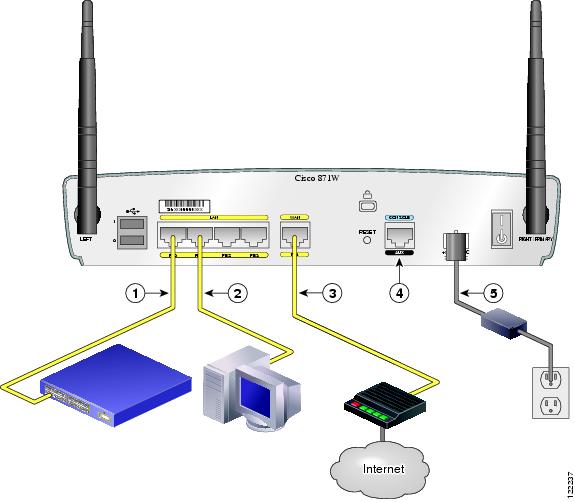
Ports FE0 up to FE3 under the LAN group can be used to connect internal computers or maybe to an internal switch to expand the number of internal ports (see points 1,2 in the figure above). These ports are actually Layer 2 switch ports, and not regular Layer 3 router ports. They are assigned by default to VLAN 1. You can create more VLANs and assign each port to a different VLAN (870 series), thus creating extra segmentation for your internal LAN. You can not configure IP addresses directly on the interface ports. The IP address must be configured on the Interface VLAN 1 (we will see example below).
Port FE4 is the WAN interface which must be connected to the ISP DSL broadband modem (see point 3 in the figure above). This port is a normal Layer 3 router port, which means you can configure IP address directly on the interface port.
Default Configuration for 851 – 871 Router
The Cisco 851 and 871 routers come with some preconfigured parameters (IP addresses etc) which might be in conflict with your current network topology. What I suggest is to erase the factory’s default startup configuration before you begin configuring your router for the first time. This allows you to start with a clean state and configure the router with all the features you need and leave off any that you don’t want. Connect with a console cable and after you get a command prompt execute the following:
Router> enable
Router# erase start
After you confirm the command, all the default configuration will be deleted. Power off the router device and then power on again. You will get a prompt as below:
Would you like to enter the initial configuration dialog [yes/no]
Type no and press Enter. This will give you a command prompt (Router>) and you are ready to configure your router from scratch.
Type show run to see the current configuration which looks like the following:
(some output omitted)
interface FastEthernet0
no ip address
shutdown
!
interface FastEthernet1
no ip address
shutdown
!
interface FastEthernet2
no ip address
shutdown
!
interface FastEthernet3
no ip address
shutdown
!
interface FastEthernet4
no ip address
duplex auto
speed auto
interface Vlan1
no ip address
Initial Interface Configuration
From the above output you can see that FE0 up to FE3 are shutdown and also there are no IP addresses configured to any ports. You need first to enable FE0 to FE4 and then configure IP address under the “interface Vlan 1” and also under the “interface FastEthernet4” port. Notice that you CAN NOT configure IP addresses under the “interface FastEthernet0″ up to “interface FastEthernet3″ ports. Those ports are Layer 2 switch ports and will inherit the IP address you assign under “interface Vlan1″.
Example:
Assume that the internal LAN has IP network range 192.168.10.0/24. Also, our ISP has assigned us a static public IP address of 200.200.200.1 . Let’s see the interface configuration below:
Router(config)# interface fastethernet 0
Router(config-int)# no shutdown
Router(config-int)# exit
Router(config)# interface fastethernet 1
Router(config-int)# no shutdown
Router(config-int)# exit
Router(config)# interface fastethernet 2
Router(config-int)# no shutdown
Router(config-int)# exit
Router(config)# interface fastethernet 3
Router(config-int)# no shutdown
Router(config-int)# exit
Router(config)# interface fastethernet 4
Router(config-int)# no shutdown
Router(config-int)# ip address 200.200.200.1 255.255.255.252
Router(config-int)# exit
Router(config)# interface vlan1
Router(config-int)# no shutdown
Router(config-int)# ip address 192.168.10.1 255.255.255.0
Router(config-int)# exit
Notice that we configured IP addresses only to fastethernet 4 and vlan1. By default, interfaces fastethernet 0 to 3 are assigned to VLAN1 so anything you connect to those interfaces (internal LAN hosts) will belong to vlan1 network range 192.168.10.0/24 and they must have as default gateway the address 192.168.10.1.
Related posts:
- How to Configure DHCP on Cisco 851 or 871 Router
- Basic Cisco Router Configuration Steps
- Configuring Cisco Router Interfaces
- Cisco Router HSRP Configuration
- How to Configure a Cisco ASA 5510 Firewall – Basic Configuration Tutorial
- Cisco Router-on-a-stick with Switch
- Basic IP Phone Configuration on Cisco Call Manager Express
Sponsored Links


Thanks for a nice post.
I was wondering if you could post a basic configuration for setting up wireless interfaces?
Here is a quick Wlan configuration for a Cisco 851w or 871w routers. We will use a Wlan in the same VLAN as the internal LAN (i.e the native VLAN 1) which has address subnet of 192.168.1.0/24:
————————————————————————-
bridge irb
bridge 1
bridge 1 protocol ieee
bridge 1 route ip
!
interface Dot11Radio0
no ip address
!
broadcast-key vlan 1 change 45
!
!
encryption vlan 1 mode ciphers tkip
!
ssid myhomessid
vlan 1
authentication open
wpa-psk ascii 0 somestrongkey
authentication key-management wpa
!
speed basic-1.0 basic-2.0 basic-5.5 6.0 9.0 basic-11.0 12.0 18.0 24.0 36.0 48.0 54.0
rts threshold 2312
power local cck 50
power local ofdm 30
channel 2462
station-role root
!
interface Dot11Radio0.1
description My Home WLAN
encapsulation dot1Q 1 native
no cdp enable
bridge-group 1
bridge-group 1 subscriber-loop-control
bridge-group 1 spanning-disabled
bridge-group 1 block-unknown-source
no bridge-group 1 source-learning
no bridge-group 1 unicast-flooding
!
interface Vlan1
no ip address
bridge-group 1
bridge-group 1 spanning-disabled
interface BVI1
ip address 192.168.1.254 255.255.255.0
———————————————————————————
If you have Windows XP or Vista, you need to configure your wireless card for WPA-PSK (Network Authentication) and TKIP (Data Encryption)
I have tried to configure my 851w wlan interface with the configuration you’ve pasted, but after assigning vlan1 to bridge group, the computers connected to ethernet ports looses connectivity. Still it does not start to broadcast a radio signal.. I need it to use the vlan 1 ip adressess. My vlan1 belongs to 192.168.1.0/24 network as in an example above, and I use IOS version 12.4(11)T1.
Could you please advice or write a guide about setting wireless on these routers?
Hello there,
Check the configuration again as I added some commands that were not shown before (they were the default in my version of IOS so the show run command did not show them).
Hope its fixed now. Also, note that on your windows wireless client you should configure WPA-PSK (Network Authentication) and TKIP (Data Encryption)
Hi,
Tried your config, but it wasn’t working for me…
power local cck and power local ofdm can only be set up with maximum on my router, the are no numbers anywhere near 50 and 30.
And I think you should use no shutdown on dot11radio, because after the config it was shut down.
Cisco IOS Software, C850 Software (C850-ADVSECURITYK9-M), Version 12.4(15)T5, RELEASE SOFTWARE (fc4)
It’s very funny that configuring a Wlan needs so much work…
Ok, now it’s working, as a side not there is no ssid broadcasting, so you have to set it up manually on your computer to connect anyway. My router works now as an AP, thanks man!
On of these I will try to get it working with wpa2-psk(AES) and wpa2-ent(EAP). Shouldn’t be so hard ;O.
Sorry for the typos, One of these days I will try to get it working
. It’s 2:30 AM here btw, night!
Hello Repcsi,
The “power local cck” and “power local ofdm” values depend on the power levels allowed in your regulatory domain (different values between USA and Europe for example), so this is the reason that IOS does not allow you to configure different values (maybe you are in USA wireless regulatory domain).
I’m glad you made it work. Yes, configuring a Cisco wireless router its kind of a pain !!
Cheers
Hello there,
I managed to make change it to AES with SSID broadcast(WPA2-Personal setup), for those who don’t know you have to add to the ssid the “guest-mode” option, and just change the “encryption vlan 1 mode ciphers tkip” to “encryption vlan 1 mode ciphers aes-ccm” (you just have to type in the latter in conf mode) it’s better to change it, than using the “no ” command then you have to enter the key again.
Thanks for checking back(yeah country regulations make sense I know we can’t use 2 channels here in europe and there are other differencies).
I would like to ask for your advice. I’m preparing for my ccna exam, after that (if I can make it ;|), which exams should I take to get on the track of the ASA-s? I’m configuring ASA 5505 devices for about a year now, but I have to use ASDM for advanced configuration, and however I had so many troubleshootings with VPN that usually I know how to check the crypto acls, nat exemptions etc, but I would like to know all the other stuff.
Cisco ASA Specialist should work for me?
As far as I know I need the following exams:
640-802 CCNA
640-553 IINS Implementing Cisco IOS Network Security (IINS)
642-524 SNAF * Securing Networks with ASA Foundation (SNAF)
Thanks in advance for you help!
PS: On my router the cck and ofdm values are not present in the startup-config after saving the config, maybe its on max by default?
Hello Repcsi,
Thanks for your feedback regarding AES configuration for wireless.
To become a Cisco ASA specialist you need to have the following:
CCNA Security (640-553 IINS) This requires also to have the normal CCNA
Securing Networks with ASA Foundation (642-524 SNAF)
Securing Networks with ASA Advanced (642-515 SNAA)
Thank you,
I passed my exam \o/, so I can think about another
.
I’m trying to configure my 871 using Cisco SDM but it keeps saying “wrong IP” or “HPPT/HTTPS not enabled”. But I have configured an IP for FE4 (no IP on Vlan1 though) and I see “ip http server” in the configuration.
What’s wrong?
Is there a way to also make FE4 pickup an ISP assigned IP (dhcp client)???
I just figured it out (the no http).
there was an “access-list”. I removed it and it worked.