Networks Training

  • About
  • My Books
  • IP Tools
  • HOME
  • Cisco Networking
    • Cisco General
    • Cisco IOS
    • Cisco VPN
    • Cisco Wireless
  • Cisco ASA
    • Cisco ASA General
    • Cisco ASA Firewall Configuration
  • Certifications Training
    • CCNA Training
    • Cisco Certifications
    • I.T Training
  • General
    • Tech News
    • General Networking
    • IP Telephony
    • Network Security
    • Product Reviews
    • Software
  • Cisco Routers
  • Cisco Switches
You are here: Home / Cisco General / Cisco Launches SA 500 Series Security Appliance

Cisco Launches SA 500 Series Security Appliance

Edited By Harris Andrea

Cisco announced a new security appliance model, the SA500 series, which is focused for the small business market.

Cisco tried to fill the gap of the UTM (Unified Threat Management) appliance market in which other competitors (such as Fortinet, Checkpoint etc) were already ahead.

Following the philosophy of the UTM appliance, the SA500 offers an all-in-one security solution combining firewall, virtual private network (VPN) and optional email and web security capabilities.

The SA500 is most appropriate for businesses with less than 100 employees.
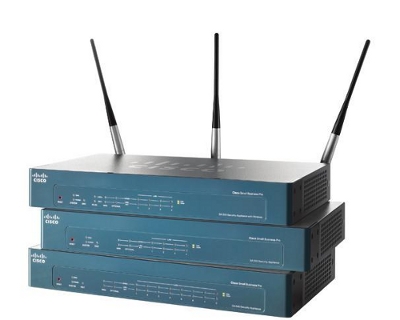
There are currently three models as following:

  • SA520 : 200 Mbps Firewall Throughput, 4 LAN ports, 1 WAN port, 15,000 max connections, SSL and IPSEC VPN capabilities, Trend Micro ProtectLink Gateway.
  • SA520w: Same as above but also supports WiFi.
  • SA540: 300 Mbps Firewall Throughput, 8 LAN ports, 1 WAN port, 40,000 max connections, enhanced SSL and IPSec VPN performance, Trend Micro ProtectLink Gateway.
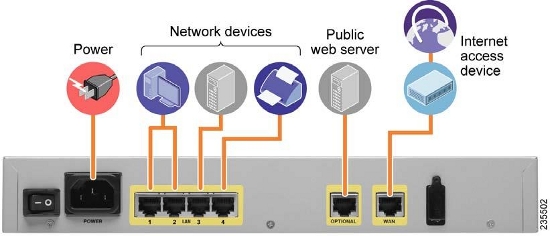
From the back panel of the SA500 appliance above you can see an “OPTIONAL” port in addition to the 4-port LAN interfaces and the WAN interface.

MORE READING:  What is Cisco Meraki ? Some FAQ About Cisco Meraki You Need to Know

The “OPTIONAL” port can be configured either as an additional LAN or WAN port but its main purpose is to configure it as a DMZ port to connect a public server (e.g Web or email Server).

The SA500 is easily managed with a web browser. Just connect your PC to an available LAN port on the back panel. You need to set your PC to obtain IP address dynamically from a DHCP.

The security appliance will assign an IP address to your PC in the range 192.168.75.x. Just open your browser and enter in the Address bar the default IP of the SA500 which is 192.168.75.1. Log on with the default username/password (cisco/cisco) and you are ready to start configuring the appliance.

Spread the love

Related Posts

  • Failure-Mode Engineering: Turning Network Adversity Into an Advantage
  • What is Cisco Virtual Port Channel (vPC) – Explained and Discussed
  • What is a Wildcard Mask – All About Wildcard Masks Used in Networking
  • Configuration Drift? Not on our Watch in Networks
  • What is Cisco Identity Services Engine (ISE)? Use Cases, How it is Used etc

Filed Under: Cisco General

Download Free Cisco Commands Cheat Sheets

Enter your Email below to Download our Free Cisco Commands Cheat Sheets for Routers, Switches and ASA Firewalls.

By subscribing to our email list you will be receiving technical tutorials and industry news from time-to-time. You can unsubscribe at any time.

About Harris Andrea

Harris Andrea is an Engineer with more than two decades of professional experience in the fields of TCP/IP Networks, Information Security and I.T. Over the years he has acquired several professional certifications such as CCNA, CCNP, CEH, ECSA etc.

He is a self-published author of two books ("Cisco ASA Firewall Fundamentals" and "Cisco VPN Configuration Guide") which are available at Amazon and on this website as well.

Leave a Reply

Your email address will not be published. Required fields are marked *

This site uses Akismet to reduce spam. Learn how your comment data is processed.

Search this site

About Networks Training

We Provide Technical Tutorials and Configuration Examples about TCP/IP Networks with focus on Cisco Products and Technologies. This blog entails my own thoughts and ideas, which may not represent the thoughts of Cisco Systems Inc. This blog is NOT affiliated or endorsed by Cisco Systems Inc. All product names, logos and artwork are copyrights/trademarks of their respective owners.

Amazon Disclosure

As an Amazon Associate I earn from qualifying purchases.
Amazon and the Amazon logo are trademarks of Amazon.com, Inc. or its affiliates.

Search

BLOGROLL

Tech21Century
Firewall.cx

Copyright © 2026 | Privacy Policy | Terms and Conditions | Contact | Amazon Disclaimer | Delivery Policy