Today’s Internet is quickly becoming as much a part of daily life in the home as water, gas, and electricity. A high-speed, always-on Internet connection is now a fundamental utility in the home, enabling a broad range of applications, solutions, and services that save people time, increase family convenience and security, and build and helps family members maintain personal and professional communications.
Cisco has bought Linksys a few years ago to get into the Home Network market, and since then has dominated the SMB market as well. Linksys was then sold to Belkin which is the current owner.
Cisco recently has announced the Grand Prize winner of its competition for the best overall home network using Cisco equipment.
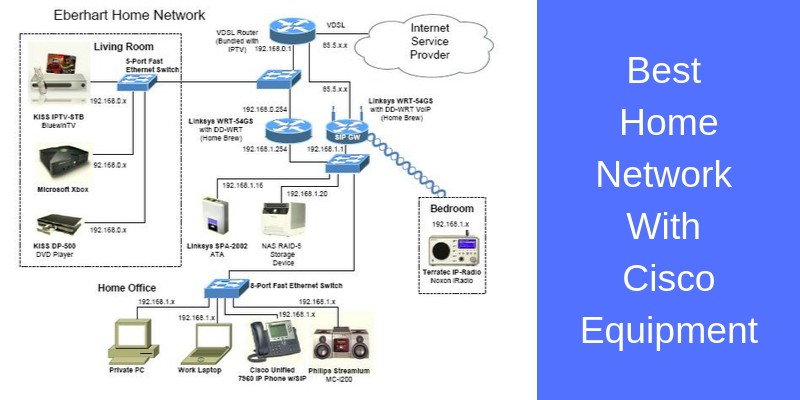
This competition is run among Cisco employees. The winner is Iwan Eberhart, Frauenfeld, Switzerland. His Home Network is shown in the figure below:

“I enjoy having the latest and greatest technologies at home, too,” he says. In fact, not a day goes by that Eberhart doesn’t use his home network for work, play, or both.
As you can see, Eberhart uses his home network for TV and Movies, Centralized Storage of his media collection, Sound and Music, IP Telephony, Home LAN gaming etc.
Eberhart’s prize-winning home network evolves continually as new technology becomes available. His next plan is to consolidate the three devices in his living room.
One option is to use the KiSS Technology set-top box to stream local movies and MP3 files, which would enable Eberhart to relocate the media player to his bedroom.
Or, if his service provider agrees, he might install the Microsoft IP/TV client on a new Xbox 360, which would let him move the set-top box to his bedroom.
He plans to use the prize money to buy more home network gadgets.
In the past computer networking was the reserve of office places and businesses utilizing computer systems and shared software for completing demanding workload tasks. However, since the introduction of the PC to the home, primarily in the form of the desktop computer, the need for home networking has become an almost everyday necessity.
No Longer a One PC Home
Whereas 10-15 years ago, there was generally only one computer per household, and before the prevalence and ease of use of wireless internet connection, the expense and complicated methods used in home networking seemed like an extraneous expenditure of both time and money.
A simple Ethernet connection was the only thing essential to allowing your singular computer internet access, thus most households didn’t contemplate the need for a home network.
However, over the past decade we have moved on from the singular home PC for all in the home to use, to a plethora of internet-ready devices in almost every room.
From hand-held devices such as tablet computers and smart phones, to internet televisions and games consoles that require a connection to update games and play online, the event of wireless internet connectivity and home networking is now commonplace in the home, even in it’s simplest form of a wireless router and modem.
Making the Most of Your Home Network
Despite many households now using a wireless router or even a hardware firewall for the internet connectivity and security throughout the home, most do not utilize the capabilities of home networking to its full capacity.
Investing in devices such as wireless printers can be beneficial to family households in addition to a home network; although the aesthetics of printers have transformed greatly over the past decade, they are still often cumbersome and plain, with many people wishing to hide them away out of sight.
If you have a home office, this is the perfect place to keep your printer, and with a home network, you can send documents to be printed from any room in your house, meaning that children can print off homework and the adults can still work simultaneously, without a queue for printer-use.
Many other types of peripherals devices can be shared in this way, from scanners to CD burners.
Ease of File Sharing
File sharing is another benefit of a home network; no longer do we need to rely on portable storage devices such as USB memory sticks to transport files and media between computers in the home, as a home network will allow you to drag and drop your files instantaneously depending on the devices being used.
You can use file sharing for anything from music MP3s to important text documents, photographs and viral marketing content, with great ease and efficiency.
Consoles and Online Gaming
This is also a bonus for those using high-end gaming consoles such as a PS3; with a home network you can stream videos and music from your PC to your PS3, or even share your favorite photographs to be displayed in HD on your television.
Utilizing devices such as PS3 and PC in combination with a home network is a wonderful way to entertain guests without having to leave the comfort of your living room.
Of course, the most immediate use of a home network with an internet capable games console is the ability to simply browse the internet and partake in online gaming.
Online gaming can be arranged not only in an online setting, but using a LAN via your home network, meaning that members of the same household can play against each other if their computers are set up accordingly.
The Future of Home Networking
The most basic use of a home network is as mentioned previously, the ability to share your internet connection throughout the home on all internet capable devices.
The ease of internet connection sharing is now a prerequisite to almost all home internet connections, and gone are the days of family members squabbling over whom will use the dial-up modem or Ethernet connection next.
As time passes and technology evolves, it is inevitable that home networking will become more than just a bonus to a household, but rather a necessity; with more and more everyday home electrical devices being designed with wireless capabilities and internet connectivity.
From controlling your oven via the computer to automated stock taking refrigerators, investing in a home network now will ensure your home is ready for all the fantastic innovations in home technology that await us.
Related Posts
- Difference Between Routers and Switches in TCP/IP Networks
- 11 Different Types of IP Addresses Used in Computer Networks
- Compare and Contrast Network Topologies (Star, Mesh, Bus, Hybrid etc)
- 11 Networking Companies Like Cisco (Competitors)
- What is a Wildcard Mask – All About Wildcard Masks Used in Networking