The Cisco CallManager Express is a product under the Unified Communications Products suite of Cisco. In the past it was known as CCME (Cisco Call Manager Express) but now the new name is Cisco Unified Communications Manager Express.
This product is an IP Telephony system (IP PBX) for small to medium size businesses of up to 250 IP phones capacity.
Basically, a CallManager Express system is a normal Cisco Integrated Services Router (models 1800, 2800, 3800 etc) which has the CallManager software installed on the router’s flash memory.
The router hosting the callmanager system can work also as normal Internet Border router or as WAN Router connecting to other enterprise sites.
The CallManager software provides call control and IP telephony functionality to internal IP phones. For connectivity to the PSTN network, voice interface cards can be installed on the CallManager router (such as voice BRI, PRI etc).
In this post we will describe three common deployment models for a CallManager Express system as it is implemented in real world enterprise environments. The three deployment models are Single Site, Multi Site with Distributed Call Processing, and Multi Site with Centralized Call Processing.
Moreover. we will describe also 3 functionality modes (models) which dictate how the device handles the IP Telephony service. These modes of operation are PBX Model, KeySwitch model and Hybrid model.
Topology Deployment Models
Single Site Deployment Model
This is the most common scenario and is usually found in smaller business environments. See the picture below:
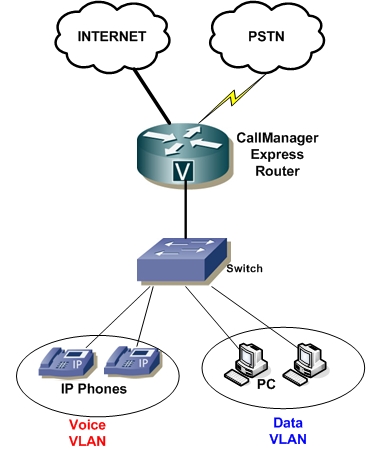
Basically a single CallManager Router system is installed which usually provides also the Internet connectivity for the office.
If you are a little flexible with your budget, I would recommend installing a firewall in front of the CallManager router to protect it from Internet attacks.
All IP Telephony services are provided on the LAN network for internal IP Voice communication. Any call beyond the LAN uses the PSTN network. There are no telephony services provided over an IP WAN.
Characteristics and Best Practices
- Maximum of 250 IP phones can be supported.
- Arrange your internal switch to have two VLANs (one for Voice and one for Data Traffic).
- Use G.711 codec for all IP phone calls on the LAN (80kbps bandwidth per call) for best voice quality.
- You can also install a Voice Mail card on the router to offer voice mail functionality to users.
- Use appropriate Voice Interface Cards on router for PSTN connectivity.
- You can use dual router for redundancy if needed.
- Try to avoid connecting the CallManager router directly to the Internet. Use a firewall as border internet device.
- Dial Plan is simplified. If DID (Direct Inward Dialing) is required, then arrange your dial plan and internal IP phone numbering accordingly.
Multi Site with Distributed Call Processing Model
The multi site model consists of two or more independent sites, each with its own CallManager Express system installed (distributed call processing) as shown in the figure below.
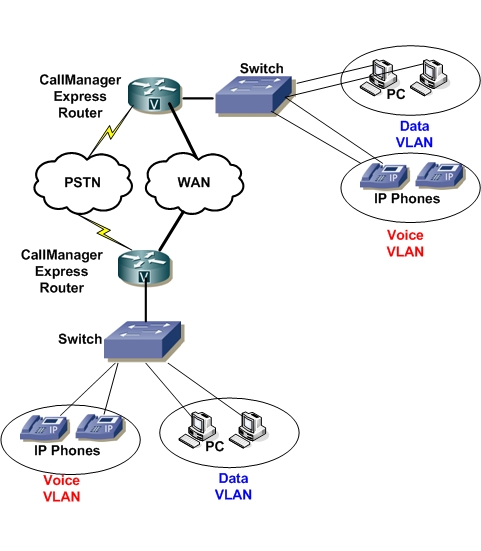
All the sites are interconnected over an IP WAN which can be offered via Leased Lines, Frame Relay, ATM, MPLS Layer2/3 VPN, IPSEC VPN over the Internet etc. All sites have also local PSTN connectivity which can serve as backup to the WAN telephony connectivity or for local inbound and outbound PSTN calls.
Characteristics and Best Practices
- PSTN Call cost savings when using the IP WAN for calls between sites.
- Bypass long distance call charges (toll bypass) by routing calls through remote site callmanager systems which are closer to the PSTN number dialed. For example, you have one site in New York and one in California. Calls from NY to California can be routed over the IP WAN towards Cal office and then get out to PSTN from the Cal office.
- No loss in functionality for IP WAN failure because there are independent Call processing units in each site.
- Recommended to install a GateKeeper (Cisco IOS gatekeeper) to provide call admission control and dial-plan resolution.
- Use G.729 or G.723 codec for IP calls over the WAN to save bandwidth.
- Use a SIP proxy if you are using SIP instead of H323.
Multi Site with Centralized Call Processing Model
This implementation scenario is suitable for an Enterprise that has a big central office with several smaller branches. One centralized CallManager system can be installed to the Central Site offering call processing and IP Telephony service to both the central site as well as to the remote small branches. The remote branches are equipped only with IP phones (no callmanager system). This is shown in the figure below:
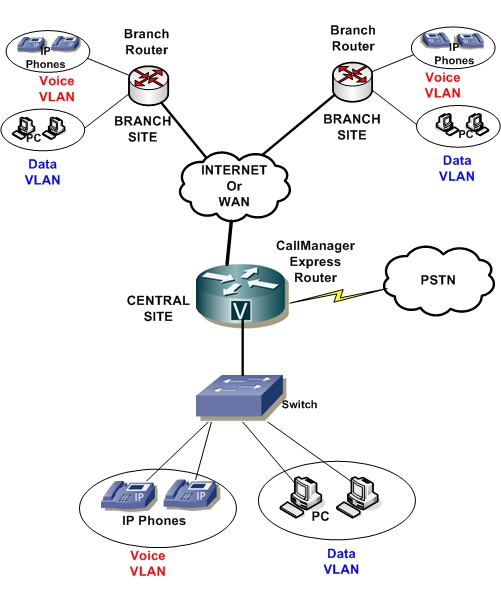
The remote branches are connected to the central site over an IP WAN or even using IPSEC VPN over the Internet. The IP phones located to the remote sites should have IP connectivity to the Central CallManager system, where they are registered. PSTN access is offered only on the Central Site. That is, the call of a remote branch user calling a PSTN number is routed over the WAN to the Central Site and then routed out to the PSTN.
Characteristics and Best Practices
- Cost savings in hardware (only one central callmanager express)
- Easier to manage (centralized management for all IP phones).
- Disadvantage in redundancy since remote sites depend heavily on the availability of WAN lines.
- Use G.729 or G.723 for inter-site calls.
- Savings in PSTN line costs.
- Remote sites must not have many IP phones (10-20 maximum).
All the above deployment models apply also for the other Cisco IP Telephony solution, the Cisco Unified Communications Manager system which is for bigger implementations compared to the Express solution.
Operational Models
Before deploying a Unified Communications Manager Express system you must decide how the system will handle calls. There are three call handling models: PBX model, KeySwitch model or Hybrid model.
PBX Model:
This is the simplest and most popular call manager mode of operation. Each internal telephone has its own unique directory number (extension number) as shown in the diagram below.
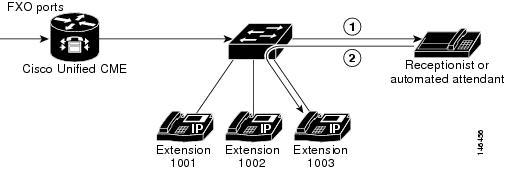
Incoming PSTN calls are usually routed by the CME router to a central receptionist (or auto-attendant) which then delivers the calls to the appropriate requested extension number.
There is also the option of having Direct Inward Dialing (DID) lines towards the PSTN which allows incoming PSTN calls to be directly routed to specific internal extensions.
An example of DID is when calls coming to number 555-838-1001 will be routed directly to Extension 1001, calls coming to number 555-838-1002 will be routed to Extension 1002 etc.
It is recommended for this model that you configure directory numbers as dual-lines so that each button that appears on an IP phone can handle two concurrent calls. Dual-line directory numbers enable your configuration to support call waiting, call transfer with consultation, and three-party conferencing (G.711 only).
Keyswitch Model:
In this model there is no central receptionist telephone. Rather, all telephones have an identical configuration in which each phone is able to answer any incoming PSTN call on any line. An example is shown below:
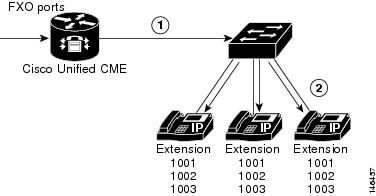
The keyswitch model is configured by creating a set of directory numbers (Extension numbers) that correspond one-to-one with your PSTN lines. Then you configure your PSTN ports to route incoming calls to those directory numbers.
When an incoming PSTN call arrives (e.g on Extension 1001), then ALL telephones will ring on line 1001. Any user can then pick-up the ringing line by just pressing the button corresponding to that line.
Hybrid Model:
In this model, each IP phone can have both PBX and Keyswitch configurations. Each telephone can have unique extension numbers (PBX model) and also shared lines numbers (keyswitch model).
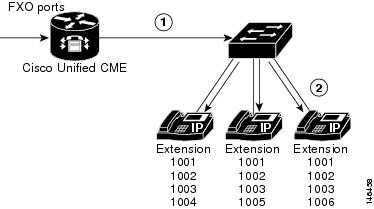
A hybrid model is shown above. Extension numbers 1001, 1002, 1003 are shared lines, and Extensions 1004, 1005, 1006 are unique private numbers for each user.