One of the new additions in the Cisco ASA 7.x and 8.x software image is the ability to configure Quality of Service for VoIP traffic, something that was found only on IOS routers in the past. The ASA supports now Low Latency Queuing (LLQ priority queuing) which lets you prioritize certain traffic flows (such as latency-sensitive traffic like voice and video) ahead of other traffic.
In its simplest form, you just enable priority queuing on an interface and select with an ACL and a policy map which traffic should pass through the priority queue of the interface. All other traffic will be passing through the “best effort” queue. For example if we have FTP data traffic (which is usually a long packet) together with a VoIP packet, the VoIP will be served first by the interface (priority queue) while the FTP packet will be served in a best-effort basis.
In our example below, we present a usual scenario in which we have two (or more) sites communicating through a Lan-to-Lan IPSEC VPN via the Internet. Between the sites we can have both data and VoIP traffic communication. Although we can not enforce real QoS through the Internet, at least we can ensure voice traffic prioritization on the firewall interface.
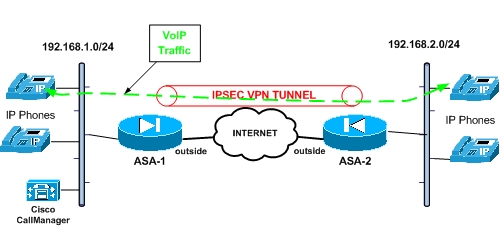
From the diagram above we assume that we have already configured the IPSEC VPN and is working properly (i.e both subnets 192.168.1.0/24 and 192.168.2.0/24 can communicate via the tunnel). The example configuration below is for the ASA-1 firewall and should be applied accordingly to ASA-2 for better QoS performance.
! Enable a priority queue on the outside interface
ASA-1(config)# priority-queue outside
ASA-1(config-priority-queue)# exit
! Select VoIP traffic for prioritization
ASA-1(config)#access-list VoIP-Traffic-OUT extended permit tcp 192.168.1.0 255.255.255.0 192.168.2.0 255.255.255.0 eq h323
ASA-1(config)#access-list VoIP-Traffic-OUT extended permit tcp 192.168.1.0 255.255.255.0 192.168.2.0 255.255.255.0 eq sip
ASA-1(config)#access-list VoIP-Traffic-OUT extended permit tcp 192.168.1.0 255.255.255.0 192.168.2.0 255.255.255.0 eq 2000
ASA-1(config)#access-list VoIP-Traffic-IN extended permit tcp 192.168.2.0 255.255.255.0 192.168.1.0 255.255.255.0 eq h323
ASA-1(config)#access-list VoIP-Traffic-IN extended permit tcp 192.168.2.0 255.255.255.0 192.168.1.0 255.255.255.0 eq sip
ASA-1(config)#access-list VoIP-Traffic-IN extended permit tcp 192.168.2.0 255.255.255.0 192.168.1.0 255.255.255.0 eq 2000
! Match the ACL and traffic with Expedited Forwarding (EF)
ASA-1(config)# class-map Voice-OUT
ASA-1(config-cmap)# match dscp ef
ASA-1(config-cmap)# match access-list VoIP-Traffic-OUT
ASA-1(config-cmap)# exit
ASA-1(config)#class-map Voice-IN
ASA-1(config-cmap)# match dscp ef
ASA-1(config-cmap)# match access-list VoIP-Traffic-IN
ASA-1(config-cmap)# exit
! Configure the actual policy that will be applied to the interface
ASA-1(config)# policy-map VoicePolicy
ASA-1(config-pmap)# class Voice-OUT
ASA-1(config-pmap-c)# priority
ASA-1(config-pmap-c)# exit
ASA-1(config-pmap)# class Voice-IN
ASA-1(config-pmap-c)# priority
ASA-1(config-pmap-c)# exit
ASA-1(config-pmap)# exit
! Apply the policy to the outside interface
ASA-1(config)# service-policy VoicePolicy interface outside
EDIT: A small correction here. Priority Queue will only apply to an interface in the “outbound” direction, so the Voice-IN class above will not have any effect in the policy-map. Also, as I stated at the beginning of the article above, the configuration shown in this post applies for ASA-1. The reciprocal configuration should be also applied on ASA-2 with the proper ACL which should match traffic from 192.168.2.0 to 192.168.1.0 network.
Related Posts
- Prevent Spoofing Attacks on Cisco ASA using RPF
- Configuring Connection Limits on Cisco ASA Firewalls – Protect from DoS
- Configuring AAA Authentication-Authorization-Accounting on Cisco ASA Firewall (TACACS+, RADIUS)
- Cisco ASA Firewall Management Interface Configuration (with Example)
- How to Configure Access Control Lists on a Cisco ASA 5500/5500-X Firewall (with Examples)