A Cisco ASA Firewall is ideal for Broadband access connectivity to the Internet since it provides state of the art and solid network security protection.
Especially for small business or home use, the ASA 5505 model is ideal for broadband ADSL access connectivity.
Some ISPs provide Point to Point over Ethernet access, which is abbreviated as PPPoE. Cisco ASA 5500 series support the PPPoE protocol as we can see below.
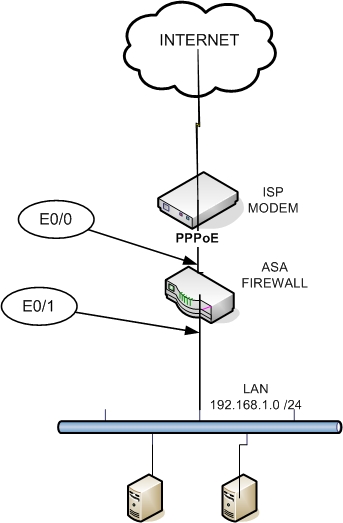
On the Figure above we assume the following:
- The Internal IP address range is 192.168.1.0 /24
- There is a modem in front of the Firewall connected to the ISP
- The ISP provides a public address to the ASA via PPPoE
- The ASA connects to the modem with Ethernet 0/0 (E0/0)
- The ASA connects to the internal network with Ethernet 0/1 (E0/1)
- There is NAT performed on the ASA to translate internal private addresses to the ISP Provided public address
- The ASA acts as a DHCP server to provide 32 addresses to the internal hosts.
Here is the sample configuration example on 5505:
ASA Version 7.2(2)
!
hostname ciscoasa
domain-name default.domain.invalid
enable password * encrypted
names
!
interface Vlan1
nameif inside
security-level 100
ip address 192.168.1.254 255.255.255.0
!
interface Vlan2
nameif outside
security-level 0
pppoe client vpdn group ATT
ip address pppoe setroute
!
interface Ethernet0/0
switchport access vlan 2
!
interface Ethernet0/1
!
interface Ethernet0/2
!
interface Ethernet0/3
!
interface Ethernet0/4
!
interface Ethernet0/5
!
interface Ethernet0/6
!
interface Ethernet0/7
!
passwd * encrypted
ftp mode passive
dns server-group DefaultDNS
domain-name default.domain.invalid
access-list inside_access_out extended permit ip any any
pager lines 24
logging enable
logging asdm informational
mtu inside 1500
mtu outside 1492
icmp unreachable rate-limit 1 burst-size 1
asdm image disk0:/asdm-522.bin
no asdm history enable
arp timeout 14400
! for the following nat commands see note at the end
global (outside) 1 interface
nat (inside) 1 0.0.0.0 0.0.0.0
access-group inside_access_out in interface inside
timeout xlate 3:00:00
timeout conn 1:00:00 half-closed 0:10:00 udp 0:02:00 icmp 0:00:02
timeout sunrpc 0:10:00 h323 0:05:00 h225 1:00:00 mgcp 0:05:00 mgcp-pat 0:05:00
timeout sip 0:30:00 sip_media 0:02:00 sip-invite 0:03:00 sip-disconnect 0:02:00
timeout uauth 0:05:00 absolute
http server enable
http 192.168.1.0 255.255.255.0 inside
no snmp-server location
no snmp-server contact
snmp-server enable traps snmp authentication linkup linkdown coldstart
telnet timeout 5
ssh timeout 5
console timeout 0
vpdn group ATT request dialout pppoe
vpdn group ATT localname [ENTER ISP USERNAME HERE]
vpdn group ATT ppp authentication chap [or PAP, depends on your ISP settings]
vpdn username [ENTER ISP USERNAME HERE] password [ENTER ISP PASSWORD HERE]
dhcpd auto_config outside
!
dhcpd address 192.168.1.1-192.168.1.32 inside
dhcpd dns [ENTER ISP DNS ADDRESS HERE] interface inside
dhcpd enable inside
!
!
class-map inspection_default
match default-inspection-traffic
!
!
policy-map type inspect dns preset_dns_map
parameters
message-length maximum 512
policy-map global_policy
class inspection_default
inspect dns preset_dns_map
inspect ftp
inspect h323 h225
inspect h323 ras
inspect rsh
inspect rtsp
inspect esmtp
inspect sqlnet
inspect skinny
inspect sunrpc
inspect xdmcp
inspect sip
inspect netbios
inspect tftp
————————————————————————————-
Please remember to configure the Outside MTU to 1492 since there is an extra 8-bytes overhead used by PPPoE.
EDIT: For ASA version 8.3 and later
From ASA version after 8.3 the NAT commands are changed as following:
object network obj_any
subnet 0.0.0.0 0.0.0.0
nat (inside,outside) dynamic interface
Related Posts
- Prevent Spoofing Attacks on Cisco ASA using RPF
- Configuring Connection Limits on Cisco ASA Firewalls – Protect from DoS
- Configuring AAA Authentication-Authorization-Accounting on Cisco ASA Firewall (TACACS+, RADIUS)
- Cisco ASA Firewall Management Interface Configuration (with Example)
- How to Configure Access Control Lists on a Cisco ASA 5500/5500-X Firewall (with Examples)